



Apex Legends supports cross platform play, allowing players on PC, Xbox, PlayStation, and Switch to squad up seamlessly. You can add friends using their EA ID, join matches together, and enjoy crossplay without being limited by platform.
This guide shows how to add friends on Apex Legends Cross Platform, enable crossplay, and troubleshoot common issues when friends don’t appear.
Is Apex Legends Cross Platform?
Yes. Apex Legends supports cross-platform play, and it was designed with the specific intent of allowing players to effortlessly team up with friends using different devices. Whether you are playing on PC, Xbox, PlayStation, or Nintendo Switch, the game connects all players through a unified system linked to your EA Account (EA ID).
You won’t have to deal with isolated ecosystems or navigate through complicated setup procedures. You don’t need to deal with independent ecosystems or go through tedious setup steps. The only difference lies in game performance, as different versions are designed for different levels of portability.
Regardless of the device you use, this system ensures that you can quickly join the same squad.
How to Add Friends on Apex Legends Cross Platform?
Adding cross platform friends in Apex Legends is simple once you know that everything is tied to your EA account (EA ID), not your console username. No matter if your friend is on PC, Xbox, PlayStation, or Switch, the process is exactly the same.

Step 1: From the main lobby, open your friends list. On most platforms, you’ll see it at the bottom right of the screen.
Step 2: Select the option to search for a new friend. This opens the player search bar.
Step 3: Enter Your Friend’s EA ID.
Step 4: Once the correct profile appears, click on it and send the friend request.
Step 5: Your friend needs to accept the request. After that, they’ll appear in your friends list across all platforms.
Step 6: Once added, you can invite them to your squad and start playing together immediately through Apex Legends crossplay.
You only need to add a friend once using their EA ID; from then on—regardless of which gaming platforms you each use—they will always appear in your friends list, ready to join this free FPS game at any time.
Why Can’t I Find Friends in Apex Legends Crossplay?
If you are unable to find a friend while attempting to use the cross-play feature in Apex Legends, the issue is often simply a minor detail gone awry.
Here are the most common reasons why you might be unable to find a friend during Apex Legends cross-play:
1. Incorrect EA ID Entry
When performing a cross-platform search in Apex Legends, the game does not use Xbox Gamertags or PlayStation IDs; instead, it relies on EA IDs. If the entered name is misspelled, outdated, or contains incorrect spacing, the target player will not appear in the search results.
2. Cross-Play Feature Disabled
If the “Cross-Play” feature has been disabled within your in-game settings, you will be unable to search for or add players from other platforms.
Here are the steps to ensure that the Cross-Platform Play feature is enabled:
On PlayStation (PS4 / PS5)
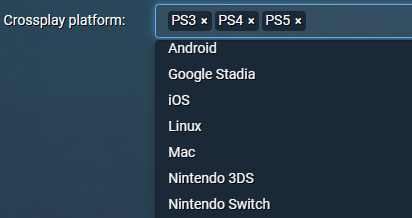
- Launch Apex Legends and enter the main menu.
- Navigate to “Settings.”
- Scroll to the “Gameplay” tab.
- Locate “Cross-Platform Play.”
- Set it to “Enabled.”
On Xbox
- Launch Apex Legends.
- Go to “Settings” → “Gameplay.”
- Ensure that “Cross-Platform Play” is set to “On.”
If the feature still does not work correctly, please check your Xbox system settings: Go to “Settings” → “Account” → “Privacy & online safety” → “Xbox Live privacy.”
3. Privacy Settings Are Blocking Requests
Sometimes, the issue lies not with the search function itself but with friend requests being filtered by privacy settings. Here is the solution:
Step 1: Go to your EA Account Settings page, navigate to “Privacy Settings,” and ensure that options such as “Who can search for me” and “Who can send me friend requests” are set to “Everyone” or “Friends of Friends.”
Step 2: Privacy settings on console platforms, such as Xbox and PlayStation, may also affect crossplay interactions.
- Xbox: Go to “Settings” → “Account” → “Privacy & online safety,” and ensure that the option “You can play with people outside of Xbox Live” is set to “Allow.”
- PlayStation: Go to “Settings” → “Users and Accounts” → “Privacy,” and ensure that your friend request and visibility settings are not restricted.
Step 3: After updating your settings, please restart Apex Legends to ensure that the changes take full effect.
4. Regional Differences or Server Issues
In most cases, Apex Legends’ Crossplay feature operates smoothly across the globe. However, players sometimes encounter difficulties finding friends due to server-side glitches or region-specific issues.
A simple way is to manually switch to the same data center:
- From the main menu screen, wait for approximately 90 seconds, then click on “Accessibility Options” and immediately exit.
- A “Data Center” option will then appear at the bottom of the screen.
- Select the data center that corresponds to the server/region your friend is currently using.
If the problem persists, it may be caused by unstable routing or regional network restrictions. In such cases, using the best VPN for gaming may prove helpful.
LightningX VPN offers access to over 2,000 servers, allowing you to route your connection through a more stable server to help optimize your network performance. This helps to:
- Reduce issues encountered during cross-region connections
- Improve server communication stability when adding friends
- Help prevent packet loss or routing errors
Download it now to enjoy free high-speed nodes, unlimited bandwidth, and unrestricted speeds.
FAQ: Add Friends on Apex Legends
1. Can you crossplay between PC and PS5?
Yes, Apex Legends fully supports crossplay between PC and PS5. Players on either platform can add each other via EA ID and join the same squads without restrictions.
2. Can you link console and PC Apex Legends?
Yes, you can link your console and PC accounts through your EA account. Once linked, your friends list, progress, and crossplay functionality are shared, allowing you to play seamlessly across platforms.






