



Discord is one of the largest community platforms in the world, hosting millions of servers around topics like AI, anime, games, education, programming, marketing, and more. However, discovering the right communities isn’t always straightforward.
In this post, you will learn various Discord server search methods to find active and high-quality servers that match your interests. Each approach comes with step-by-step instructions.
Method 1. Use Discord’s Built-In Server Discovery (Official Way)
Discord offers an official Server Discovery feature, which is the safest starting point for Discord server search, especially for beginners.
Step-by-Step Instructions
- Open the Discord app on desktop/mobile or visit the Discord website in a browser.
- Log in to your Discord account.
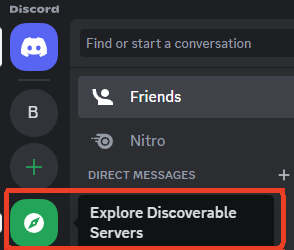
- Look at the left sidebar and click the compass icon (Explore Discoverable Servers) at the bottom of your server list. The built-in Discord search feature lets you explore discoverable public servers.
- Browse categories like Gaming, Education, Music, Science & Tech, Entertainment, etc.
- Or you can use the search bar to enter keywords (e.g., “AI”, “Anime”) to search Discord servers by name or topic.
- Click your preferred server to preview server descriptions, member counts, and activity.
- Click Join to enter the server instantly and add it to your list.
Pros
- Official and secure
- High-quality, moderated servers
- No risk of broken invite links
Cons
- Limited selection
- Many niche servers are not listed
Also read: Discord User Search: How to Find Someone on Discord
Method 2. Visit the Official Discord Server List Website
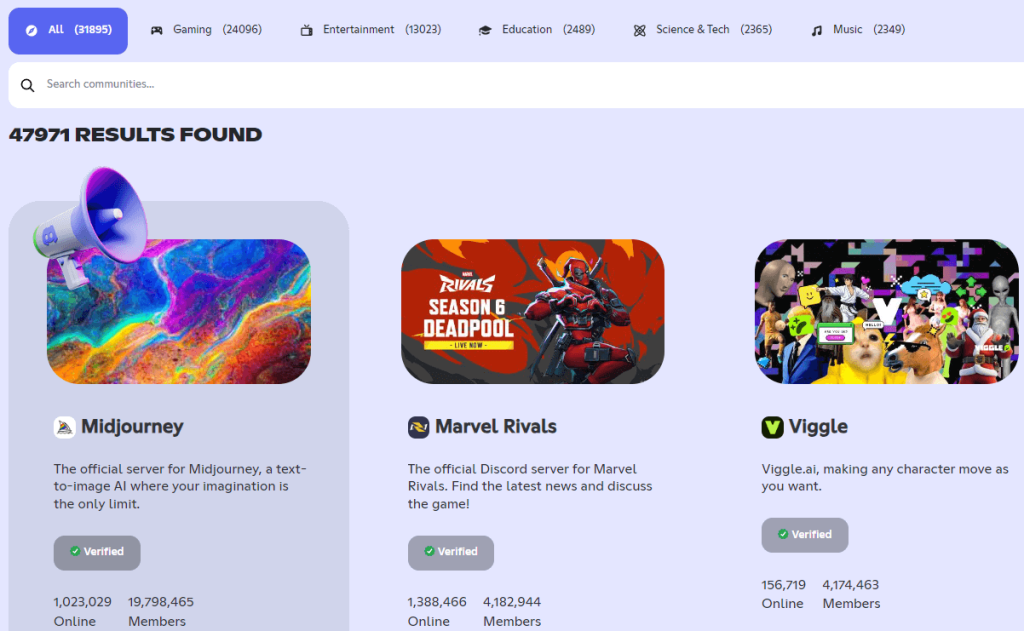
Discord displays all available servers on a page of its official website. You can visit this webpage to search best Discord servers.
Step-by-Step Instructions
- Visit https://discord.com/servers in your browser.
- Select a category: All, Gaming, Entertainment, Education, Science & Tech, or Music. Alternatively, you can directly search Discord communities via the search box.
- Browse the server list or search results to find your favorite Discord server.
- Click the target server, preview the information of the server, and click “Join Server”.
Pros
- Official and safe
- Easy to navigate and search
- Full list of Discord servers
Method 3. Use Dedicated Discord Server Finder Websites
If you want more control and advanced filtering, third-party platforms are powerful tools to find Discord servers by topic, language, or popularity.
Popular Discord server finder tools
- https://discadia.com/
- https://disboard.org/search
- https://discordservers.com/
- https://communityone.io/servers/
Popular features of a Discord server search website include
- Keyword-based server search
- Category tags
- Member count filters
- Activity indicators
Step-by-Step Instructions
- Open a trusted Discord server finder website in your browser.
- Enter your keyword in the search box.
- Filter by category, language, or size.
- Read server descriptions and rules.
- Click the invite link to join.
These platforms are ideal when you can’t find the target server via Discord’s native search. For advanced users, they’re often the fastest way to search Discord servers across thousands of communities.
Method 4. Search for Discord Servers in Google
You can also search Discord servers in Google Chrome, especially for niche topics.
Step-by-Step Process
- Open Google Chrome.
- Enter search operators like: keyword + “Discord server”, keyword + “Discord invite”. Example searches: AI Discord server, best marketing Discord server, etc.
- Open relevant blog posts, Reddit threads, or landing pages.
- Verify invite link validity.
- Join and check the server.
Google-based Discord server search works especially well for professional, educational, and industry-specific communities.
Also read: How to Make a Discord Server: Step-by-Step Guide for Beginners
Method 5. Find Discord Servers via Reddit Communities
Reddit is one of the most organic places to discover real Discord servers shared by real users.
Where to Look
- r/discordservers
- Niche subreddits (e.g., r/learnprogramming, r/gaming, r/Games)
Step-by-Step Instructions
- Open Reddit.
- Search for your topic on Reddit. Add “Discord” or “Discord server” to the query.
- Open high-engagement posts.
- Read comments to look for updated invite links or server recommendations.
- Join recommended servers
Discord server search on Reddit often helps you find high-quality, active Discord communities, especially for learning and collaboration.
Method 6. Use Social Media Platforms to Search Discord Servers
Many Discord communities promote themselves on social media platforms like X (Twitter), TikTok, YouTube, Facebook, etc.
How to Find Discord Servers on Social Media
- Open the social media platform.
- Search hashtags like #DiscordServer or #DiscordCommunity.
- Look for creators linking their Discord in bios.
- Check video descriptions and pinned comments.
- Verify server activity before joining.
Also read: How to Delete a Discord Server on Desktop or Mobile
Method 7. Join One Discord Server and Expand from There
Once you join a high-quality server, the Discord server search becomes easier.
Why This Works
- Many servers cross-promote partner servers
- Moderators often share related communities
- Members recommend useful servers organically
Steps
- Join a relevant Discord server.
- Check channels like #partners or #resources.
- Ask members for server recommendations or send you server invite links.
- Join related servers.
About Discord Server Search
Unlike traditional social networks, Discord is built around closed communities. Most servers are invite-only, and many valuable servers don’t appear in obvious places. If you rely on random invite links, you’ll often end up in inactive or poorly moderated servers.
A proper Discord server search strategy helps you:
- Discover active and niche communities
- Avoid spam or low-quality servers (Related: How to Leave a Discord Server)
- Find servers aligned with your goals (learning, networking, entertainment)
- Save time by using reliable server discovery methods
Conclusion
By combining built-in discovery, Discord server finder sites, Google search, Reddit, and social media, you can master Discord server search and join servers that match your interests and goals.
If you can’t access some Discord servers from different regions, you may utilize a VPN tool to change your IP to another country/region. LightningX VPN offers numerous servers in 70+ countries, and is available for PC, Mac, Android, iPhone/iPad, Linux, TV, Chrome, Firefox, and Edge.






