



Whether you’re planning to stop using eBay for whatever reason, this guide will show you how to delete your eBay account on the eBay app or eBay.com, what you need to check before closing your account, and help you avoid common problems.
5 Things Before You Delete Your eBay Account
Before deleting your eBay account, please take a few minutes to review the following:
1. Ensure your account balance is zero
You must pay all outstanding seller fees and ensure there are no pending payments to your bank account. If eBay is still processing payments, your account cannot be closed until the funds have settled.
2. Close all active listings and bids
Your account must not have any open bids or ongoing auctions, including:
- Items you are selling.
- Auctions you’ve bid on but haven’t ended yet.
3. Resolve all pending transactions
Before closing your account, there must be no outstanding activity, such as:
- Pending payments from buyers.
- Unprocessed return or refund requests.
- Payment disputes or claims.
- Orders marked as “in progress.”
4. Cancel all subscriptions
If you subscribe to an eBay Store or any paid add-on services, please cancel them first. All active subscriptions must be fully canceled before eBay will allow you to close your account.
5. Check for account restrictions or performance issues
If your account is restricted, suspended, or does not meet eBay’s minimum seller performance standards, you will not be able to close your account directly. In this case, you will need to contact eBay customer service to resolve the issues first.
How to Delete an eBay Account?
Once your account meets eBay’s cancellation requirements, you can delete your eBay account through 2 platforms.
How to Delete your eBay Account on the App?
- Open the eBay app and tap “My eBay” at the bottom of the screen.
- Scroll down and tap “Help”.
- Enter “close account” in the search bar and select “Close account and delete my data”.
- Scroll to the bottom and tap “Close account”.
- Select the reason for closing your account and confirm.
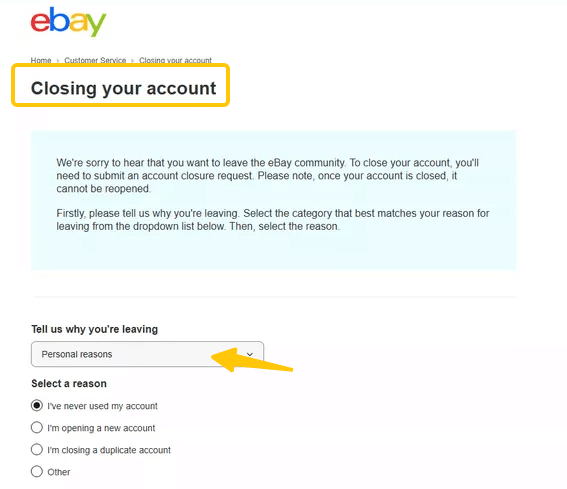
How to Delete an eBay Account on eBay.com?
In addition, you can also delete your eBay account through your browser:
- Visit eBay.com in your browser and log in to your account.
- Go to “Account Settings” and then open the “Close Account” page.
- Scroll down and click “Close account and delete my data”.
- Select the reason for closing your eBay account.
- Review the information, then click “Submit” to confirm.
After submitting your request, eBay will send a confirmation within 24 hours, and your account will be permanently deleted within 30 to 60 days.
When using eBay, a VPN can reduce the risk of data interception, malicious tracking, or online fraud.
LightningX VPN is designed for everyday privacy protection. It offers over 2000 high-speed nodes and advanced encryption protocols, suitable for users who want to protect their online security without complex settings.
Download now to enjoy free nodes and a 30-day money-back guarantee.
What Happens After You Close Your eBay Account?
After submitting a request to close your eBay account, the following changes will occur:
1. You lose access to your eBay account
Once your account is closed, you will no longer be able to log in to My eBay, buy or sell items, send messages, or manage orders. Your username will become inactive and cannot be reused.
2. Your feedback and account history are removed
After your account is permanently closed, your feedback score, purchase history, and sales history will no longer be accessible.
3. Account closure is not immediate
While you will receive confirmation within 24 hours, eBay typically takes 14 days to process account closure requests. If you have had transactions, payments, or disputes in the past 30 days, processing may take up to 60 days.
4. Some data will be deleted
After account closure, eBay will delete personal data as required by law.
However, some information may be retained to fulfill legal, financial, tax, or security obligations (such as resolving disputes or preventing fraud).
5. Associated eBay services will also be closed
Closing your eBay account will also close any associated eBay services that rely on the same identity, including programs such as the eBay Partner Network (EPN).
Common Problems When Deleting an eBay Account
You may encounter some issues when deleting your eBay account. Let me explain the corresponding solutions.
Problem 1: You Have a Pending Balance or Payout
How to fix it:
- Pay all outstanding seller fees.
- Wait for all pending payments to be fully processed to your bank account.
Once your balance shows zero and there are no pending payments, you can submit your deletion request.
Problem 2: You have active listings or open bids
How to fix it:
- End all active listings.
- Cancel all bids in auctions that have not yet ended.
Even a single open bid will prevent you from deleting your eBay account.
Problem 3: You have pending transactions or returns
How to fix it:
- Complete all pending payments.
- Resolve all outstanding return or refund requests.
- Wait for all disputes or claims to be fully resolved.
Problem 4: Your eBay account is restricted or suspended
How to fix it: You need to contact eBay customer service directly to resolve the restriction issue before requesting account closure.
Problem 5: You still have active subscriptions
How to fix it:
- Cancel all subscriptions.
- If necessary, wait for the billing cycle to end.
- Once all subscriptions are fully canceled, the account closure option will become available.
Problem 6: You can’t find the “Close Account” option
How to fix it:
- Use the eBay Help Center to search for “Close Account”.
- Ensure you are logged into the correct account.
- If the option is not displayed in the app, try using a desktop browser.
Problem 7: You didn’t receive a confirmation email
How to fix it:
- Check your spam or junk folder.
- Verify the email address associated with your eBay account.
- Contact eBay support if no message arrives after 24 hours.
FAQ about Delete Ebay Account
1. Does eBay Delete All Your Data?
No. After you close your eBay account, eBay deletes the personal data it is legally required to remove. However, some information may be retained to meet legal, financial, tax, security, or fraud-prevention obligations.
2. Can You Reopen a Closed eBay Account?
Yes, but only for a limited time. If your eBay account is in good standing, you can reactivate it during the account closure period. Once the account is permanently deleted, it cannot be recovered.






