


No Caller ID calls hide the caller’s phone number, making it difficult to know who’s calling or whether the call is safe.
If you’re looking for how to find No Caller ID calls, this guide explains what No Caller ID means, how to trace or identify hidden numbers, and how to block them on iPhone and Android.
What is No Caller ID?
No Caller ID is a phone call where the caller’s number is hidden, so you can’t see who is calling you. Instead of a phone number or contact name, your screen simply shows “No Caller ID,” “Unknown,” or “Private Number.”
These calls are usually made by people who intentionally block their caller information, but they can also come from businesses, telemarketers, or automated systems.
How to Find a No Caller ID Number?
If you want to learn how to find anonymous numbers, please follow these methods:
Method 1: Use *69 to find the last unknown caller
Dialing *69 activates the last call return service in North America, which is one of the quickest ways to identify the most recent no caller ID. This service will announce the phone number of the last caller and may also provide their name if the number is registered in a public database.
Method 2: Use *57 to trace harassing or threatening calls
If anonymous calls are harassing, threatening, or suspicious, dialing *57 is a better option. This feature can trace recent calls and send detailed information directly to your phone service provider and, if necessary, to local law enforcement.
Method 3: Use third-party apps to find anonymous callers
Third-party apps can utilize reverse phone number lookup databases, spam reports, and user-submitted data to assist in identifying no caller ID. Some apps can even display hidden numbers after you decline a call.
Popular tools like TrapCall and Truecaller are widely used to reveal unknown callers, block spam calls, and prevent repeated harassment.
To further protect your online security, LightningX VPN helps safeguard your personal data privacy by encrypting your internet connection and hiding your real IP address.
With over 2000 servers and advanced encryption technology, it reduces the risk of data breaches, which are vulnerabilities often exploited by scammers and malicious attackers.
Download it to access free nodes and browse the internet securely and privately.
Method 4: Look for clues in voicemails and call behavior
Even if the number is hidden, callers often leave clues. Voicemails may contain callback numbers, company names, etc., which can hint at the caller’s identity.
Method 5: Use built-in spam call detection and blocking tools
Both iPhone and Android devices have built-in spam call detection and call filtering features. These tools analyze incoming calls and, if possible, flag them as “spam” or “suspected scam calls.”
How to Block No Caller ID Calls on iPhone and Android?
If you frequently receive calls with no caller ID, blocking these calls can not only reduce interruptions but also help prevent scams and harassment.
How to Block No Caller ID Calls on iPhone?
iPhones allow you to mute or block calls from unknown and hidden numbers using built-in features.
1. Silence No Caller ID Callers: This feature automatically silences calls from numbers that are not in your contacts list, have not been called before, or are not recommended by Siri.
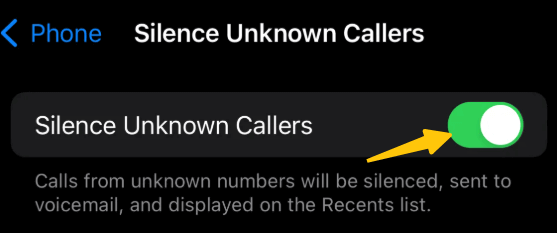
- Open “Settings.”
- Tap “Phone.”
- Select “Silence Unknown Callers.”
- Turn on this feature.
2. Block individual No Caller ID calls
- Open the “Phone” app.
- Tap “Recents.”
- Select the “No Caller ID” entry.
- Tap “Block this Caller.”
This prevents repeated calls from the same hidden source, although some callers may still bypass the block using different systems.
3. Use Carrier Spam Call Filtering
Many carriers offer spam call filtering services integrated with iOS. These tools can automatically block or flag suspicious anonymous calls before they reach you.
How to Block No Caller ID Calls on Android?
Android devices generally offer more flexibility in blocking unknown or private numbers.
1. Block Unknown or Private Numbers
- Open the “Phone” app.
- Tap the three-dot menu in the top-right corner.
- Go to “Settings.”
- Select “Blocked numbers.”
- Toggle “Block unknown calls” or “Block private numbers.”
2. Enable Spam Call and Caller ID Filtering
Most Android phones have built-in spam call detection features:
- Open the “Phone” app.
- Go to Settings.
- Enable “Spam and Call Screen.”
If the built-in tools are insufficient, third-party apps can provide more advanced blocking options.
3. Contact Your Carrier for Network-Level Blocking
Some phone service providers offer network-level call blocking services that can intercept anonymous calls before they reach your device. This option is especially useful if anonymous calls are frequent or persistent.
Is No Caller ID a Scam? How to Tell
Not all No Caller ID calls are scams, but they do carry a higher risk than regular calls. Many legitimate organizations, such as banks, hospitals, schools, and customer service centers, use blocked numbers to protect their employees’ privacy.
A No Caller ID call is more likely to be a scam if the caller:
- Urges you to take immediate action or creates a sense of urgency.
- Requests sensitive information, such as verification codes, passwords, or payment details.
- Claims to be a law enforcement officer, bank employee, or government agency representative, but refuses to verify their identity.
- Threatens negative consequences if you hang up or don’t cooperate.
- Avoids answering basic questions about who they are and why they are calling.
Legitimate callers are usually willing to identify themselves and allow you to independently verify their claims.
FAQ about No Caller ID
1. “No Caller ID” vs. “Unknown Caller”: What’s the difference?
Although “No Caller ID” and “Unknown Caller” seem similar, they have distinctly different meanings.
- “No Caller ID” means the caller’s number has been intentionally hidden by the caller. This is usually achieved by enabling caller ID blocking.
- “Unknown Caller” means the caller’s number could not be properly transmitted. This can be due to network issues, international calls, or certain VoIP services that fail to transmit caller ID information correctly.
2. Can police trace No Caller ID calls?
Yes, the police can trace anonymous calls, but only under specific circumstances.
Even if the caller’s number is hidden on your phone screen, the phone carrier still records call metadata, including routing information and timestamps. If the call involves harassment, threats, or criminal activity, law enforcement can request this data from the service provider as part of an investigation.






