


Your Instagram feed shouldn’t feel like a digital cage. If your Explore page is stuck on stale trends and irrelevant Reels, the algorithm isn’t just “off” – it’s obsolete.
In 2026, you don’t have to settle for a broken feed. This guide cuts through the noise to show you how to trigger the final option: a total algorithmic reset. We’ll cover how to incinerate your old behavioral data.
Why Your Instagram Algorithm Feels “Broken”
Instagram’s AI is a hyper-aggressive mirror that refuses to let you grow. If you’ve ever hate-watched a trend or lingered on a random Reel, the algorithm locks you into a behavioral feedback loop, assuming that one-off curiosity is now your entire personality. It’s not “curation”; it’s an echo chamber showing you the ghost of who you were months ago.
If you’ve reached the point where you’re looking for an Instagram Alternative just to escape the clutter, Meta’s new “Reset Suggested Content” is a hard reboot – a “panic button” that admits the AI gets it wrong – allowing you to incinerate the behavioral shadow the platform has built of you.
But hit that button without a plan, and you’re wasting the “blank slate.” Without intentional retraining during the first few hours of a reset, the algorithm will rebuild that same annoying cage within 48 hours, leaving you right back where you started.
How to Reset Suggested Content (Step-by-Step)
Before you hit the button, understand that this isn’t just a minor tweak- it is a total recalibration of your digital environment. Instagram’s 2026 update provides a rare opportunity to strip away years of accumulated data and start over. Follow this precise sequence to execute a clean break from your old algorithm.
- Locate the Entry Point: Go to your Profile > Tap Menu (top right) > Select Content Preferences.
- Initiate the Hard Reset: Tap Reset suggested content. This is your “nuclear option” to incinerate the old AI data.
- The Follower Audit: Review your Following list when prompted. Unfollow any accounts that no longer align with the feed you want. If you don’t cut the source, the old algorithm will grow back.
- Ad Topic Cleanup: Review your Ad topics. Clearing these ensures the “ghost” of your past search history doesn’t haunt your new feed through sponsored posts.
- Confirm and Execute: Tap Reset suggested content one last time. The change is immediate and permanent.
Refining What You See Without a Full Reset
If you aren’t ready to pull the “nuclear trigger” on your entire account, you can still perform a surgical strike on your feed. These three strategies allow you to manipulate the AI’s behavior and clean up your digital space without losing the data you actually want to keep.
1. The “Not Interested” Surgical Strike
Don’t just scroll past content you hate; actively reject it. Every time you ignore a post that annoys you, the AI interprets your “dwell time” as interest. You have to break that cycle manually.
- The Move: On any Reel or Feed post, tap the three-dot menu and select “Not Interested.”
- The Result: This sends an immediate negative signal to the algorithm. In 2026, Instagram has sharpened this tool: you can now often select specific keywords or “Reasons” why you don’t want to see that content, helping the AI prune entire categories of junk at once.
2. Manage Your “Sensitive Content” Threshold
Sometimes the feed isn’t “boring” – it’s just too much. If your Explore page is cluttered with clickbait, heavy news, or suggestive content that drains your energy, you can tighten the filters.
- The Move: Go to Settings > Content Preferences > Sensitive Content.
- The Strategy: Set this to Less. This acts as a global filter that forces the AI to prioritize “Standard” and safe content across Reels, Search, and Explore. It’s the quickest way to “sanitize” a feed that has become too chaotic.
3. The “Mute” vs. “Unfollow” Strategy
We all follow people out of obligation, colleagues, distant relatives, or old high school friends, whose content we find exhausting. Unfollowing causes social drama; Muting is the silent solution.
- The Move: Go to their profile, tap the Following button, and select Mute. You can choose to mute their Posts, their Stories, or both.
- The Strategy: Use Mute for people you need to stay “connected” with for social reasons. Use Unfollow for brands and influencers who no longer provide value. Muting allows you to keep the social bridge intact while ensuring their 50-slide vacation story never clutters your top bar again.
Advanced Hack: Using Location & VPN to Shift Your Feed
Instagram doesn’t just watch what you like; it watches where you are. By default, the algorithm uses your IP address to categorize you into a local content pool.
This is why your Explore page and Reels are often flooded with local trends, regional creators, and local language content that you might find repetitive or uninspiring. Even after a reset, the AI will default to these local “safe” suggestions because it assumes proximity equals interest.
The VPN Solution: Shifting to Global Content Pools
To bypass this regional gravity, you can use a VPN for Instagram to “teleport” your account into a high-quality content market. By masking your real IP with one from a different country, you force the algorithm to pull from a completely different set of data.
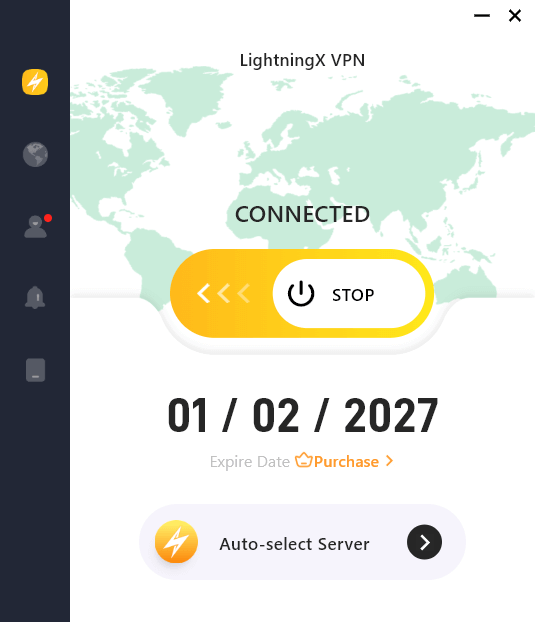
- Switching Regions via VPN: By connecting to a server in the US, UK, or Japan via LightningX VPN, you immediately shift your digital footprint.
- Instant Access to Global Trends: Once your IP shows you are in New York or London, the AI begins prioritizing global viral trends, high-production Reels from international creators, and niche topics that may not be popular in your actual geographic location.
- The “Clean IP” Advantage: Using a high-speed provider like LightningX VPN ensures your connection is stable enough that Instagram doesn’t flag the move as suspicious, allowing for a seamless transition into a more diverse, global feed.
FAQs – Reset Instagram Algorithm
Q1: Will resetting delete my account or messages?
No. It only wipes the “interest tags” associated with your suggested content. Your DMs, saved posts, and followers remain 100% intact.
Q2: Can I undo a reset if I don’t like the new feed?
No. The action is permanent. Once you incinerate your old behavioral data, you have to build a new profile from scratch by interacting with content you love.
Q3: Will I still see ads after resetting?
Yes, but the topics will be broader. During the reset, you have the option to clear your “Ad Topics” to ensure those ads align with your new interests rather than your old ones.






