


Streaming is one of the most popular activities on Discord. And Netflix is certainly a preferred platform for many users. Well, if you’re looking for a guide on how to stream Netflix on Discord, you’re in the right place. We’ll introduce you to the detailed steps and tips for resolving the black screen during streaming.
How to Stream Netflix on Discord
You can stream Netflix on Discord from a phone, tablet, or PC. Follow the step-by-step tutorial to start sharing the Netflix screen.
How to Stream Netflix on Discord on a PC or Mac
Here’s how to use Discord’s “Go Live” feature to stream Netflix on a PC or Mac.
1. Go to the Netflix website and log in to your account. Select your favorite series or movie.
2. Open Discord on your computer.
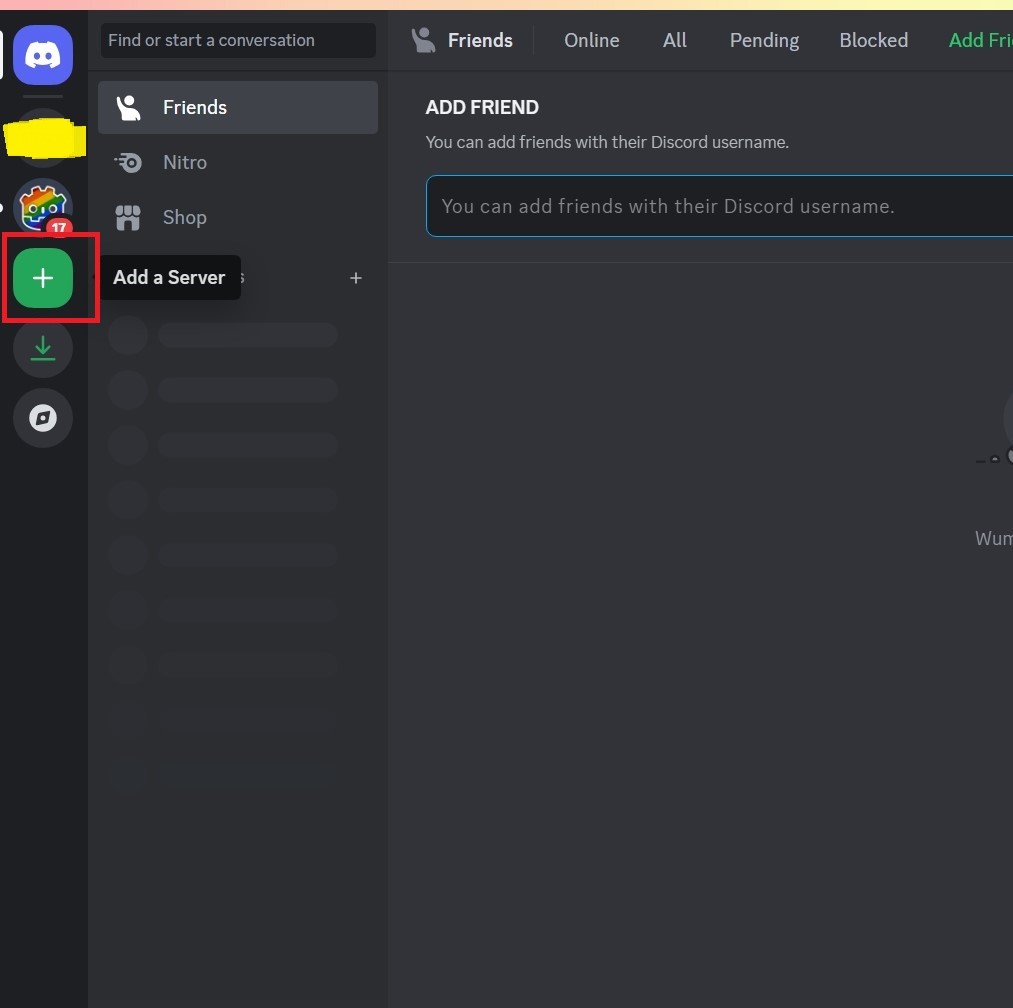
3. Create a Discord server or join one. To add a server on Discord, click the + (Add a server) button on the left panel.
4. Click on the gear icon (User Settings) at the bottom right.
5. Under ACTIVITY SETTINGS, choose Registered Games.
6. Click Add it next to “Not seeing your game?”. A drop-down menu will open.
7. Choose your Netflix app or the web browser you open Netflix in.
8. Click the Go Live icon on the bottom left above your profile.
9. Adjust the resolution and frame rate, and then click the Go Live button to start streaming Netflix on Discord.
Related: How to Stream Movies on Discord (Step-by-Step)
You can follow the steps below to stream Netflix on Discord on phones, iPads, or other tablets.
1. Launch Netflix on your mobile device.
2. Open Discord and go to the desired voice channel.
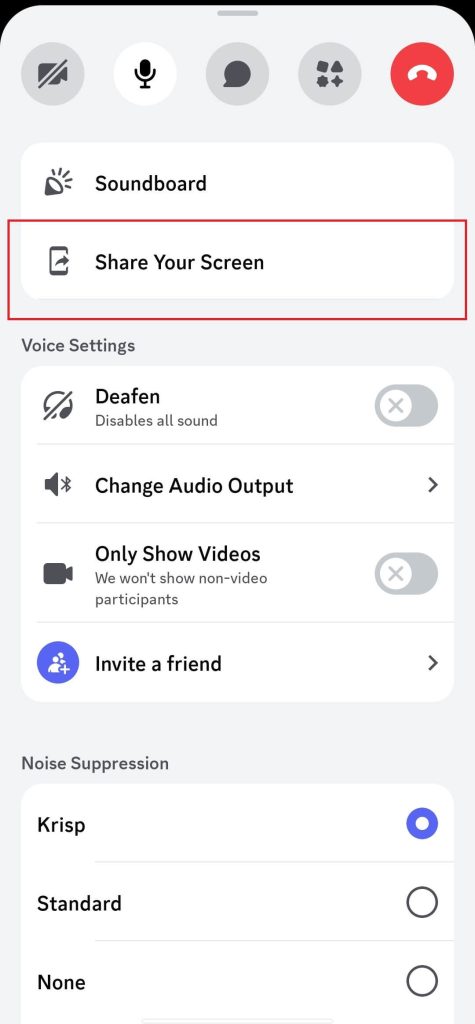
3. In the selected voice channel, swipe up from the bottom to open the toolbar.
4. Tap “Share Your Screen” and choose “Start Now”. You might need to enable camera permissions.
5. Go to the Netflix page and start streaming your desired series or movies. If you want to end the screen sharing, tap “Stop sharing” on the Discord app screen.
How to Fix Black Screen When You Stream Netflix on Discord
If streaming Netflix on Discord turns black screen, it might be caused by DRM, hardware acceleration conflicts on Discord, or graphics driver issues. Don’t worry, check if these solutions can fix the black screen.
Fix 1. Disable the Hardware Acceleration
Check the steps below to disable the hardware acceleration in Discord and your browser (Chrome and Firefox).
On Discord
- Go to Discord and tap on the gear icon at the bottom left to enter the settings.
- Tap “Advanced” from the left menu.
- Switch off the Hardware Acceleration option.
- Click the three-dot menu in the upper right of the Chrome browser.
- Select “Settings”.
- Choose “System” from the left sidebar.
- Disable “Use Hardware Acceleration When Available”. Then, restart the Chrome browser.
- Click on the three-dots menu in the upper right and select “Settings”.
- Select “General” from the left sidebar. Then, scroll down to the “Performance” section from the right panel.
- Switch off “Use Recommended Performance Settings” and “Use Hardware Acceleration When Available”.
If Netflix shows a black screen when using Discord screen sharing, try Go Live instead. Go Live uses Discord’s game streaming system and is more stable for DRM-protected content.
When sharing your screen, always select the application window (the browser playing Netflix) instead of Entire Screen. Sharing the full screen is more likely to cause a black screen due to DRM restrictions.
Use LightningX VPN to Protect Your Streaming
When streaming Netflix on Discord, you can use a VPN to encrypt your internet traffic and protect your online data. You can use a robust VPN like LightningX VPN. Here are LightningX VPN’s core features.
- It uses advanced algorithms like AES-256-GCM and ChaCha20-Poly1305.
- It offers unlimited bandwidth and data.
- It has 2,000+ servers in 70+ countries.
- It supports Windows/macOS/iOS/Android/Linux/Apple TV/Android TV/Chrome/Edge/Firefox.
Wrap Up
Streaming Netflix on Discord can be done through the web browser or app. Also, when the black screen happens while you’re streaming, try disabling the hard acceleration of your Discord or browser, using the Go Live feature, and sharing the application windows.






