


Instagram is an important platform for people to connect. However, sometimes you might block someone out of anger or annoyance. After a certain period, you might calm yourself down and want to reconnect with that person. So, you want to unblock the person on your Instagram.
Well, you’ve come to the right place. In this guide, we’ll teach you step-by-step on how to unblock someone on Instagram on a PC/Mac/Android/iPhone.
General Method for Unblocking Someone on Instagram
A quick way to unblock someone on Instagram is to search for their profile directly. Once you open their profile page, tap Unblock, then select Unblock again to confirm the action.
However, this method has some limitations. You won’t be able to find the account if the person has also blocked you or if they have changed their username.
To view your full list of blocked accounts and unblock someone, follow the steps below.
Related: How to Know If Someone Blocked You on Instagram – 8 Ways
How to Unblock Someone on Instagram on PC & Mac
Unblocking someone on Instagram on PC and Mac can be done through the website. Here are the steps.
1. Open Instagram.com on your PC or Mac. Make sure you’re signed in.
2. From the left-side menu, choose Profile to enter your profile page.
3. Click on the gear icon next to your profile.
4. Choose Settings and privacy from the pop-up window.
5. From the left side of the “Settings” page, choose Blocked. Here, you’ll see all the blocked accounts.
6. Locate the account you want to unblock, and click Unblock next to it.
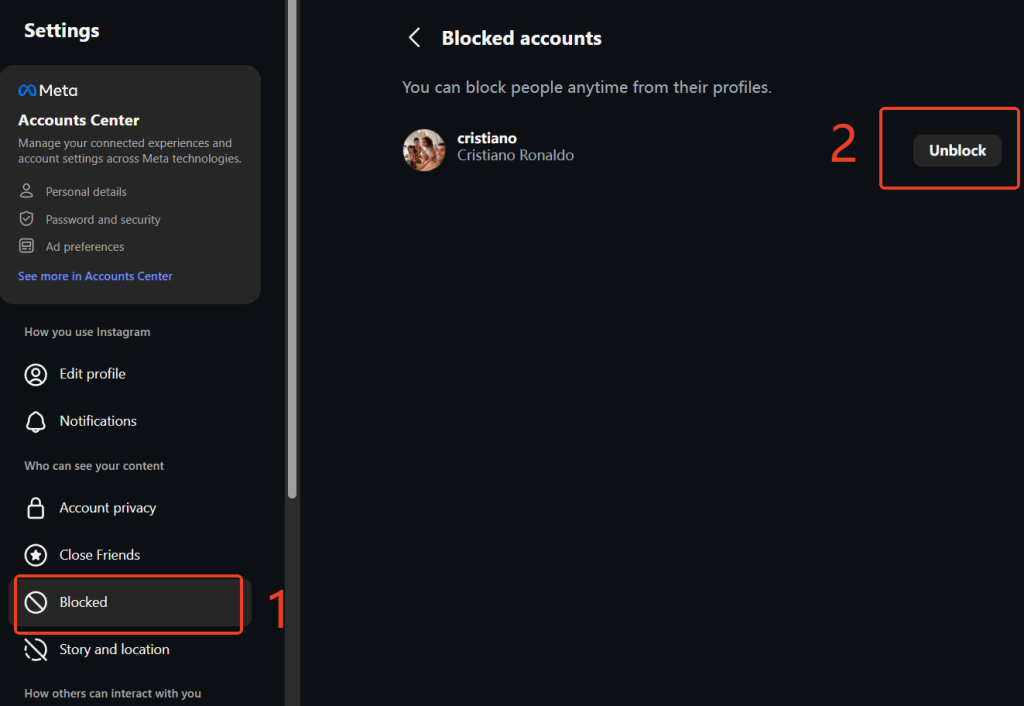
7. Choose Unblock again to confirm the action. The blocked Instagram account should now be unblocked.
How to Unblock Someone on Instagram on Android & iOS
Unblocking someone on the Instagram Android app is similar to that on the iOS app. Here are the steps.
1. Launch the Instagram app on your Android or iOS device.
2. Tap your profile picture on the bottom right of the screen.
3. Tap the three horizontal lines (Menu) in the top right to enter the settings.
4. Scroll down to the Who can see your content section, and choose Blocked. Here, you’ll see all the accounts you blocked.
5. Locate the account you want to unblock, and tap Unblock next to it.
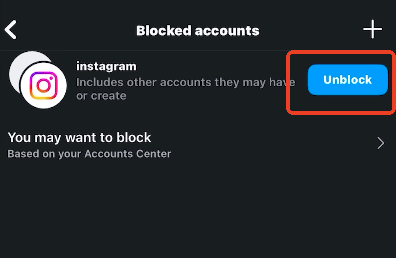
6. Tap Unblock again to confirm the action. Now, the blocked Instagram account should be unblocked from your Instagram account.
How to Unblock Someone Who Blocked You Back on Instagram
Can you unblock a user if you’ve both blocked each other? Yes. While their profile won’t appear in a standard search, you can still manage your “Blocked Accounts” list through your privacy settings.
Method 1: Use the Blocked Accounts List
- Go to your Profile and tap the Menu (three lines).
- Select Settings and Privacy.
- Scroll down to Blocked.
- Find the user’s name and tap Unblock.
Method 2: The Group Chat Workaround
If the user doesn’t appear in your blocked list, you can use a secondary account to “bridge” the connection:
- Create a Group: Using a different account, start a new DM group.
- Add Both Parties: Invite both your main account and the account you wish to unblock.
- Access the Profile: From your main account, open the group chat, tap the user’s name, and select Unblock.
Related: Instagram Login and Sign Up: 2026 Detailed Guide
What Happens After I Unblock Someone on Instagram?
When you unblock someone on Instagram, several changes take place. However, unblocking does not fully restore your previous interaction. Here’s exactly what happens:
1. You Can View Their Profile Again
If the person has not blocked you, you will be able to search for their account and view their profile again.
2. You Do Not Automatically Follow Each Other
Unblocking someone does not restore your previous follow status. If you were following them before, you must follow them again manually.
3. They Are Not Notified
Instagram does not send a notification when you unblock someone. However, they may realize it if they search for your profile and can see it again.
4. Previous Messages Remain
Your existing direct message conversation will still appear in your inbox. However, you will not receive any messages they sent while they were blocked.
5. Likes and Comments May Not Be Restored
In some cases, previous likes and comments may not reappear after blocking and unblocking.
Pro-Tip: Boost Your Instagram Privacy with a VPN
While unblocking users manages your interactions inside the app, using a VPN for Instagram protects your data from the outside. A VPN masks your IP address, ensuring that your location and browsing habits remain private from third parties and even your ISP. If you’re serious about digital boundaries, a VPN is the perfect companion to your Instagram privacy settings.
LightningX VPN is one of the best VPNs for secure online browsing on Instagram and other social media platforms. It has an advanced encryption cipher, 256-bit, and follows a no-logs policy, ensuring your online data stays underground. As for speed, it has a large server fleet (2,000+ servers in 70+ countries), providing a stable and smooth traffic transmission.
Frequently Asked Questions about Unblocking Someone on Instagram
Q1: How do I unblock each other on Instagram?
If you blocked each other on Instagram, you can go to Settings > Blocked to find the blocked list and unblock. However, if he blocked you, you can’t directly search for his profile and unblock him.
Q2: How can I see recently unblocked accounts on Instagram?
Instagram does not provide a “recently unblocked” list. However, you can view all blocked accounts by going to Settings > Blocked.
Once someone is removed from this list, they are officially unblocked.
Q3: Why can’t I find someone I unblocked on Instagram?
If you can’t find someone you unblocked on Instagram, there are several possible reasons:
- They have blocked you, and you can’t find their profiles through search.
- They changed their username.
- Their Instagram account was deactivated or deleted.
- You are searching for the wrong username.
Compared to finding the blocked Instagram accounts through search, it’s better to check them in the “Blocked” list in “Settings”.
Q4: Can you see who stalks you on Instagram?
No. Instagram does not allow users to see who views their profile. You can only see who viewed your Stories within 24 hours, but there is no official way to track profile visitors.
Be cautious of third-party apps that claim to show profile stalkers, as they are often unreliable or unsafe.






