


TVer is a free ad-supported Japanese streaming platform, offering a lot of premium content. However, when you open a video on TVer from outside Japan, you might see a message saying “通信エラー”, which means communication error. This is mainly because TVer detects your location and blocks you from accessing.
To solve the problem, keep reading our post to learn how to watch TVer outside Japan, no matter where you are. Some binge-worthy titles are also recommended for you.
What Is TVer?
TVer is a free-to-view video-on-demand (VOD) service by a group of leading Japanese commercial broadcasters. The service was launched in October 2015 with the original aim of providing a legal method for video delivery by five Tokyo-based broadcasting companies, Nippon TV, TV Asahi, TBS Television, TV Tokyo, and Fuji Television.
Catch-up television is the platform’s most used feature, and it serves as a limited online PVR of all programming that broadcasts on NHK and its channels for seven days after their air dates. Available Content TVer offers dramas, variety shows, anime, news, and sports content provided by broadcasters who are partnered with them.
TVer does not require a paid subscription, and all content is supported by advertisements that cannot be skipped. The service is designed mainly for domestic audiences in Japan, and its content is provided entirely in Japanese.
How to Watch TVer Outside Japan – Step-by-Step Guide
Here are the steps for watching TVer outside Japan.
Step 1. Access TVer from Japan
TVer is only available within Japan. To watch its full range of content from outside Japan, you need a VPN that provides a Japanese IP address.
LightningX VPN is one option that provides access to servers in Japan, allowing you to connect through a Japanese IP address. Below are the steps to download and use LightningX VPN.
- Go to LightningX VPN’s official site.
- Click “Free Download”.
- Choose the correct version for your device or browser to download. LightningX VPN supports Windows 11/10, macOS, iOS, Android, Apple TV, Android TV, Linux, and browsers (Chrome, Edge, Firefox).
- Open LightningX VPN and sign up for an account. LightningX VPN offers a 30-minute traditional free trial for beginners.
- Select a server in Japan. For example, you can connect to Chiba.
Step 2. Watch TVer
Unlike most streaming platforms, TVer doesn’t require registration or a subscription. However, before watching, you’ll be asked to provide some basic information.
Here are the detailed steps for accessing TVer.
1. Open TVer’s website or app on your device.
2. Select a video and click the play button. A new page will appear, asking for your basic information.
3. Enter your birthdate, gender, and a valid Japanese postcode (for example, 2730005, Funabashi City, Honcho, Chiba).
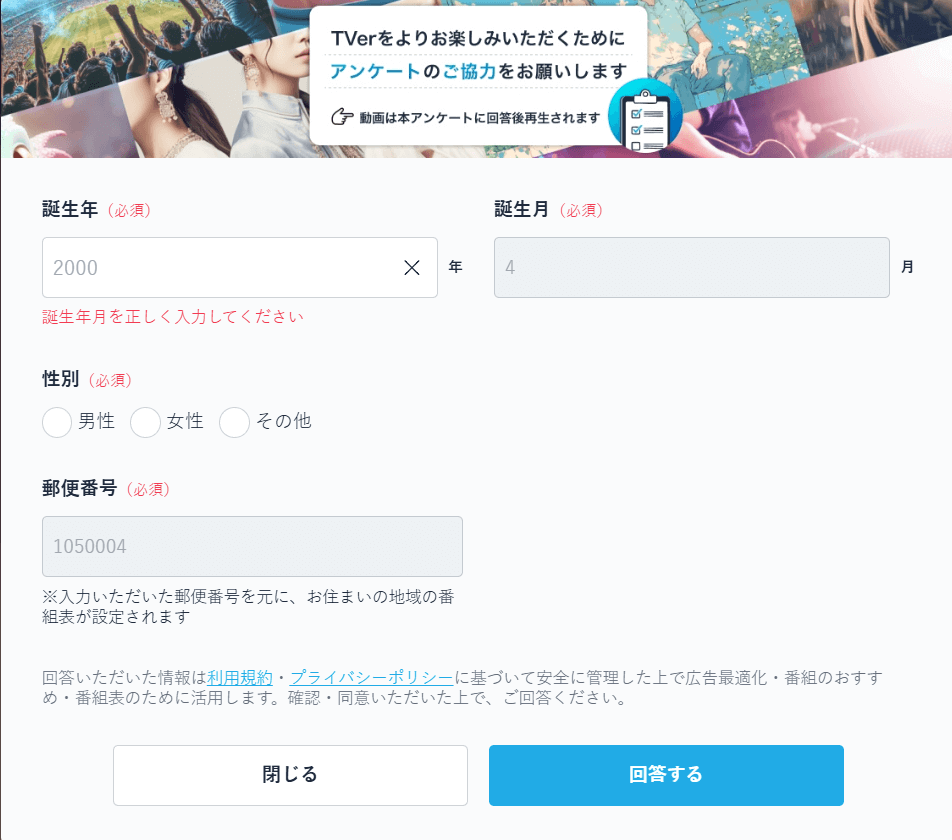
4. Click the answer button to submit the information.
5. You can now watch TVer’s series, shows, anime, and other content.
Streaming Issues on TVer When Using a VPN
TVer is a Japan-only streaming service, and VPN connections may interfere with playback due to network restrictions or IP filtering. If you experience buffering or playback errors while connected to a VPN, consider the following general checks:
- Disconnect from the VPN and reload the TVer page to confirm whether the VPN is causing the issue.
- Restart your network connection or device.
- Reopen your TVer web or app page.
Why Choose LightningX VPN for TVer?
LightningX VPN is a reliable VPN with excellent performance, allowing you to access geo-restricted services from anywhere.
Thanks to its massive server network and lightweight protocols, LightningX VPN minimizes the internet speed loss, ensuring a smooth streaming experience under optimal conditions.
It offers multiple server locations in Japan, including Tokyo and Chiba, allowing you to access Japanese streaming platforms with unlimited bandwidth. With 2,000+ servers in 70+ countries, LightningX VPN provides plenty of server options.
As for security, LightningX VPN uses an AES-256-bit cipher to encrypt your internet traffic and hide your online data, such as your IP address and browsing history.
What to Watch on TVer
TVer offers a variety of streaming content, including reality shows, dramas, anime, sports, and news. Here are some titles that are worth watching.
Dramas:
- La Grande Maison Tokyo (2019)
- Voice (2009)
- Madoka 26-sai, Kenshuui Yattemasu! (2025)
- Extremely Inappropriate! (2024)
- Last Man: The Blind Profiler (2023)
- My Love Mix-Up! (2021)
- My Beautiful Man (2021)
- Hold My Hand at Twilight (2023)
- Tokyo Dogs (2009)
Variety shows:
- Monday Lateshow (2012)
- Ametalk! (2003)
- Wednesday’s Downtown (2014)
- Aiseki Shokudō (2018)
- Ueda to Onna ga Deepni Hoeruyoru (2024)
- Sekai no Hate Made Itte Q! (2007)
- LONDON HEARTS (1999)
- Shabekuri 007 (2008)
- Kayō wa Zenryoku! Hanadai-san to Chidori-kun (2021)
Anime:
- Case Closed (1996)
- Jujutsu Kaisen (2020)
- Inuyasha (2000)
- JoJo’s Bizarre Adventure (2012)
- Frieren: Beyond Journey’s End (2023)
- Chained Soldier (2024)
- Champignon Witch (2026)
- Noble Reincarnation (2026)
FAQs About Watching TVer Outside Japan
Q1: Does TVer Offer English Subtitles?
TVer does not offer English subtitles or multilingual options. The platform is designed primarily for Japanese audiences, and most content is available only in Japanese. Viewers who do not understand Japanese may need to rely on third-party translation tools.
Q2: What Devices Are Compatible with TVer?
TVer is compatible with a wide range of devices, including computers (via supported web browsers), smartphones and tablets (iOS and Android), streaming devices such as Fire TV Stick and Chromecast with Google TV, and selected smart TVs sold in Japan. Compatibility depends on the device model and operating system.
- Smart TVs: AQUQS, BRAVIA (Sony), FUNAI, Hisense, LG, LUCA (Iris Ohyama), REGZA, TCL, VIERA (Panasonic), and Nitori
- Projectors: Aladdin X, NEBULA (Anker), XGIMI
- Set-top boxes: au Hikari TV service (KDDI), Cable Plus STB-2 (KDDI), J:COM TV






