


U-Next is one of the largest streaming platforms in Japan. It provides massive digital content from Japan, including anime, movies, dramas, music, manga, and more. However, due to licensing agreements, the service is not available outside Japan. Therefore, using a VPN is needed if you’re not located in Japan.
Next, we’ll guide you through how to watch U-Next outside Japan using a VPN and give advanced tips for unblocking U-Next successfully.
How to Watch U-Next Outside Japan
U-NEXT is a Japan-only streaming service. If you try to access it from outside Japan, you’ll usually see a region restriction error. To watch U-NEXT abroad, you need a reliable VPN to change your IP address to Japan. Follow the step-by-step guide below.
Unblock and Watch U-Next on Smart TVs, Streaming Devices, and Mobile Devices
U-NEXT offers native apps on smart TVs, smartphones, tablets, and streaming devices such as Amazon Fire TV. To access U-NEXT on these devices, make sure your VPN app supports the platform you’re using. Below are the steps to watch U-NEXT on Android, iOS, smart TVs, and Amazon Fire TV.
1. Choose a VPN that works with U-NEXT. LightningX VPN is an excellent option.
2. Get the VPN app on your streaming device.
For example,
- Go to the official LightningX VPN website.
- Download and install the VPN app for your device (PC, phone, tablet, or TV).
3. Open the VPN app.
4. Create an account and log in.
5. Sign up for a subscription or use a free trial if possible.
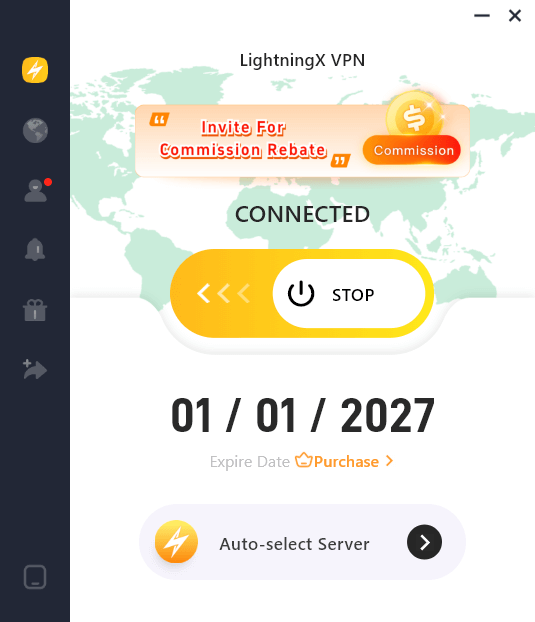
6. Connect to a server in Japan.
In LightningX VPN’s app, open the server list, find the “Asia” section, select “Japan”, and choose a server that appears green (faster). Once connected, your IP address will appear as if you are in Japan.
7. Launch the U-NEXT app and sign up for an account.
8. You can subscribe to U-Next or watch its free content. If you want to pay for a subscription, a local payment method may be required. A virtual credit card can often work as a workaround.
Unblock and Watch U-Next on Windows and macOS
On Windows and macOS, U-Next is streamed directly through a web browser. To bypass regional restrictions, you can directly use a VPN app. However, if you don’t want all traffic on your device to go through the VPN, using a VPN browser extension is a more flexible option.
Here’s how to watch U-Next on Windows and macOS using the VPN extension.
- Open your browser’s extension store (e.g., Chrome Web Store – Extensions).
- Search for your chosen VPN provider.
- Add the VPN extension to your browser.
- Create an account for the VPN and sign in.
- Connect to a Japan server.
- Visit the U-Next website (https://video.unext.jp/) and sign in with your account.
- Start streaming the U-Next library.
Best VPN for Unblocking U-Next
Not all VPNs can unblock Japanese streaming platforms. You need a VPN with stable Japan servers and strong streaming support.
LightningX VPN is recommended because it:
- Offers multiple servers and locations in Japan, including Tokyo and Chiba. Each node is fast, stable, and secure for unblocking and watching TVer, U-Next, and other Japanese streaming platforms.
- Covers 2,000+ servers in 70+ countries in total. The massive server fleet minimizes the internet lag caused by the VPN encryption and restores your original internet speed to the greatest extent. Using LightningX VPN, you can smoothly stream HD movies, TV series, and anime on U-Next.
- Provides flexible configuration options, including Android TV, Apple TV, Windows, macOS, Android, iOS, Linux, Chrome, Edge, and Firefox.
- Allows 3 simultaneous connections by default, with options to customize the number of devices.
How to Fix U-Next Not Working with a VPN
If U-Next isn’t loading while using a VPN, it could be caused by several factors, such as browser cache, a weak VPN connection, or network issues. Try the following steps to fix it:
1. Clear your browser cache
Cached data can store your real IP address and then interfere with streaming. You can clear your cache and cookies, then reload U-Next to see if it works.
2. Switch to a different VPN server in Japan
Some servers may be blocked or congested. Try connecting to another Japanese server (e.g., Tokyo or Chiba).
3. Check your internet connection
Make sure your network is stable and fast enough for streaming. Restart your router or modem if needed.
4. Use the U-Next website directly
If the app isn’t working with your VPN, try streaming on the official U-Next website instead. VPNs often work more reliably through the browser.
5. Try a different VPN or browser extension
If your VPN still doesn’t work, switch to a VPN with better streaming support, or use a VPN browser extension instead of the app.
6. Manually change your DNS settings
Changing to a public DNS (e.g., Google DNS 8.8.8.8 / 8.8.4.4) may help bypass restrictions if your VPN isn’t routing traffic correctly.
What Subtitles Does U-Next Offer?
U-Next primarily provides Japanese subtitles for most of its content.
Luckily, U-Next offers plenty of licensed content from platforms like HBO Max and Paramount, and some titles offer English original audio but without subtitles.
If you don’t understand Japanese, you can use a real-time subtitle translator or an AI-powered video translation tool to assist with comprehension.
Alternatively, you can explore other legal and free Japanese movie sites or channels.
Binge-Worthy Titles on U-Next
The U-NEXT library contains plenty of Japanese dramas, anime, movies, and TV shows. Here are some works worth checking out.
- So, You Make It
- Attack on Titan
- Alderamin on the Sky
- Adventurers Who Don’t Believe in Humanity Will Save the World
- Dollhouse
- Wednesday Downtown
- A Gatherer’s Adventure in Isekai
- Don’t Call It Mystery
- Fake Mommy
- Oshi ga Joshi ni Narimashite: Full Throttle
- One Punch Man
- Spy Family
- The Royal Family
- The Solitary Gourmet Spring Special 2023
- A Farewell’s Love That Begins with a Bet
- Takopi’s Original Sin
FAQs
Q: How to watch U-Next for free?
U-Next offers a 31-day free trial for new users. The monthly fee won’t be charged if you cancel within the trial period. After the free trial ends, the subscription will automatically renew unless canceled.
Q: How much does U-Next cost?
U-Next’s basic monthly subscription costs 2,189 yen (tax included). This plan gives you access to unlimited streaming titles, magazine reading, and about 1,200 points each month, which can be used for rentals and other paid services (1 point = 1 yen).






