



Wavve is one of the largest streaming platforms in South Korea, offering plenty of movies, variety shows, TV dramas, and original content. However, due to licensing and geographic restrictions, Wavve is not available in most of the world. Today, we’ll introduce you to a guide on how to watch Wavve outside Korea, no matter where you are.
Where Is Wavve Available?
Wavve primarily targets users in South Korea.
As global streaming platforms like Netflix and YouTube continue to expand their presence in the Korean market, major local broadcasters and telecom companies, including SK Telecom, KBS, MBC, and SBS, collaborated to launch Wavve as a domestic streaming service with a strong focus on Korean content.
Due to its localized business strategy and region-specific content licensing, Wavve remains unavailable in most other countries and regions, including the United States, Canada, Australia, Japan, and Taiwan.
Even though Wavve is also available in some Southeast Asian countries, including Singapore, Indonesia, Malaysia, the Philippines, Vietnam, Laos, and Thailand, the platform offers limited functionality and language support compared to its Korean domestic version.
Tip: Similar to Wavve, TVING is also a Korean OTT platform offering a wealth of premium content. To watch TVING outside of Korea, refer to our guide: How to Watch TVING Outside Korea: A Detailed Guide.
How to Watch Wavve Outside Korea: Step-by-Step Guide
To watch Wavve outside Korea, you’ll need a Korean IP address, a Wavve account, and a subscription. Here are the detailed steps for getting them.
Step 1. Change Your IP Address to South Korea
To access the complete Wavve library and features, the first step is to change your IP address to South Korea. You can use a proxy or a VPN for South Korea to do so. However, we recommend you use a VPN because it is more secure, faster, and simpler to use.
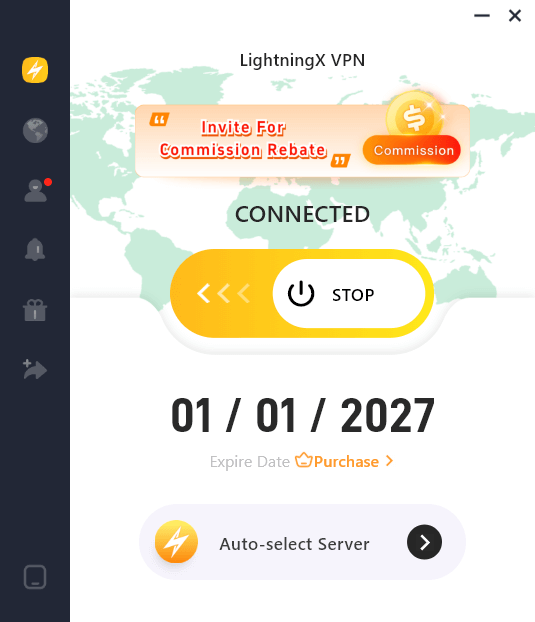
LightningX VPN is a solid choice for unblocking and watching Wavve. Based on the advanced AES-256-bit algorithm and following a no-logs policy, LightningX VPN encrypts your internet traffic and keeps your data safe. It offers multiple servers in South Korea, like Seoul, with unlimited bandwidth. With 2,000+ servers/70 countries in total, LightningX VPN gives you access to global content.
Here’s how to use LightningX VPN to get a South Korean IP address.
- Go to LightningX VPN’s official website: https://lightningxvpn.com/
- Click on “Download Free” and choose the correct version for your device to download.
- Install the app and sign up for an account.
- Select a server in South Korea. Now you should successfully get a Korean IP.
Step 2. Sign Up for Wavve
If you don’t have a Wavve account, follow the steps below to sign up for one.
Note: The Wavve page is only available in Korean. You can use a translation tool to assist in reading.
1. Open Wavve.com or the app. You can download the Wavve app from the Google Play Store or App Store.
2. Choose the profile icon on the top right. A drop-down menu will open.
3. Select the sign-in button.
4. In the sign-in page, choose the sign-up button.
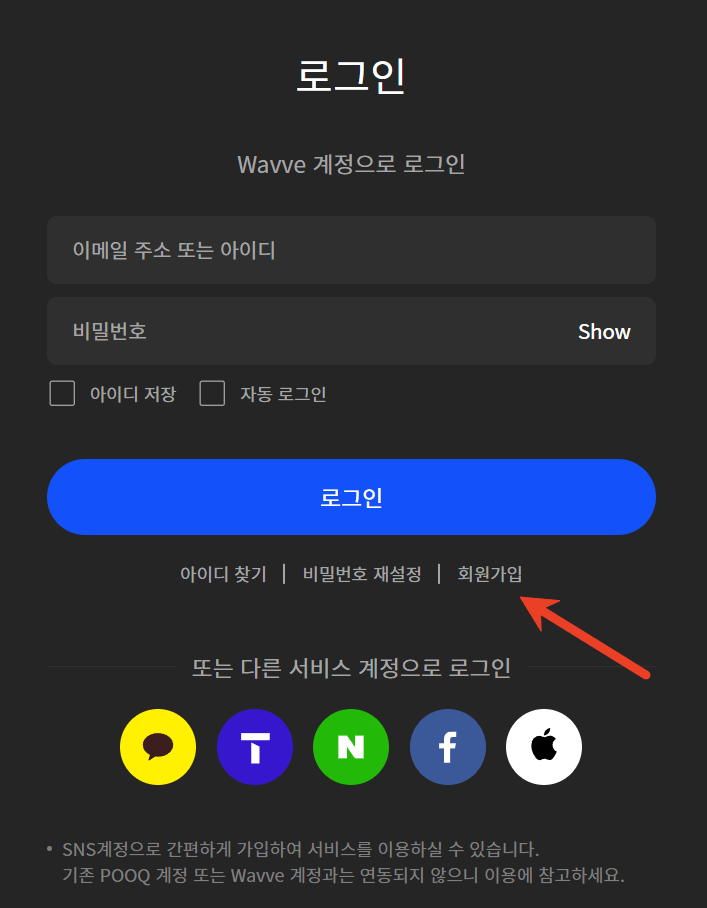
5. Use your email, Kakao Talk, T ID, Naver, Facebook, or Apple ID to register a Wavve account.
If you want a Kakao Talk account, follow our guide to get one: KakaoTalk Login & Sign-Up: Desktop, Mobile, & Web.
Step 3. Subscribe to Wavve
Since Wavve is a subscription-based platform, you’ll need to purchase one of its plans to access its whole library. Wavve subscription plans include:
- Standard with Ads: KRW 5,500/mo
- Basic: KRW 7,900/mo
- Standard: KRW 10,900/mo
- Premium: KRW 13,900/mo
To purchase a Wavve subscription, you’ll need a local payment method. You can ask a Korean friend to help you with the purchase.
Keep your VPN connected, and now you can watch Wavve outside Korea.
Does Wavve Offer English Subtitles?
Unfortunately, Wavve only supports Korean subtitles and does not provide English subtitles. If you are unfamiliar with Korean, we recommend using translation tools to assist with viewing content.
Additionally, Wavve offers international content with English audio, such as Sherlock, Hidden Assets, and When Calls the Heart: The Heart of Homecoming.
Binge-Worthy Titles on Wavve
Wavve offers a vast collection of exclusive or original Korean variety shows, movies, and dramas. Below is a curated list of must-watch programs.
Movie:
- Concrete Market (2025): Earthquake, Thriller
- Brave Citizen (용감한 시민) (2023): Action, Comedy
- Gentleman (젠틀맨) (2022): Crime, Action
- First Kiss (첫 번째 키스) (2025): Romance
- 18×2 Beyond Youthful Days (청춘 18×2 너에게로 이어지는 길) (2024): Romance
Drama:
- No Mercy (단죄) (2025): Crime, Thriller, Revenge
- Will You Be My Manager? (되어줄래? 나의 매니저) (2025): Romantic, High School
- ONE: High School Heroes (ONE: 하이스쿨 히어로즈) (2025): Action, High School
- The 4th Love Revolution (제4차 사랑혁명) (2025): Romantic, Comedy
- One Day Off (박하경 여행기) (2023): Growth, Comedy
- Tracer (트레이서) (2022): Crime, Revenge, Investigation
Reality Shows:
- The Community (사상검증구역: 더 커뮤니티) (2024): Social Experiment
- Bloody Game (피의게임) (2021): Game
- A New Relationship in Denmark (도포자락 휘날리며 in 덴마크) (2022): Travel
- Civilization: The Last Island (문명: 최후의 섬) (2021): Adventure, Survival
- We’re Still Single (우리 아직 쏠로) (2025): Dating
- SeokSam Play (석삼플레이) (2025): Travel
How to Watch Wavve Outside Korea – FAQs
Q: Can I Use a Free VPN to Watch Wavve?
Compared to a paid VPN, a free VPN offers fewer security protection features and might collect or track your online activities. Additionally, most free VPNs offer limited data and servers, delivering a slower speed and limited accessibility. Considering these factors, free VPNs are not ideal for streaming on Wavve.
Q: What Does a Wavve Subscription Include?
A standard Wavve subscription has these features:
- 2 simultaneous connections
- TV access included
- Ad-free experience
- Full HD quality
- Unlimited mobile downloads
- Accessibility to the entire Wavve library
- Live replay + rewind playback






