



Telegram hosts millions of public channels, groups, bots, etc. Whether you want to follow new channels, join niche communities, or discover trending content, knowing how Telegram search works and how to use it effectively makes a huge difference.
This post helps you understand how Telegram search really works, its limitations, and how to use it to find content, channels, groups, etc.
What Is Telegram Search and How Does It Work?
Telegram search is a built-in discovery system that allows users to find public content inside the Telegram ecosystem. This includes:
- Public Telegram channels
- Public Telegram groups
- Telegram bots
- Messages inside chats you’ve already joined, including photos, videos, downloads, links, files, music, voice, etc.
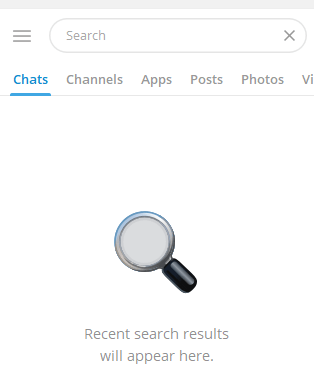
Telegram search is keyword-based. When you enter a word or phrase into the search bar, Telegram scans public titles, usernames, and descriptions to return relevant results.
However, unlike Google, Telegram search does not index the full content of every channel or group. This limitation explains why many high-quality Telegram communities remain hard to find unless you already know their exact name or username.
Below is a complete, feature-by-feature explanation of Telegram search, including how each function works and how to use it effectively.
1. Global Telegram Search (Public Content Discovery)
Global Telegram search is the most commonly used feature and the foundation of Telegram search. It allows users to discover public Telegram channels, public groups, bots, and users across the entire platform.
When you tap or click the Telegram search box without opening a specific chat, it enters global Telegram search mode.
What Global Telegram Search Can Find
- Public Telegram channels
- Public Telegram groups
- Verified and unverified bots
- Public usernames
- Matches keywords from names, usernames, and descriptions
Telegram search results are primarily based on:
- Channel or group name
- Username (@username)
- Description keywords
Key Limitations
- Telegram search does not index all public content
- Search results are influenced by keyword accuracy
- Newly created channels may take time to appear
2. Telegram Channel Search Feature
The Telegram channel search feature is optimized for broadcast-style content. Channels are easier to find than groups because Telegram encourages public content distribution through channels.
How Telegram Channel Search Works
- Indexes channel titles and usernames
- Considers channel descriptions
- Prioritizes relevance over subscriber count
When you use Telegram search to find channels, results often favor:
- Clear, keyword-rich names
- Consistent posting activity
- Established channels with history
Best Practices
- Search using topic + “channel” (e.g., AI news channel)
- Try username-style searches (@ai_news)
- Test multiple keyword variations
Related: How to Create a Telegram Channel for Free: Step-by-Step Guide
3. Telegram Group Search Feature
Telegram group search is more restrictive than channel search. This is intentional, as groups are discussion-based and often private.
What Telegram Group Search Shows
- Public groups only
- Groups with searchable usernames
- Groups that allow discovery
Private groups and invite-only communities are completely invisible to Telegram search.
Why Telegram Group Search Is Limited
- Privacy protection
- Spam prevention
- Reduced abuse of public discussions
Because of this, Telegram group search often returns fewer and less relevant results compared to channel search.
Related: How to Join a Telegram Group: Step-by-Step Guide
4. In-Chat Search (Message-Level Search)
One of the most powerful but underused Telegram search features is in-chat search. This allows users to search messages inside a specific chat, group, or channel they have already joined.
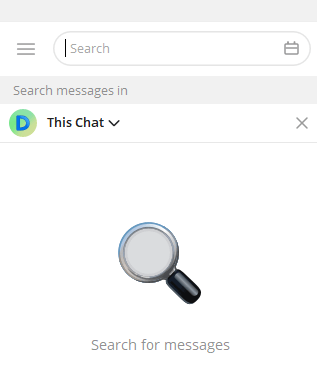
In-Chat Search Capabilities
- Search keywords within message history; matched keywords are visually highlighted.
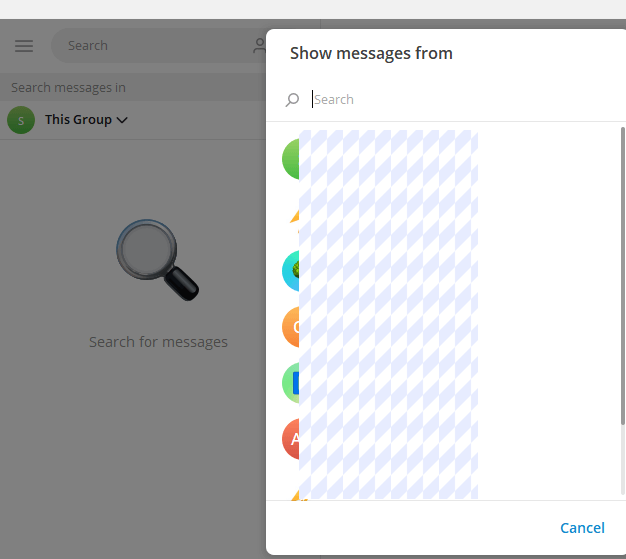
- Filter by sender (user-based filtering): Inside group chats or channels, click the search icon, tap the user icon on the left of the search box, select a specific user, and Telegram search will only show messages from that sender.
- Jump directly to matched messages; no need to scroll manually.
This feature is extremely useful for:
- Finding old information
- Locating shared links or files
- Reviewing past discussions
- Finding admin announcements
- Tracking replies from a specific member
Important: In-chat search does NOT work across chats globally – only within the selected chat.
5. Telegram Search Filters by Media Type
Telegram search also supports content-based filtering, which many users overlook. When searching inside a chat or globally, Telegram allows you to filter by:
- Media (photos and videos)
- Files (PDFs, ZIPs, documents)
- Links
- Music
- Voice messages
This feature significantly improves search accuracy when dealing with large or active communities. For example, instead of scrolling endlessly, you can instantly find:
- A PDF shared months ago
- A specific download link
- An audio message
6. Username-Based Search (@Search)
Telegram treats @usernames as unique identifiers, making username-based Telegram search one of the most accurate methods available.
How Username Search Works
- Searches for exact or partial matches
- Prioritizes usernames over display names
- Works for users, channels, and bots
- Accuracy increases dramatically
Searching with @ often bypasses many keyword-related limitations of Telegram search. For example, searching @technews is far more effective than searching “tech news”.
7. Bot Search Within Telegram Search
Telegram search also indexes public bots, which act as tools, services, or automation systems.
Common Bot Categories Found via Telegram Search
- Search bots
- Download bots
- Moderation bots
- Utility bots
Bot discovery relies heavily on:
- Bot name
- Username
- Short description
Because bots are highly structured, Telegram search tends to return more accurate bot results than group results.
8. Recent Searches and Search Suggestions
Telegram search includes search memory and suggestions, designed to speed up repeated discovery.
How This Feature Helps
- Remembers previous search terms
- Suggests related queries
- Speeds up frequent searches
However, this feature does not improve discovery quality – it simply enhances convenience.
9. Language and Regional Behavior in Telegram Search
The Telegram search box is language-sensitive, meaning results depend heavily on the language you use. Telegram search behaves differently depending on:
- Language used.
- Regional trends
- Local popularity of keywords
Searching in different languages can dramatically change results. Many high-quality channels never appear in English Telegram search results but are easily found using native-language keywords.
10. Advanced Telegram Search Techniques Most Users Don’t Know
If you want to outperform 90% of users, these advanced techniques are essential.
Use Google to Enhance Telegram Search
Google often indexes public Telegram pages better than Telegram itself. Try search operators like:
- site:t.me keyword
- site:telegram.me keyword
This method is extremely effective for finding hidden gems that native Telegram search misses.
Search in Multiple Languages
Many Telegram communities are multilingual. Searching in English, Spanish, Russian, or Arabic can unlock completely different results.
What Telegram Search Does Not Do
Understanding what Telegram search cannot do is just as important.
Telegram search does NOT:
- Rank by content quality
- Analyze full message history globally
- Offer advanced filters (size, activity, date)
- Guarantee comprehensive results
This is why experienced users combine Telegram search with external discovery methods.
Why Telegram Search Feels Limited for Many Users
Many users complain that Telegram search “doesn’t work”, but the issue is more nuanced. The platform intentionally restricts how much data is searchable to protect privacy and reduce abuse.
Here are the main reasons Telegram search can feel incomplete:
- Partial indexing – Not all public channels are indexed immediately
- Keyword sensitivity – Small wording differences can hide results
- Regional filtering – Results may vary depending on language and location
- No advanced filters – You can’t filter by size, activity, or date
Because of these constraints, relying only on native Telegram search often leads to frustration — especially when trying to find niche or newly created communities.
Conclusion
Telegram is one of the richest content ecosystems online, but only if you know how to navigate it. By understanding how Telegram search works, how each search feature works, recognizing its limitations, and applying advanced discovery techniques, you can consistently find valuable channels and communities others miss.






