


Call of Duty: Warzone is one of the most popular first-person shooter games in recent years, thanks to its original battle royale game style, high playability, and free-to-play. The game now has millions of players around the world. Such a large user base brings high interactivity, which is interesting, but also poses potential risks of DDoS attacks within certain matches.
In that case, you can use the best VPN for Warzone to hide your IP address from strangers, reducing the risks of being attacked. Nevertheless, not all VPNs are ideal. This quick guide provides the 4 best options for getting a secure and smooth gaming environment.
Why Should You Use a VPN for Warzone?
Using a VPN for Call of Duty: Warzone can improve both your privacy and your matchmaking flexibility.
First, a VPN hides your real IP address and encrypts your internet traffic. This prevents DDoS attacks, protects your location data, and keeps hackers from intercepting your connection during competitive matches.
Second, by routing your connection through a different region, a VPN may help you access less crowded or less competitive servers. In some cases, this can result in easier matchmaking conditions compared to peak-hour servers in your local region.
4 Best VPNs for Warzone
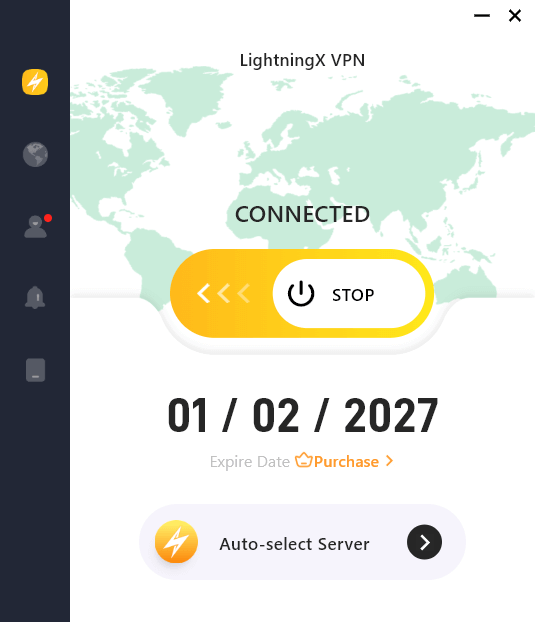
1. LightningX VPN – Fast and Secure for Warzone
LightningX VPN delivers stable, high-speed servers while keeping your connection secure and affordable, making it a strong contender for the best VPN for Warzone players.
It uses advanced encryption standards such as AES-256-GCM and ChaCha20-Poly1305 to protect your IP address and prevent DDoS attacks, ensuring your gameplay remains uninterrupted during competitive matches.
Why LightningX VPN Stands Out for Warzone?
LightningX VPN balances performance and value. With flexible plans (1 week, 1 month, 3 months, and 1 year) starting at $9.99 per month, it offers an affordable solution for gamers who want both speed and security.
More importantly, its optimized server network and lightweight protocols help reduce latency spikes, which is crucial in fast-paced shooters like Warzone.
Key Features for Warzone Players
- 2,000+ servers in 70+ countries, giving you more regional routing options and potential matchmaking flexibility
- Gaming-friendly protocols like WireGuard, Shadowsocks, and Vless to minimize ping and lag
- Built-in ad blocking and split tunneling to prioritize Warzone traffic
- Strict no-logs policy to protect your privacy
- 30-day money-back guarantee
- Supports Windows, macOS, iOS, Android, Linux, and smart TVs
- Up to 3 simultaneous device connections
Related: 6 Best VPNs for Gaming (Ultra-fast, Stable, Secure)
2. NordVPN – Powerful and Stable for Warzone
NordVPN is one of the most well-known VPN providers on the market. It offers excellent speed, strong security, and a massive server network, making it a reliable option for Warzone players.
It uses AES-256 encryption to protect your internet traffic and hide your real IP address. This helps prevent DDoS attacks and keeps your connection secure during competitive matches.
Why NordVPN Stands Out for Warzone?
NordVPN’s biggest advantage is its proprietary NordLynx protocol, which is built around WireGuard technology. It is designed to deliver faster speeds and lower latency compared to traditional VPN protocols.
With thousands of servers worldwide, NordVPN also provides flexible regional routing options. This can help stabilize your ping during peak hours or when local servers are congested.
Key Features for Warzone Players
- 8,400+ servers in 167+ countries, offering wide regional coverage
- NordLynx protocol for improved speed and lower latency
- AES-256 encryption to protect against DDoS attacks
- Strict no-logs policy
- The Threat Protection feature helps block malicious websites and trackers
- Supports Windows, macOS, iOS, Android, Linux, routers, and more
- Allows up to 10 simultaneous connections
- 30-day money-back guarantee

3. ExpressVPN– Premium Speed and Reliability for Warzone
If consistent performance and strong security standards are your priority, ExpressVPN is the best VPN for Warzone. It keeps a perfect balance of stability and speed while keeping your online data safe.
It uses AES-256 encryption to secure your internet traffic and hide your real IP address. This helps protect against DDoS attacks and keeps your gaming sessions private.
Why ExpressVPN Stands Out for Warzone?
One of ExpressVPN’s core advantages is its proprietary Lightway Turbo protocol. Designed to be lightweight and efficient, Lightway helps deliver fast connection speeds with minimal latency, which is important in fast-paced games like Warzone.
ExpressVPN also maintains a well-optimized global server network. Instead of focusing only on server quantity, it emphasizes server quality and consistency. This can help reduce sudden ping spikes or unstable connections during matches.
Key Features for Warzone Players
- Servers in 105 countries for flexible regional routing
- Lightway protocol for fast and stable connections
- AES-256 encryption for strong security protection
- Strict no-logs policy
- Built-in Network Lock (kill switch) to prevent IP leaks
- Supports Windows, macOS, iOS, Android, Linux, and routers
- Allows up to 10 simultaneous connections
- 30-day money-back guarantee

4. Private Internet Access – Customizable and Server-Rich for Warzone
Private Internet Access (PIA) is known for its large server network and strong customization options. It offers solid performance at a competitive price, making it a practical choice for Warzone players.
It uses AES-256 encryption (with adjustable encryption settings) to secure your internet traffic and hide your real IP address. This helps protect against DDoS attacks and ensures your gaming connection stays private.
Why Private Internet Access Stands Out for Warzone?
One of PIA’s biggest advantages is its massive server network, with 10-Gbps servers across 90 countries. This gives players more regional routing options, which may help reduce congestion during peak gaming hours.
Another key strength is customization. PIA allows users to adjust encryption levels and protocol settings (including WireGuard and OpenVPN). Advanced users can fine-tune their connection to balance speed and security based on their gaming needs.
Key Features for Warzone Players
- 30,000+ servers across 90 countries
- Supports WireGuard and OpenVPN protocols
- Adjustable encryption settings for performance tuning
- Strict no-logs policy
- Built-in kill switch to prevent IP leaks
- Supports Windows, macOS, iOS, Android, Linux, and routers
- Allows unlimited simultaneous connections
- 30-day money-back guarantee
How to Get Easier Lobbies in Warzone Using a VPN
After choosing a reliable VPN, you can try connecting to specific regions that may have lower player density or different matchmaking conditions. Here’s how to do it:
- Visit the official website of your chosen VPN provider.
- Download and install the VPN app on your device (PC, console router, etc.).
- Open the app and create an account.
- Activate the free trial (if available) or subscribe to a plan.
- Connect to a server in regions such as Egypt, Singapore, South Africa, India (Chennai), Argentina, Turkey, Brazil, Mexico, or Hawaii.
- Launch Warzone and enter a match to test lobby difficulty.
Best Time to Get Easier Lobbies in Warzone (EST)
Connecting to specific VPN server locations in Call of Duty: Warzone does not guarantee bot lobbies. However, playing during certain off-peak hours may expose you to less competitive matchmaking pools.
Below are suggested time windows converted to EST (USA time):
- Egypt: 8 PM – 1 AM
- Singapore: 3 PM – 8 PM
- South Africa: 7 PM – 12 AM
- India (Chennai): 6:30 PM – 11:30 PM
- Argentina: 1 AM – 5 AM
- Turkey: 8 PM – 12 AM
- Brazil: 12 AM – 4 AM
- Mexico: 4 AM – 8 AM
- Hawaii: 6 AM – 10 AM
How to Choose the Best VPNs for Warzone
There are many VPN services available online. However, not all of them can balance both speed and security, two essential factors for competitive games like Warzone.
If you want to choose the best VPN for Warzone, focus on the following criteria:
Fast Speed and Low Latency: You should also look for a VPN with a large server network and lightweight protocols like WireGuard.
Strong Security Protection: A reliable VPN should use strong encryption (such as AES-256) to protect your internet traffic and hide your real IP address. This helps prevent DDoS attacks and keeps your connection private. Additional features like a kill switch and a strict no-logs policy are also important for protecting your privacy.
Flexible Server Locations for Matchmaking: Server location can affect both your ping and matchmaking experience. A quality VPN should offer multiple regional server options.
Frequently Asked Questions About the Best VPN for Warzone
Q1: What’s the Best Free VPN for Warzone Bot Lobbies?
ProtonVPN is currently one of the best free VPNs for Warzone bot lobbies, as it offers unlimited data on its free plan. However, free VPNs generally come with significant limitations. Compared to paid VPNs, they often restrict server locations, reduce speeds, and may log user data.
While ProtonVPN and UrbanVPN provide unlimited data, their limited server coverage and slower speeds make them less reliable for latency-sensitive games like Warzone.
Q2: How to Fix a VPN Not Working for Warzone?
If your VPN isn’t working for Warzone, common causes include connecting to the wrong server, incompatible VPN software, a corrupted DNS cache, or antivirus interference. You can try these fixes to solve the problem.
- Check your server location: Make sure you’re connected to a server that supports gaming and is close to your region to reduce latency.
- Restart your VPN and game: Sometimes a simple restart resolves connection issues.
- Update your VPN software: Ensure you’re using the latest version for compatibility with Warzone.
- Clear DNS and flush cache: On Windows, use ipconfig /flushdns to reset your network cache.
- Switch VPN protocols: Try OpenVPN, WireGuard, or IKEv2 to see which works best.
- Check for firewall or antivirus interference: Temporarily disable them to see if they are blocking VPN connections.






