


Telegram bots are one of the most powerful features of Telegram, allowing you to automate tasks, share information, and interact with users efficiently.
If you’ve ever wondered how to create a Telegram bot, this complete guide will walk you through the process step by step, from setting up your bot account to writing code and adding useful features.
What is the Telegram Bot?
A Telegram bot is an automated program that interacts with users on Telegram. Bots can send notifications, answer questions, manage tasks, and perform other useful actions on Telegram groups.
Using the Telegram API, developers can create bots that work in chats and channels, helping businesses and individuals engage with audiences efficiently.
How to Create a Telegram Bot?
Creating a Telegram bot is easier than you might think. Even if you have no prior experience with bot development, in this part, you’ll learn how to create a Telegram bot, run it locally, and have it respond to basic commands.
Step 1: Set up your Telegram bot account
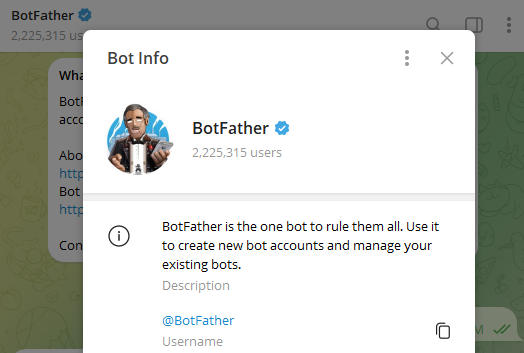
- Before creating a Telegram bot, install the Telegram app on your device.
- Once installed, open Telegram and search for BotFather, the official bot used to create and manage other bots.
Step 2: Create a New Bot Using BotFather
- Open the chat with BotFather.
- Send the command: /newbot.
- Choose a name for your bot.
- Set a unique username ending with bot (for example: my_first_test_bot).
Step 3: Prepare the Development Environment
Telegram bot creation supports multiple languages, including Python, JavaScript, and PHP. In the next section, we’ll show how to make a Telegram bot using Python.
Step 4: Write Your Telegram Bot Code (Python Example)
Create a new Python file and write your bot code. Here is a basic example:
1. Import the modules
from telegram import Update
from telegram.ext import Updater, CommandHandler, CallbackContext
- Update: represents updates received from Telegram.
- Updater: used to process and dispatch updates received from Telegram.
- CommandHandler: used to handle specific commands.
- CallbackContext: used to pass context information in callback functions.
2. Set Token and define the start callback function
TOKEN = “YOUR_TOKEN_HERE”
async def start(update: Update, context: ContextTypes.DEFAULT_TYPE):
await update. message.reply_text(
“Hello! I am your Telegram bot. How can I help you?”
)
Replace YOUR_TOKEN_HERE with the token provided by BotFather.
3. Define the main function
def main():
app = ApplicationBuilder().token(TOKEN).build()
app.add_handler(CommandHandler(“start”, start))
app.run_polling()
if name == “main“:
main()
- Connects your bot to Telegram
- Listens for the
/startcommand - Keeps the bot running continuously
Step 5: Run Your Telegram Bot
Run your Python script to start the TG bot:
python bot.py
Your bot should now be running and responding to the /start command.
Step 6: Add More Commands and Features
To make your bot more useful, you can add additional commands.
For example, a /help command:
async def help_command(update: Update, context: ContextTypes.DEFAULT_TYPE):
await update. message.reply_text(
“Available commands:\n/start – Start the bot\n/help – Show help”
)
app.add_handler(CommandHandler(“help”, help_command))
This is how most developers gradually build Telegram bots with more advanced features.
Step 7: Deploy Your Bot
Once you’re satisfied with your bot locally, deploy it to a server (VPS, cloud hosting, etc.) so it can run 24/7.
This completes the basic process for making a bot in Telegram.
What Functions Does Telegram Bot Have?
Once you know how to create a Telegram bot, it’s helpful to understand the core functions that make a Telegram bot useful. The best Telegram bot can do much more than just send messages:
1. Send and receive messages
Telegram bots help send and receive messages, and they can handle various types of content, including: Text messages, Images, Videos, and Files.
2. Command execution
Users can interact with a bot using commands. For example:
- /help – Shows available commands
- /status – Retrieves system or service status
- /stop – Stops a running process
3. Personalized interaction
Bots can respond to users naturally by understanding queries and providing relevant answers. Personalized responses improve engagement and make your bot feel more interactive.
4. Data storage and retrieval
Telegram bots can store user preferences, track interactions, or connect to external databases.
5. Secure and encrypted data
All bot interactions are securely stored and encrypted in Telegram’s cloud, ensuring user data is protected.
In short, Telegram bots offer a wide range of features. Telegram bots can significantly improve efficiency and user engagement, whether used for personal assistance or business operations.
How to Use Your Telegram Bot Safely?
To keep your interactions with Telegram bots secure, follow these practical tips:
1. Use a VPN: Protect your connection and privacy with the best VPN for Telegram.
We recommend using LightningX VPN for a secure and reliable VPN service. This can help protect your data from being intercepted and provide additional privacy when using Telegram bots.
Download now to enjoy free nodes and a 30-day money-back guarantee.
2. Avoid suspicious links
Don’t click on links from unknown or untrusted bots. If in doubt, verify the link before opening it.
3. Stick to reputable bots
Only use bots trusted by other users. Check reviews and ratings to ensure their reliability.
4. Never share sensitive information
Avoid giving out passwords, credit card details, ID numbers, or other personal data.
5. Be cautious with sensitive requests
Bots that ask for personal info or redirect you to external sites may be phishing attempts—stay alert.
6. Keep your bot updated (for creators)
Regularly update your bot and use secure APIs, proper encryption, and validated input to protect your users’ data.
Following these steps lets you safely use Telegram bots while protecting your personal information and data.
FAQs: Create a Telegram Bot
1. Are Telegram Bots Safe?
Yes, Telegram bots are generally safe if you use trusted bots and follow basic precautions, such as avoiding suspicious links, not sharing sensitive information, and optionally using a VPN like LightningX VPN for added privacy.
Read more: What is Telegram? Is Telegram Safe?
2. Do Telegram bots make money?
Yes, Telegram bots can generate income by offering services, selling products, sending paid notifications, or integrating with monetization tools. Their profitability depends on the bot’s functionality and audience engagement.
3. How much does it cost to build a Telegram bot?
Creating a basic Telegram bot can be free if you use open-source libraries like Python’s python-telegram-bot. Costs increase if you hire developers, use paid APIs, or deploy the bot on servers for 24/7 operation.






