


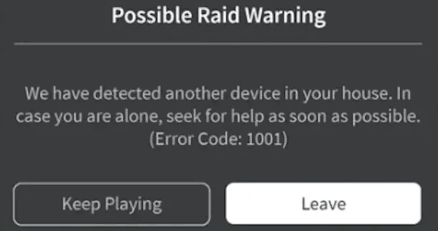
Is the error code 1001 in Roblox real? This message claims that another device is in your house and warns you to call 911. Many players are scared and looking for answers. Is your safety actually at risk?
In this guide, we reveal the truth about this mysterious code. Then we will help you understand why it appears and how to stay safe.
Is Roblox Error Code 1001 Real?
The short answer is no. Error code 1001 in Roblox is not an official error message from Roblox. If you look at the official Roblox support pages, you can’t find it. Instead, most real Roblox errors use three-digit codes, such as 277 or 403. A four-digit code, such as 1001, is a major red flag.
Furthermore, the language used in the pop-up is unprofessional. Roblox would never tell you to call emergency services through a game client.
They also cannot detect other physical devices in your home network in that specific way. So, the entire message is designed to create fear. It is exactly what the internet calls a “creepypasta” or an urban legend.
The Origins of the Roblox Error Code 1001 Myth
This myth started gaining traction on social media around 2022 and 2023. A TikTok user shared a mock-up of the error to scare their followers.
The video claimed that the error was an “old” message from 2013 that Roblox had removed. This story is completely fabricated. There is no record of this error existing in the 2013 game files.
The hoax became even more popular because of a horror game called Start Survey. In this game, developers included a fake system alert to scare players.
Since the game looks like a real survey, many people thought the alert was real. This led to thousands of players searching for this error code online.
Real Roblox Error Codes vs. Fake Ones
It is important to know the difference between a real issue and a prank. Real Roblox errors look a certain way. They usually have a grey background with a “Leave” or “Reconnect” button. Also, the text is always calm and technical.
| Feature | Real Roblox Errors | Fake Error Code 1001 |
| Code Length | Usually 3 digits (e.g., Roblox error code 277) | 4 digits or others (1001) |
| Tone | Helpful and technical | Scary and urgent |
| Instructions | “Check your internet.” | “Call 911” |
| Official Status | Listed on Roblox Support | Not mentioned by Roblox |
If a message tries to scare you, it is fake. Keep in mind that Roblox prioritizes player safety. They would never use a game error to report a physical threat.
Why You See Error Code 1001 Roblox in Games
However, if you actually see this message while playing, don’t panic. You are likely playing a “horror” or “troll” experience created by a user.
Roblox allows developers to create custom UI elements. In that case, some developers use this power to make fake kick messages or error screens.
These creators want to give you a “scare” to make their game more memorable. When the fake error code 1001 in Roblox pops up, it is just a script running inside that specific game.
It does not mean your computer is hacked. It does not mean someone is in your house. Simply leave that specific game, and the message will disappear.
Protecting Your Account and Connection
While the Roblox error code 1001 is fake, real security threats do exist. Hackers often use “fear-ware” to make you download dangerous software. They might tell you that you need a “fix” for error 1001. Never download unknown files from unofficial sites.
To stay truly safe, you should focus on your digital privacy. A strong connection is the best way to avoid real errors. Sometimes, your internet provider might have bad routing to Roblox servers. This causes high lag and real disconnects.
Try LightningX VPN to secure your gaming sessions. Using LightningX VPN helps you hide your real IP address from potential bad actors on public servers. It also provides dedicated gaming nodes that can lower your ping.
This tool ensures that your data stays encrypted and private. By using a trusted VPN, you prevent ISP throttling and keep your connection stable.
This is a practical solution for players who want a smooth, secure experience without worrying about network glitches or fake scares.
How to Fix “Real” Connection Issues in Roblox
Sometimes players mistake a real lag spike for a “cursed” error. If your game keeps crashing, try these simple steps. These will help even if you are worried about the Roblox error code 1001.
Flush Your DNS
Your computer might have old network data. Open the Command Prompt as an administrator. Type “ipconfig /flushdns” and hit Enter. This clears your internet path and can stop real connection errors.
Update the Roblox App
An old version of the app might glitch out. Go to the official Roblox website and download the latest launcher. A fresh install often fixes UI bugs and prevents fake scripts from acting up.
Check Your Firewall
Sometimes your antivirus blocks the Roblox client. This can cause a real “Connection Failed” message. Add Roblox to your allowed apps list. This ensures you stay connected to the official servers.
Read more: How to Turn off Windows Defender: RTP, Firewall, & Antivirus
Why Do People Spread the Error Code 1001 Roblox Hoax?
The internet loves a good mystery. Creators on TikTok and YouTube get millions of views by sharing scary content. They know that younger players might believe the story. The more people share it, the more “real” it feels to the community.
However, spreading this hoax can cause real anxiety. If you see a friend talking about Roblox error code 1001, tell them the truth. Explain that it is just a prank from a horror game. Knowledge is the best way to stop the spread of misinformation.
Final Words
The error code 1001 in Roblox is a harmless internet myth. It is not a real system error. You are safe, and no one is tracking you through this code. If you see it, just leave the game and play something else. Focus on real security and a stable connection for the best experience.






