Games not blocked by school are browser games that students can still play on school Chromebooks, classroom computers, or restricted WiFi networks. Most of these games run directly in the browser without downloads, which makes them easy to access during breaks or free periods.
In this guide, we picked some of the best games not blocked by school, including racing games, multiplayer shooters, puzzle games, and lightweight titles.
Best Games Not Blocked by School
1. Run 3
- Site: https://run3.io/
- Free to Play: Yes
- Download Required: No
- Ads: No
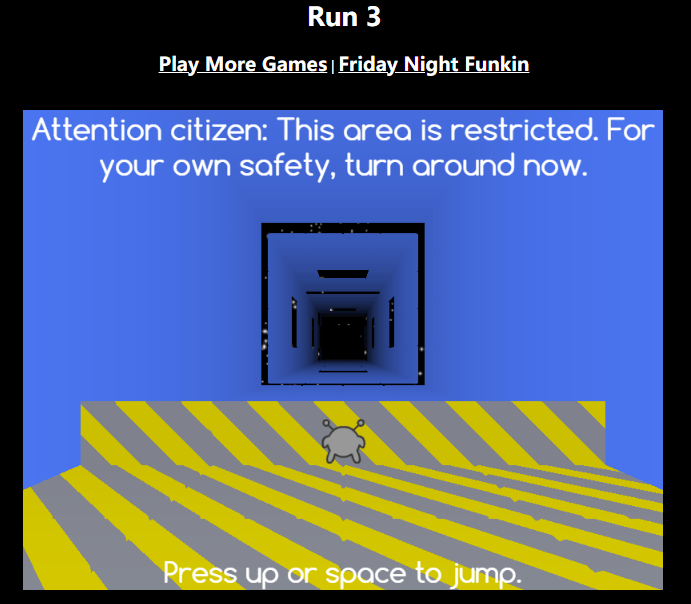
Run 3 is a fast-paced endless runner game that is unblocked by school. You will control a small alien moving through tunnels, floating in space. Jump over gaps, run along walls, and avoid falling into the void.
It starts simple, but the difficulty increases fast once gravity-switching mechanics appear. A quick session can easily turn into a long play streak because levels unlock one after another.
Run 3 often remains accessible on school networks because it is a lightweight HTML5 browser game with no downloads required. It runs well on Chromebooks and older school computers.
2. Krunker
- Site: https://krunker.io/
- Free to Play: Yes
- Download Required: No
- Ads: Moderate
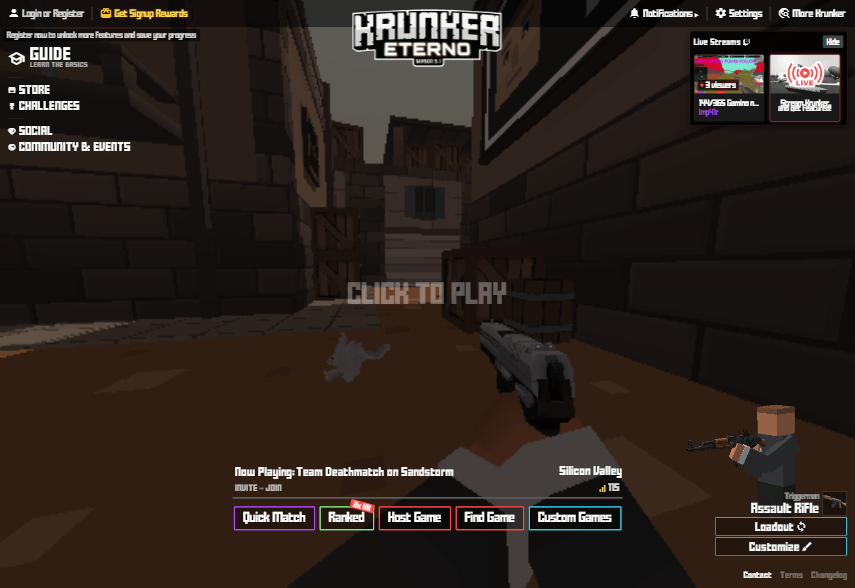
Krunker is a great FPS game that is unblocked by school on many networks. Players can join online matches, choose different classes, and compete in quick multiplayer battles with simple block-style graphics.
The matches are short and easy to jump into, but the movement system takes practice. Sliding, jumping, and quick aiming become important once you play against experienced players.
Krunker often stays accessible on school computers because it runs directly in the browser using HTML5 and does not require installation.
3. Tiny Fishing
- Site: https://tinyfishing.io/
- Free to Play: Yes
- Download Required: No
- Ads: Minimal
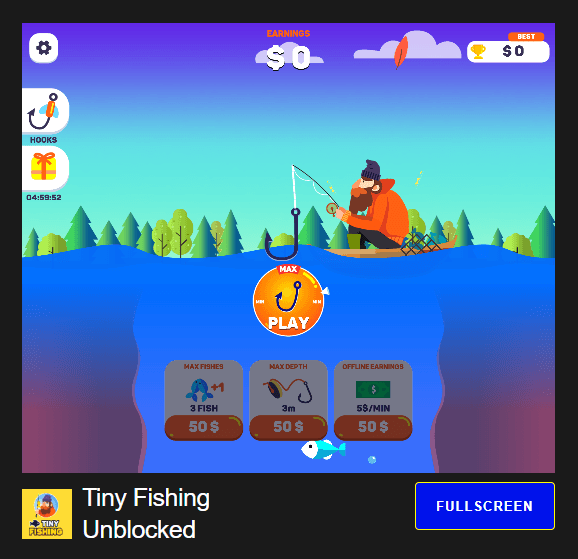
Tiny Fishing is a relaxing browser game that is unblocked on many school networks. Players drop a fishing line into the water, catch fish, and earn coins to upgrade their equipment. The gameplay is simple, but unlocking deeper areas and rarer fish keeps people playing longer than expected.
The controls require only a few movements, making it easy to play quietly during short breaks. As upgrades improve, players can catch more fish in a single run and progress much faster.
It loads quickly, uses very little hardware power, and runs smoothly even on older school laptops.
4. OvO
- Site: https://ovo-game.com/
- Free to Play: Yes
- Download Required: No
- Ads: Minimal
OvO is a parkour platformer game that is unblocked by school on many browser gaming sites. Players control a stickman character through obstacle-filled levels using wall jumps, slides, and precise movements.
The movement feels surprisingly smooth on Chromebooks, especially compared to heavier browser games. During testing, the game loaded almost instantly and kept a stable frame rate even with multiple browser tabs open. Short levels also make it easy to play during quick school breaks.
5. Drive Mad
- Site: https://www.drivemad.com/
- Free to Play: Yes
- Download Required: No
- Ads: Minimal
Drive Mad is a driving game that can be played at school. You take control of a small vehicle, navigating through an obstacle course filled with unpredictable challenges. The levels feature ramps, moving platforms, and fragile bridges. It may feel difficult to master at first, but with repeated attempts, you are sure to find success.
This game runs smoothly on school computers because it is lightweight and entirely browser-based. It is perfect for squeezing in a quick round during your breaks between classes.
6. Slope
- Site: https://slopegame-online.com/
- Free to Play: Yes
- Download Required: No
- Ads: No
Slope is a 3D endless runner game. You will control a rolling ball as it races down a neon-lit track filled with sharp turns, sheer drops, and obstacles. The game’s speed gradually accelerates; consequently, the longer you manage to survive, the higher the difficulty becomes.
Slope typically runs smoothly on school computers, thanks to its lightweight design and browser-based architecture. Furthermore, its session-based, short-form gameplay makes it the perfect way to pass the time during brief breaks.
7. Shell Shockers
- Site: https://shellshock.io/
- Free to Play: Yes
- Download Required: No
- Ads: Moderate
Shell Shockers is a multiplayer shooting game where every player controls an armed egg. You can join online matches, collect weapons, and battle other players in fast-paced arenas.
The controls are easy to learn. Matches load quickly, and most players jump in for short games during breaks. The game ran smoothly on a school computer, but it sometimes caused small lag spikes on slower school WiFi.
8. Smash Karts
- Site: https://smashkarts.io/
- Free to Play: Yes
- Download Required: No
- Ads: Moderate
Smash Karts is a chaotic kart battle game where players drive around small arenas and use random weapons to eliminate each other.
The game is simple enough to start immediately. Most rounds only last a few minutes, which makes it easy to play during short school breaks. The browser version also works well on school wifi without needing extra setup.
9. Zombs Royale
- Site: https://zombsroyale.io/
- Free to Play: Yes
- Download Required: No
- Ads: Moderate
Zombs Royale is a 2D battle royale game inspired by larger titles like Fortnite and PUBG. Players drop into a map, collect weapons, and try to survive against dozens of other players. The simple graphics help the game load quickly, even on older school laptops.
Looting only takes a few seconds, so players spend more time fighting. During testing, the game felt smooth on browsers, and short match times made it easy to play between classes.
10. Agar.io
- Site: https://agar.io/
- Free to Play: Yes
- Download Required: No
- Ads: Minimal
Agar.io is a simple online multiplayer game where you control a small cell and try to grow larger by absorbing smaller players and scattered dots.
The gameplay looks easy at first, but matches can become surprisingly competitive once larger players start chasing you across the map.
Agar.io works smoothly on most school Chromebooks. During testing, the game loaded quickly even on slower school WiFi connections.
11. Slither.io
- Site: https://slither.io/
- Free to Play: Yes
- Download Required: No
- Ads: Minimal
Slither.io is a multiplayer snake game where players collect glowing orbs to grow longer while avoiding collisions with other snakes.
The game becomes more intense as your snake grows larger because movement gets harder in crowded areas.
The browser version runs well on Chromebooks and older school laptops. Since the controls are simple and rounds start immediately, it is one of the easier online games to play during short classroom breaks.
12. Tetris
- Site: https://tetris.com/play-tetris
- Free to Play: Yes
- Download Required: No
- Ads: Minimal
Tetris is a classic puzzle game that is unblocked at school. You need to rotate and stack falling blocks to clear horizontal lines. Early rounds feel relaxing, but later stages require fast decisions and constant focus.
Tetris runs smoothly on almost any school computer because it requires very little hardware power.
13. Cookie Clicker
- Site: https://orteil.dashnet.org/cookieclicker/
- Free to Play: Yes
- Download Required: No
- Ads: Minimal
Cookie Clicker is an idle web game in which players generate a continuous stream of cookies by clicking the screen and unlocking various upgrades.
Ranked as one of the best games to play at school, Cookie Clicker runs silently in the background without interfering in the slightest with tasks being handled in other browser tabs. As the game progresses through its upgrade tiers, its core gameplay gradually evolves from simple, mechanical clicking into a strategic focus on production management and achievement unlocking.
Not only does this game load effortlessly in the vast majority of web browsers, but it also runs smoothly—even on older, low-spec school computers.
14. Fireboy and Watergirl
- Site: https://www.coolmathgames.com/0-fireboy-and-watergirl-in-the-forest-temple
- Free to Play: Yes
- Download Required: No
- Ads: Minimal
Fireboy and Watergirl is a co-op puzzle platformer where two characters must work together to complete each level. Fireboy can walk through lava, while Watergirl can move through water, so players need to coordinate movements carefully to solve puzzles and avoid traps.
As one of the better-known games not blocked by school, Fireboy and Watergirl run smoothly in browsers without downloads.
15. Chess.com
- Site: https://www.chess.com/
- Free to Play: Yes
- Download Required: No
- Ads: Moderate
Chess.com is an online chess platform where players can compete against real opponents, solve puzzles, and learn new strategies.
Quick games typically last only a few minutes, making the platform a popular choice during breaks between classes or lunch periods. Many students are also keen on using “Puzzle Mode,” as it offers the competitive excitement of a full game with significantly less pressure.
The game loads quickly and runs smoothly, even when multiple browser tabs are open simultaneously.
Best Games Sites Not Blocked by School
If you are looking for more unblocked games, here are some game websites not blocked by school:
1. Unblocked Games Premium
Unblocked Games Premium is a large browser-based gaming platform that aggregates numerous popular titles typically unblocked by schools—including games like Slope, Run 3, and Moto X3M. The site features easy navigation, and most of its games launch successfully on computers provided by schools.
2. Google Classroom 6x
Google Classroom 6x is one of the more well-known websites for unblocked games. The site specializes in providing lightweight browser games that run smoothly even on lower-spec computers or within school environments with slower Wi-Fi speeds.
3. Unblocked Games 67
Unblocked Games 67 offers a vast library of games that remain unblocked by schools, spanning a wide variety of genres such as platformers, racing games, puzzle games, and online multiplayer battles. The site requires no account registration and is frequently used for quick entertainment during classroom breaks.
4. Unblocked Games WTF
Unblocked Games WTF features a mix of classic arcade-style games and newer browser-based multiplayer titles. Compared to some older mirror sites, this website boasts a cleaner layout and offers a smoother browsing experience.
However, depending on the specific game selected, some pages may display a significant number of advertisements.
How Do Students Access Blocked Games?
If you wish to access even more gaming websites that have been blocked by your school, consider the following methods:
Method 1: Use a VPN
By routing your internet traffic through a different server, a VPN can bypass campus network restrictions, thereby allowing you to access games that remain unblocked in other regions.
However, some free VPNs collect browsing data, inject advertisements, slow down internet speeds, or even bundle suspicious software.
Consequently, for students seeking greater stability and privacy, LightningX VPN is a superior choice. It offers over 2,000 high-speed servers and advanced encryption protocols, enabling students to smoothly access any browser-based game while at school.
Method 2: Proxy Websites
Proxy sites act as “intermediaries” between the user and a blocked website. Instead of accessing the gaming site directly, students can use a proxy page to open and run the game.
However, many proxy websites are riddled with excessive pop-up ads, automatic redirects, or deceptive download buttons. Furthermore, some proxy sites are virtually unusable when accessed via a campus Wi-Fi network.
Method 3: Browser Extensions
Certain browser extensions can indeed unblock games. However, using such extensions on shared school computers is particularly risky.
Extensions that market themselves as “free game unblockers” are often major sources of spam notifications and intrusive advertisements.
Method 4: Mirror Sites and Alternative Gaming Portals
If a specific gaming website is blocked, students can simply look for an alternative version hosted on a different domain to regain access. This explains why platforms such as “Unblocked Games 67” or “Unblocked Games 6x” frequently appear in search results.
While the methods outlined above can be used to unblock games at school, for most students, playing lightweight browser games on trusted platforms remains the safest option.
Final Thought
There are many games not blocked by school that run smoothly on Chromebooks and school laptops without downloads.
Just remember that some not blocked game sites may contain ads, pop-ups, or unreliable mirrors, so it is usually safer to stick with trusted platforms and lightweight browser games.