



Whether you want to build a private chat for friends, a study or work group, or a public community on Telegram, learning how to create a Telegram group is the first step. This post covers Telegram group setup, privacy options, admin settings, and tips to grow your Telegram group.
About Telegram Groups
A Telegram group is a chat space where multiple users can communicate, share messages, files, media, polls, and links in real time. Telegram groups support up to 200,000 members, making them ideal for large communities, businesses, and interest-based discussions.
Telegram groups can be:
- Private groups (invite-only)
- Public groups (discoverable via Telegram search and shareable links)
How to Create a Telegram Group on Mobile
Here’s how to create a Telegram group using the mobile app.
- Open the Telegram app on your Android device or iPhone/iPad.
- Tap the three-line menu icon (on Android) or New Message (on iOS).
- Select New Group.
- Choose at least one contact to add (Telegram requires this).
- Tap Next.
- Enter a group name.
- (Optional) Add a group photo.
- Tap Create.
How to Create a Telegram Group on Desktop
If you prefer using Telegram on your computer, the process is just as simple.
- Launch the Telegram Desktop app or Telegram Web in a browser.
- Click the three-line menu icon in the top-left corner.
- Select “New Group”.
- Add at least one member to the group.
- Enter a group name.
- Click Create.
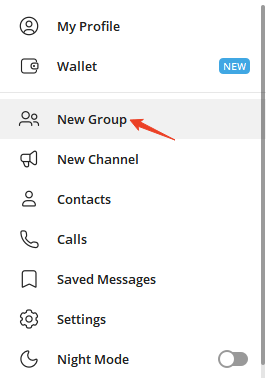
That’s it. You’ve successfully created a Telegram group on mobile or desktop. You can now start chatting, adding members, and customizing group settings.
Related: How to Add People on Telegram: Complete Guide for Beginners
How to Make a Telegram Group Public or Private
After you create a group, you can control who can find and join the Telegram group.
To Change Group Privacy:
- Open your Telegram group.
- Tap the group name.
- Go to Edit > Group Type.
- Choose:
- Private Group (invite link only)
- Public Group (username required)
Public Telegram groups are searchable and easier to grow, while private groups offer more control and privacy. This decision is crucial when planning how to create a Telegram group for long-term growth.
How to Create an Invite Link for Your Telegram Group
Telegram group invite links make it easy to grow your group. Below are the steps to generate an invite link.
- Open the Telegram group.
- Click the three-dot settings icon in the upper-right corner and select “Manage Group”.
- Tap Invite Links.
- Copy or customize the group link.
- Share it anywhere (website, social media, email).
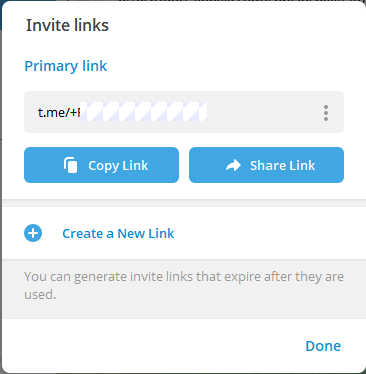
Advanced admins often create multiple invite links to track where new members come from – an underrated growth tactic.
Related: How to Create a Telegram Channel for Free: Step-by-Step Guide
Essential Telegram Group Settings You Should Configure
Creating a group is only the beginning. To truly master creating a Telegram group, you need to optimize its settings.
Important Settings to Review:
- Permissions: Control who can send messages, media, links, or polls.
- Admin Roles: Assign moderators with custom permissions.
- Pinned Messages: Highlight rules or announcements.
- Slow Mode: Limit how often members can post.
- Bots: Add moderation or utility bots.
Well-configured settings reduce spam and improve member experience.
How to Add Admins and Moderators
As your group grows, you’ll need help managing it.
How to Add an Admin:
- Open the group.
- Click the three-dot icon and select “Manage Group”.
- Click Administrators.
- Select Add Admin.
- Assign permissions.
Choosing trusted admins is critical for maintaining a healthy group, especially in large public communities.
Related: Telegram Channel vs Telegram Group: Differences
Best Practices for Growing a Telegram Group
Many people know how to create a Telegram group, but few know how to grow one successfully.
Proven Growth Strategies:
- Share your Telegram group link on niche forums.
- Embed the Telegram link on your website.
- Cross-promote with similar groups.
- Use clear group rules to retain members.
- Post engaging content daily.
- Encourage discussion, not just announcements.
Related: 60 Best Telegram Channels in 2026 (List by Category)
Common Mistakes When Creating a Telegram Group
Avoid these beginner errors:
- No group rules (leads to chaos)
- Too many admins
- Ignoring spam protection
- No clear group topic
- Making the group public too early
Advanced Tips for Power Users
If you want to take things further:
- Use bots like moderation, captcha, or analytics bots
- Enable message reactions for engagement
- Archive inactive members
- Link your group to a Telegram channel
- Customize welcome messages
These tactics are commonly used by top-performing Telegram communities.
Conclusion
Now you fully understand how to create a Telegram group, you’re equipped not just to launch one but to manage, grow, and optimize it like a pro. Whether you’re a business owner, content creator, or community builder, Telegram groups remain a powerful and future-proof tool.
For those who can’t access or use Telegram, LightningX VPN helps. You can install this VPN on your mobile or desktop and then successfully download Telegram. This VPN supports Android, iOS, Windows, Mac, Linux, TV, Chrome, Firefox, and Edge.






