



Have you grown tired of spending your days mindlessly scrolling through TikTok and feeling disconnected from reality? If so, you might decide to delete your TikTok account to address the issue. This post will guide you on how to delete or deactivate your TikTok account. You’ll also learn how to deactivate your account without logging in.
Things to Do Before Deleting Your TikTok Account
If you are determined to delete a TikTok account permanently, do these things first.
Backing Up Your Data
Deleting your TikTok account will lose your data, such as uploaded videos. Here are the steps.
- Go to the TikTok app and then “Profile”.
- Tap the menu icon (three lines) in the upper right.
- Tap “Settings and privacy”, “Account”, and then “Download your data”.
- Tap “Manage account” > “Download your data”.
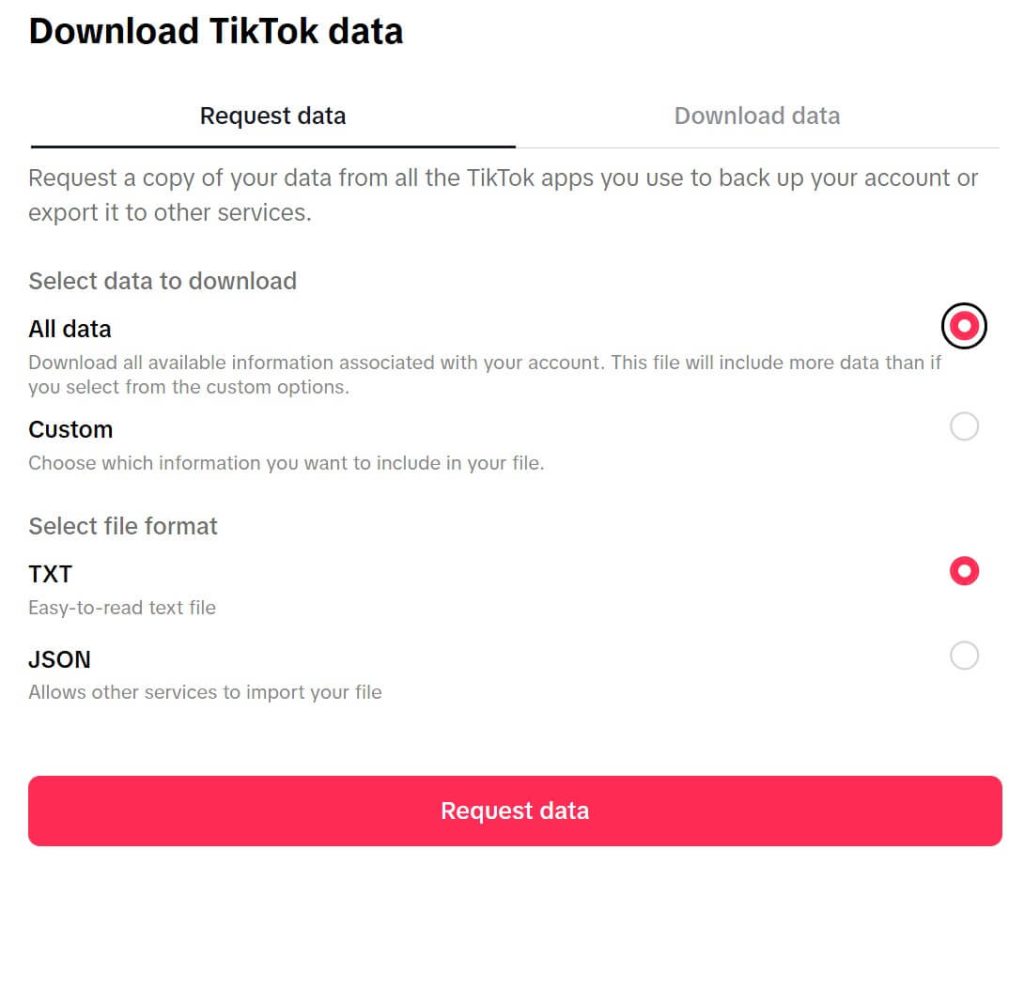
- Select the desired data and file format to download. You can download all the data or specific data. The file formats are TXT (human-readable) and JSON (machine-readable).
- Tap “Request data”. Then, check if your data has been downloaded to the device.
Checking Your Trade Orders
Once your TikTok account is permanently deleted, you will no longer be able to perform any monetary transactions. Therefore, please check if you have any pending purchases or items in the refund process on TikTok.
Checking Your TikTok Wallet and TikTok Coins
Permanently deleting your TikTok account will result in the loss of these currencies. Therefore, make sure to handle them before deleting your account.
Related: How to Recover TikTok Account with/without Email/Phone Number
How to Delete Your TikTok Account
You can delete your TikTok account from the app and web page. After the deletion, your data will be stored for 30 days. After this period, your TikTok account will be permanently deleted.
How to Delete Your TikTok Account on Desktop
You can delete your account through the TikTok website.
Step 1. Go to the TikTok website on your computer and log in to your account.
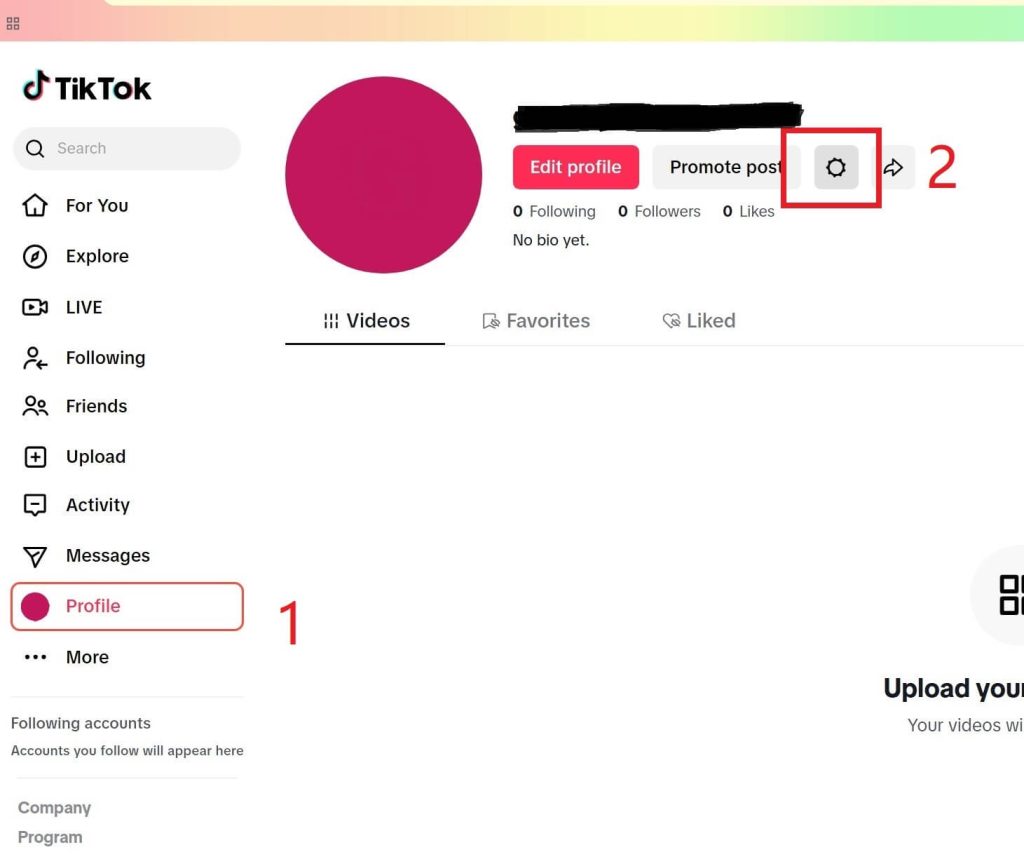
Step 2. On the left panel, click “Profile” at the bottom.
Step 3. Click the gear icon next to your profile picture. You’ll go to the settings page to manage the account.
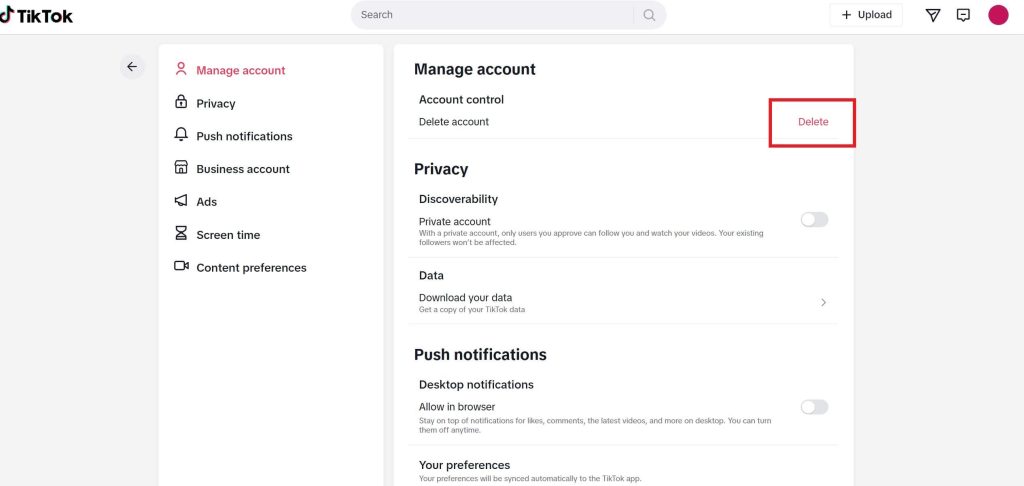
Step 4. In the “Manage Account” panel, click the “Delete” button that appears red.
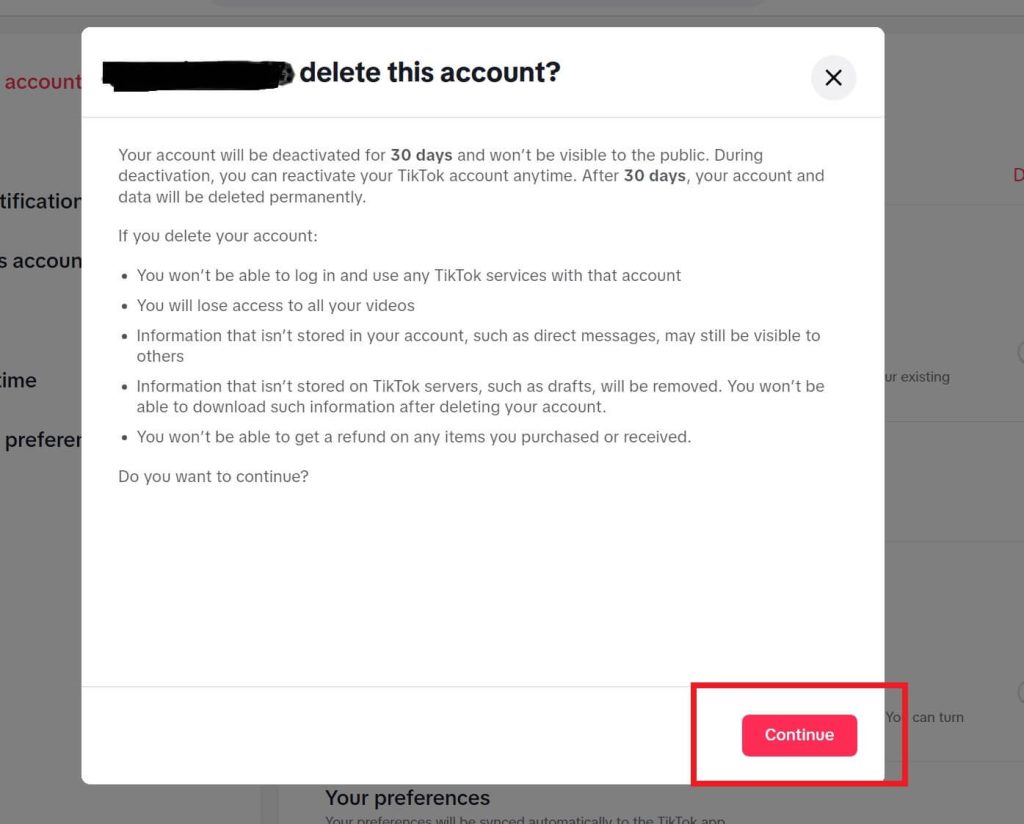
Step 5. Click “Continue” to confirm the action.
Step 6. Verify with the related account. If you used a Google account to sign up for TikTok, verify with this Google account.
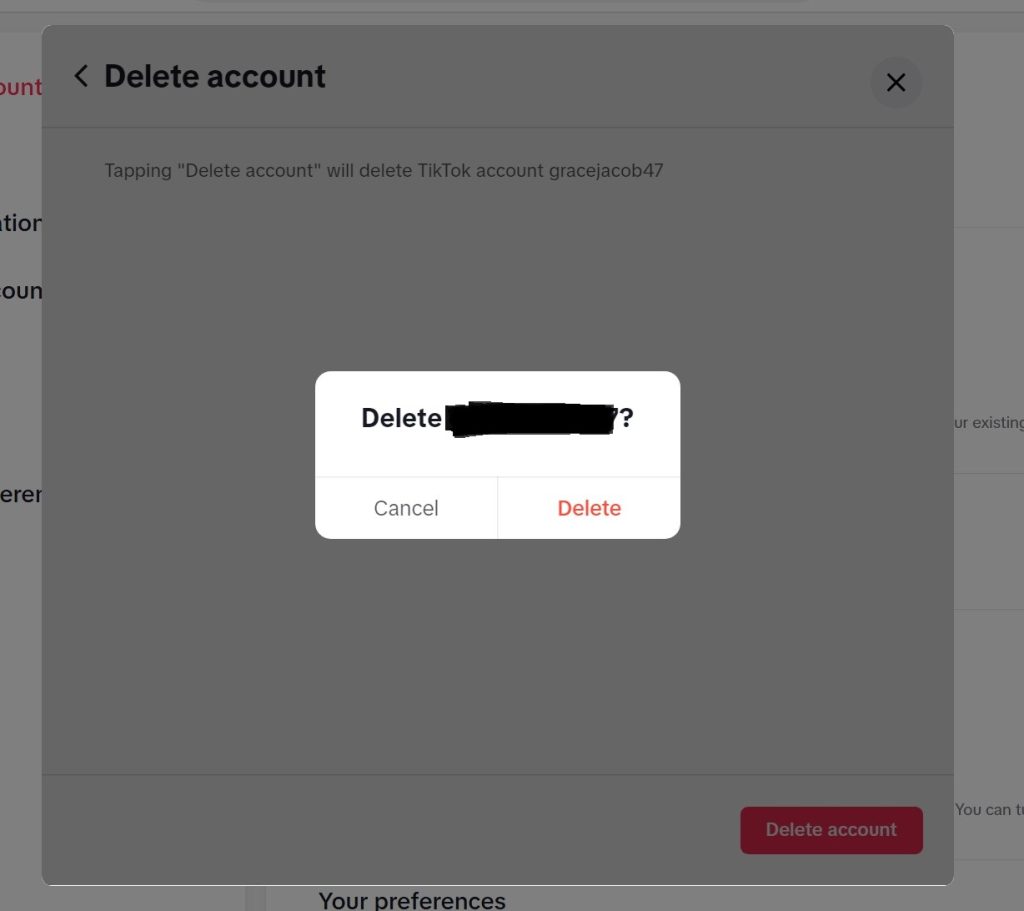
Step 7. Click “Delete account” and confirm by choosing “Delete”. The TikTok account should now be successfully deleted.
How to Delete TikTok on Mobile
Here’s how to delete your TikTok account through the Android and iOS apps.
- Open TikTok on your mobile device.
- Go to Profile and tap the Menu icon (three horizontal lines) in the upper-right corner.
- Select Settings and Privacy > Account.
- Tap Deactivate or delete account at the bottom.
- Choose Delete account permanently.
- Select the reason for leaving TikTok and tap Continue.
- Enter the code sent to your associated email address or phone number and tap Delete account.
How to Delete Your TikTok Account Without Logging In?
You can delete your TikTok account without logging in. Just email support@tiktok.com with the deletion request. You’ll use these credentials: TikTok username, the associated phone number and email address, and the birthday associated with your TikTok account.
However, TikTok may take some time to process your request.
How to Deactivate Your TikTok Account
You can deactivate your TikTok account through the app. Check the steps below.
- Open the TikTok app and tap your profile.
- Tap the three horizontal lines (Menu) in the top right.
- Choose Settings and Privacy > Account.
- Tap Deactivate or delete account > Deactivate account > Deactivate.
- Enter your password and tap Deactivate account.
- Tap Deactivate again to confirm the action.
How to Reactivate a TikTok Account
Whether you have deleted or deactivated a TikTok account, you can still reactivate it. However, you only have 30 days to get the account back after the deletion.
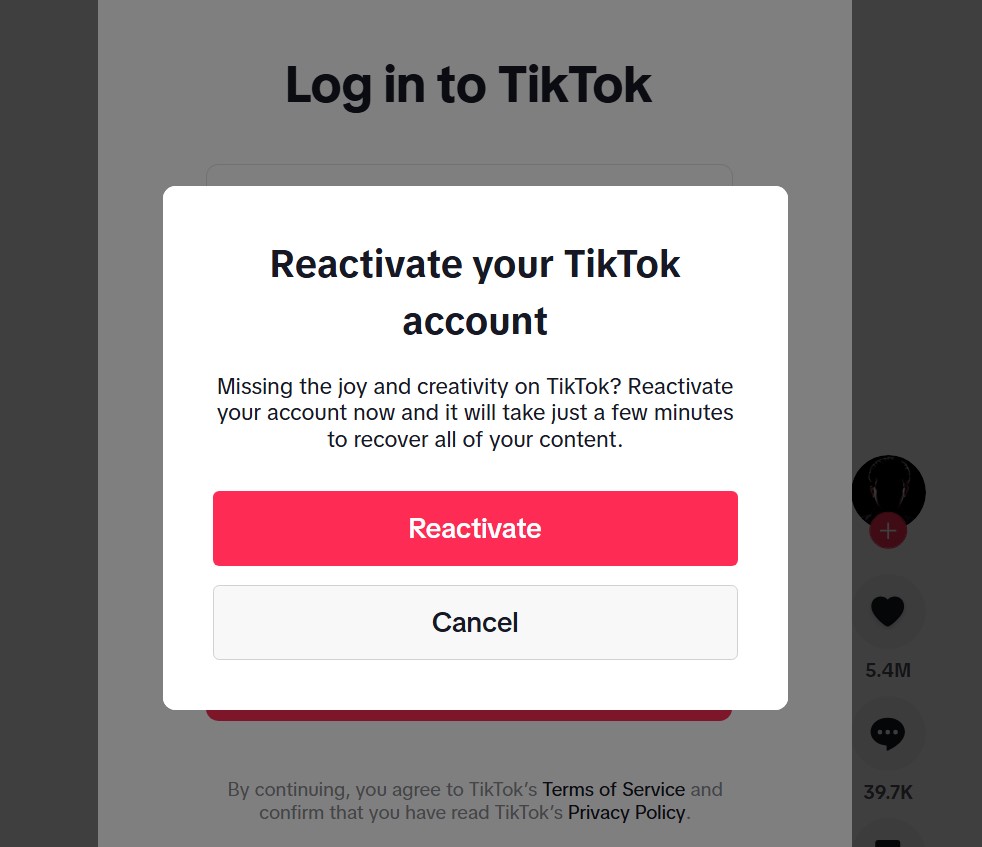
You can log into your TikTok account and tap the “Reactivate” button to regain your account. Then you can use the account as usual after reactivating it.
Please note, however, that repeatedly deactivating and reactivating your account may be considered by TikTok as intentional manipulation of traffic or other improper methods for profit-driven activities.
Can’t Delete Your TikTok Account?
If you’re unable to delete your TikTok account, it may be because the account does not yet meet the conditions for deactivation. For example, your account might be linked to other accounts, or TikTok Pay has not been disabled.
Beyond these controllable factors, TikTok may also restrict you from deleting your account if it has a significant number of followers. Additionally, if you repeatedly delete and restore your account, you may face restrictions, as TikTok may suspect that you are attempting to manipulate traffic.
Based on user feedback, here are some ways to resolve this issue:
- Perform the account deletion process from the computer web page.
- Re-download the TikTok app.
- Appeal to TikTok’s official support.
Protect Your TikTok Account With a VPN
If your TikTok account encounters hacking problems, try using a VPN to protect it. An excellent VPN like LightningX VPN will hide your IP address and encrypt your online data. It also helps you unlock TikTok from anywhere in the world. LightningX VPN has these features:
- 2,000+ servers in 70+ countries
- Supports Windows/macOS/iOS/Android/Apple TV/Android TV/Linux/Chrome/Edge/Firefox
- Super-fast and reliable
- Unlimited data usage
- Affordable price
How to Delete Your TikTok Account – FAQs
Q1: What happens if you delete or deactivate your TikTok account?
- Deactivating your TikTok account: According to TikTok, your data will be stored. Whenever you reactivate the account, the data will be back. Before reactivation, your account and videos can’t be viewed.
- Deleting your TikTok account: There will be a 30-day cool-down period after you delete your TikTok account. Within this period, you can reactivate your account along with your data, like videos and likes. Others can’t check your account. After this period, your TikTok account and data will be permanently deleted.
Q2: Can I delete my TikTok account and make a new one with the same phone number?
Yes. If you use the same phone number to sign in to TikTok within 30 days after the deactivation, it’ll sign you back to the old account. After 30 days, you can use the same phone number to create a new account.
Q3: Does deleting the TikTok app delete your account?
No. Deleting the TikTok app won’t delete your account, but clear the cache. However, you’ll need to log in to TikTok with your account credentials once the app is reinstalled.






