


How to know if someone blocked you on Snapchat? Snapchat doesn’t send any notifications when someone blocks you, which can be confusing.
In this guide, we’ll show you 6 methods to tell if your Snapchat account has been blocked, so you can truly understand what’s happening.
6 Ways to Know If Someone Blocked You on Snapchat
Way 1: Check if the recent chat history has disappeared
You can try to determine if someone has blocked you by checking your recent chat history, following these steps:
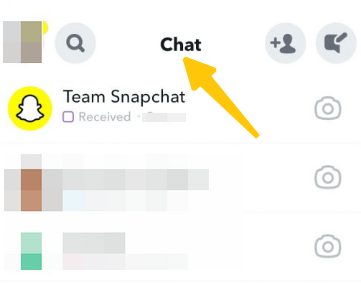
Step 1: Open the Snapchat app and log in to your account.
Step 2: Tap the “Chat” icon at the bottom of the screen to view your recent conversations.
Step 3: Browse your chat list to find the recent chat history of the user you want to check. If the history exists, it means you haven’t been blocked. If the chat history is completely gone, it may indicate that someone blocked you on Snapchat.
However, this method is not a foolproof way to determine if you have been blocked.
Additionally, it’s difficult to check if someone blocked you on Snapchat web, as the web version doesn’t display the complete chat history.
Way 2: Verify if the person still exists in your friends list
Checking your friends’ list is another simple way to determine if someone has blocked you on Snapchat.
Step 1: Launch the Snapchat app and log in to your account.
Step 2: Tap the profile icon in the upper left corner of the screen.
Step 3: Scroll down and tap “My Friends” to view your entire friends list.
Step 4: Use the search bar at the top to enter their username or display name.
If you can still find them, they haven’t blocked you. If you can’t find them, you may have been blocked.
However, if someone has removed you as a friend, their name will also not appear in your friends list.
Way 3: Search for the person using their username or display name
Besides searching through your friends list, you can also search for someone on Snapchat to determine if they have blocked you.
Step 1: Open the Snapchat app and log in.
Step 2: Tap the magnifying glass icon at the top of the screen to open the search page.
Step 3: If you know the person’s username, enter it. If the username appears, it means the person has not blocked you.
Step 4: If you don’t remember the username, try searching for their nickname.
Way 4: Try sending a message to the person to check the delivery status
Sending a message to the other person and checking its delivery status can also help determine whether they have blocked you on Snapchat.
Step 1: Launch the Snapchat app and go to the “Chat” tab.
Step 2: Search using the other person’s username or display name, or simply open the chat window.
Step 3: Type a message or send a Snap to the other person, then check the delivery status indicator.
- Delivered: Your message has been successfully sent, which means you have not been blocked.
- Pending/Gray icon/Sending failed: This may indicate that you have been blocked or removed from their friends list.
Way 5: See if you can still see their Snap score or stories
Checking their Snap score or stories can help you tell if someone has blocked you on Snapchat.
Step 1: Open Snapchat and go to the “Search” or “Chat” tab.
Step 2: Search for the user using their username.
Step 3: Tap on their profile to see if their Snap score or recent stories are visible. If you can see them, you likely haven’t been blocked.
Way 6: Use another Snapchat account to search for the person to verify
If you have another Snapchat account, you can use it to check if someone has blocked you.
Step 1: Log out of your current account or use a friend’s Snapchat account.
Step 2: Use the search function on the other account to search for the person’s username or display name.
Step 3: If the person’s profile appears on the other account but not on yours, it means you have been blocked.
If the person’s profile doesn’t appear on either account, they may have deleted their Snapchat account.
Read more: How to Unblock Someone on Snapchat: A Simple and Quick Guide
Blocked vs Removed vs Account Deleted on Snapchat: What’s the Difference?
If you want to find out if you’ve been blocked on Snapchat, you first need to understand the difference between being blocked, being removed as a friend, and having an account deleted:
If you are blocked on Snapchat:
- You will not be able to find the person by searching their username or display name.
- Their name and profile will completely disappear.
- You will not be able to send messages or snaps.
Therefore, if someone has blocked you on Snapchat, you will not be able to see their name.
If you are removed from someone’s friend list:
- You can still search for their username.
- Their profile may still appear in search results.
- Depending on their privacy settings, messages may appear as pending.
If the person deleted or deactivated their account:
- No one will be able to find their profile in search results.
- If you also cannot find the account through other Snapchat accounts, the account has most likely been deleted.
To stay safer on Snapchat, especially when browsing or messaging on public networks, consider using a VPN. LightningX VPN offers 2000+ servers and strong WireGuard encryption, helping you change your IP address and protect your online activity.
Download this best Snapchat VPN to get some free high-speed nodes!
FAQs: If Someone Blocked You on Snapchat
1. How to Know If Someone Blocked You on Snapchat Without Adding Them?
You don’t need to add someone as a friend to see if they’ve blocked you on Snapchat.
- Search for their username.
- Try sending a message to check the delivery status.
- Use another Snapchat account to search for them.
If their profile is completely invisible but can be found through another account, then you have likely been blocked.
2. Can Snapchat Notify You If Someone Blocks You?
No, Snapchat does not notify you when someone blocks you. There are no alerts, messages, or warnings.






