


Reddit is a highly interactive community. Posting high-quality content can help you promote your brand or increase your account’s visibility. Posting on Reddit is simple and can be done on both your computer and mobile device. However, there are a few things to keep in mind when posting. This guide will walk you through how to post on Reddit successfully, along with some important tips and considerations.
How to Post on Reddit Through App and Web: A Step-by-Step Tutorial
Posting on Reddit is simple, but you should always follow each community’s rules to avoid having your post removed by moderators. You can post on Reddit using the website or the mobile app on Android and iOS. Here’s a step-by-step guide.
Step 1. Find the Create Button
On a computer (PC, Mac, or laptop):
- Go to Reddit.com and log in to your account.
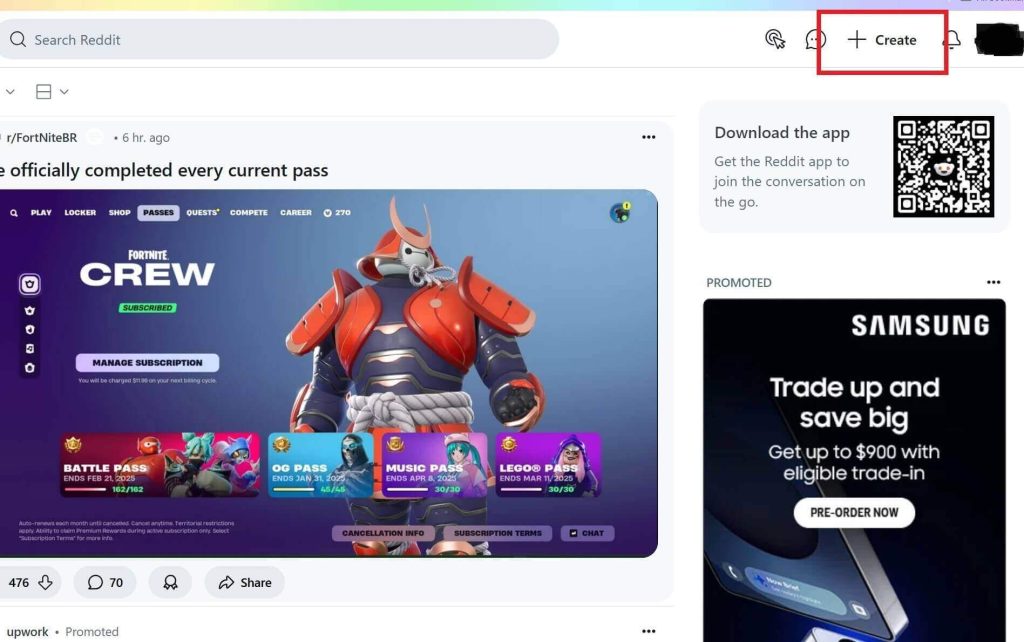
- Click the + Create button at the top right, next to your profile picture.
- Alternatively, you can go to a specific subreddit from the left community list and click Create Post at the top right.
On the mobile app (Android, iPhone, iPad):
- Open the Reddit app and sign in.
- Tap the + button at the bottom center of the screen.
- To post in a specific subreddit, tap the three horizontal lines at the top left, select a subreddit, and then tap the + button.
Step 2. Create Your Post
Creating a post is similar on the web and mobile app. Follow these steps:
1. Choose a subreddit
- Select the community where you want to post.
- If you started creating the post from within a subreddit, this step is already done.
2. Check the community rules
- On the web: Rules are displayed in the left panel.
- On the app: Tap the RULES button at the top right.
- Following the rules is crucial; posts that violate them can be removed by moderators.
3. Select a content type and add details
Reddit supports different post types:
- Text – Write your content. You can include links, but images and videos require separate post types.
- Images & Video – Upload pictures or videos. (On the web, captions for images are not supported; on the app, you can add captions.)
- Link – Share a URL or multiple links.
- Poll – Ask a question and collect responses from community members.
Add a title, choose flair if required, and add tags as needed.
Step 3. Post or Save as Draft
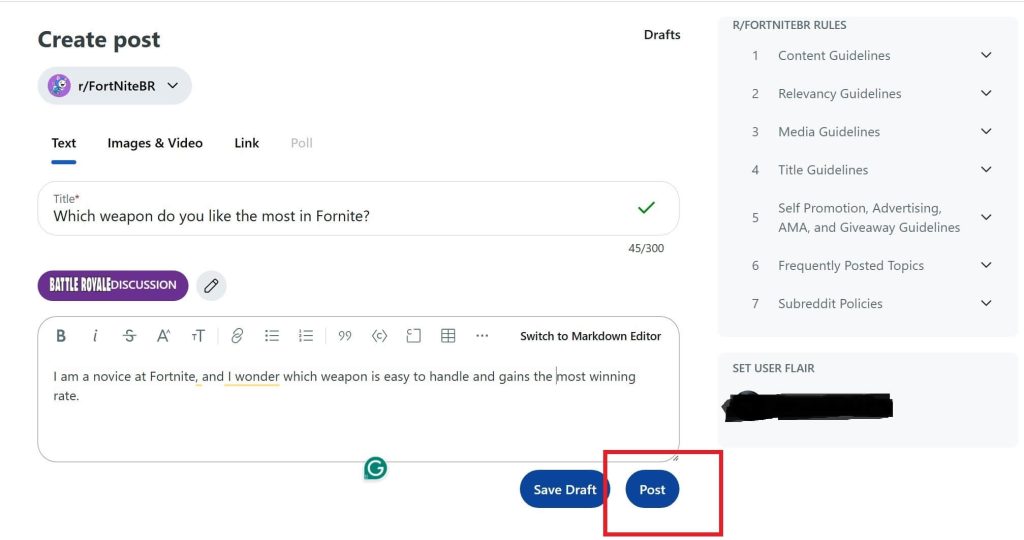
After editing, click the Post button to share your content.
- On the web: Bottom right of the post editor.
- On the app: Top right of the post editor.
You can also save your post as a draft on your Reddit.
Tip:
To unblock or protect Reddit in your region, you can try LightningX VPN. This is the best VPN for Reddit. It has over 2,000+ servers in 70 regions, including the US, Germany, Japan, and Russia. It is compatible with all computers and phones. You can even set it up on Apple TV and Android TV. It doesn’t slow down your browsing speed or limit the traffic usage.
How to Manage Your Reddit Post
After creating a post on Reddit, you can still manage it in several ways. Below are the main features for editing and controlling your posts.
1. Pin a Post
A. Pin a post in a subreddit (Community Pin)
Note: You must be a moderator to pin posts in a subreddit. Each subreddit can have up to two pinned posts.
- Go to the post you want to pin within the subreddit.
- Click the moderator shield icon on the post (only visible to moderators).
- Select Sticky post to pin it to the top of the subreddit.
B. Pin a post on your profile (Profile Pin)
- Go to your profile.
- Go to the Posts section and locate the post you want to pin.
- Click (web) or tap (app) the three dots next to the post.
- Select Pin Post to Profile.
2. Unhide a Post
If you previously hid a post and want to make it visible again:
- Go to your profile and find the Hidden section.
- Click or tap Undo to unhide the post.
3. Delete a Post
To permanently remove a post from Reddit:
- Go to your profile and open the Posts section.
- Locate the post you want to delete and click or tap the three dots.
- Select Delete.
Once deleted, the post content is no longer accessible, and comments on the post cannot be viewed.
4. Crosspost to Another Subreddit
You can share your post with other communities using Crosspost:
- Go to your profile and open the Posts section.
- Find the post you want to share.
- Click Share and select Crosspost.
- Choose the subreddit where you want to post.
- Click Post to share it.
Related: How to Delete Reddit Account? (Web, iOS, Android)
Considerations and Tips for Posting on Reddit
To make your Reddit post engaging and compliant with community rules, keep the following tips in mind:
- Follow Subreddit Rules
- Each subreddit has its own rules regarding content, titles, and formats.
- Read the rules section in the community description before posting.
- Avoid prohibited content such as violence, hate speech, or inappropriate material.
2. Optimize Post Titles
- Keep titles concise, clear, and engaging.
- Avoid excessive use of uppercase letters, symbols, or clickbait, as this may make your post look like spam.
3. Maintain Content Relevance
- Ensure your post aligns with the subreddit’s theme.
- Example: Posting travel photos in a food subreddit may lead to removal.
4. Increase Engagement
- Use media (images, videos) or interactive elements (polls) to attract attention.
- Ask questions or share interesting opinions to encourage comments.
5. Consider Timing
- Post when the community is most active to boost visibility.
- Recommended times: morning or midday (adjust based on the target audience’s region).
Frequently Asked Questions About Posting on Reddit
Q: How do I post on Reddit for the first time?
New accounts may have posting restrictions. To post successfully:
- Earn Karma: Participate in discussions, comment on posts, and engage with the community. This helps you gain karma, which may unlock posting privileges in many subreddits.
- Find Subreddits Without Karma Requirements: Some subreddits allow new users to post without any karma. Search for these communities to contribute immediately.
Q: Why won’t Reddit let me post?
The possible reasons why you can’t post on Reddit include:
- Your karma is too low.
- Your account is restricted or blocked in the subreddit.
- Reddit is temporarily experiencing technical issues.
Q: How much karma is needed to post on Reddit?
The required amount varies by subreddit. Some communities require only a small amount, while others may require more.
You can always check the subreddit rules or FAQ for specific requirements.
Q: How do I post a photo in a Reddit comment?
Some posts allow adding images in comments, while others do not. If you see an image icon in the comment box, you can upload a photo. If the icon is missing, the subreddit does not support images in comments.
Conclusion
Reddit is a dynamic platform where both new and experienced users can enhance their community engagement by learning posting techniques. However, remember to follow the rules, optimize your content, and adjust your posting strategy based on user needs. Hope this blog can help you learn how to post on Reddit!






