



Whether you are running a private Telegram discussion group, a public community, or a niche interest hub, knowing how to share a Telegram group is essential for group management and growth.
In this post, you can learn multiple ways to share a group on Telegram, how to create and manage Telegram invite links, etc.
Method 1. Use “Invite via Link” in “Add Member”
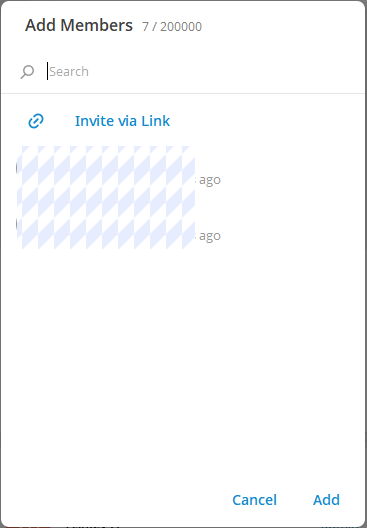
- Open the Telegram desktop app on your computer.
- Click the target group.
- Click the group name at the top.
- Click the “Add Member” icon next to Members.
- Click “Invite via Link”.
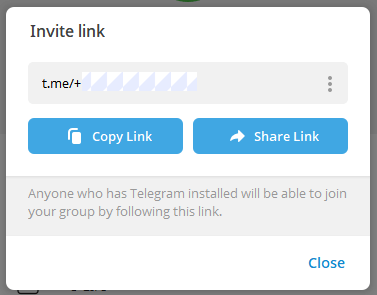
- Click “Copy Link” to copy the Telegram invite link or click “Share Link”. Paste and share the Telegram link anywhere you want.
- Then, anyone who has downloaded and installed Telegram will be able to join your Telegram group by following this link.
Method 2. Use Telegram Invite Link Setting
- Open Telegram Desktop.
- Open the group you want to share.
- Click the three-dot icon in the top-right corner and select “Manage Group”.
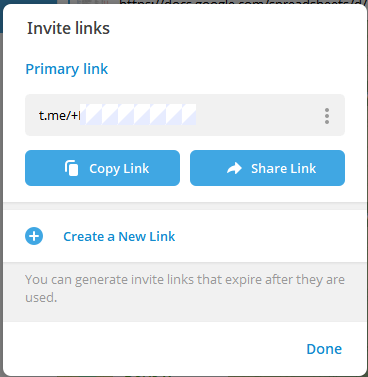
- Click “Invite links” to view your Telegram group link.
- Click “Copy Link” or “Share Link” to share the Telegram group link with others.
Tip: You can also click “Create a New Link” to generate invite links that expire after they are used. You can create multiple invite links.
Desktop sharing is especially useful for community managers who promote groups on websites, forums, or newsletters.
Related: How to Add People on Telegram: Complete Guide for Beginners
- Open the Telegram app on your Android or iPhone.
- Open the group you want to share.
- Tap the group name at the top.
- Tap the “Edit” icon in the upper-right corner.
- Select “Invite Links”.
- Tap “Copy” or “Share”. Paste or share the Telegram group link to other places.
How to Create and Manage Telegram Invite Links
A crucial part of understanding how to share a Telegram group link is mastering invite link management.
Telegram allows admins to:
- Create multiple invite links.
- Set expiration dates.
- Limit maximum users.
- Revoke links anytime.
Why This Matters: Using multiple Telegram invite links lets you track where new members come from and protects your group from spam or leaks.
Related: How to Create a Telegram Group: Guide for Beginners
In some cases, users want to know how to share a group on Telegram without invite links.
Here are alternative methods:
- Add members directly (for small groups).
- Share your public group username.
- Use QR codes generated from the group link.
- Forward messages from the
- group (public groups only).
These methods are useful when you want controlled or offline sharing.
Public vs Private Telegram Groups: Key Differences
Understanding your group type is critical when sharing a group on Telegram. Below are the differences between public and private Telegram groups.
Public Telegram Groups
- Have a username (e.g., t.me/yourgroup).
- Anyone can join without approval.
- Easily searchable on Telegram.
- Best for large communities and promotions.
Private Telegram Groups
- Do not appear in search results.
- Users must join via a Telegram invite link.
- Ideal for internal teams, paid communities, or private discussions.
Related: Telegram Channel Search: 6 Easy Ways to Find Telegram Channels
- Twitter / X
- Reddit (relevant subreddits)
- Facebook groups & pages
- Discord servers
- Niche forums
- Personal blogs or landing pages
Always match the platform with your group’s topic to attract high-quality members, not just numbers.
Popular Telegram Group Links List
On this website, https://combot.org/top/telegram/groups, you can find top Telegram groups. It categorizes popular Telegram groups by language and lists groups with links. You can click any group you are interested in to open and join.
Related: 60 Best Telegram Channels in 2026 (List by Category)
Conclusion
By applying the methods and best practices in this guide, you’ll not only know how to share a group on Telegram, but also how to attract the right members and grow your group the smart way.
For those who need a VPN to access Telegram, LightningX VPN is recommended. This VPN offers numerous servers in 70+ countries, with several free servers for Android and iOS. You can connect to a server in a country (e.g., the US) where Telegram is accessible. Use this VPN to easily unblock Telegram, Instagram, Twitter, YouTube, TikTok, or any other app/website worldwide.






