


If you’ve already heard about LightningX VPN but are still unsure whether it’s worth trying, this review may help answer some of your questions.
Is LightningX VPN worth it? Can it reliably unblock Netflix and ChatGPT? Does it slow down during peak hours? And is it worth paying for long-term?
In this article, we’ll take a closer look at the real-world performance of LightningX VPN based on hands-on testing, including connection speeds, stability, streaming access, gaming latency, and multi-device support to see whether it’s truly suitable for everyday use.
What Is LightningX VPN?
LightningX VPN is a VPN service focused on stable connections, ease of use, and fast browsing performance. It’s designed for a wide range of everyday use cases, including web browsing, streaming, AI tools, gaming, and remote work.
Compared with many traditional VPNs or proxy services that require manually importing nodes or constantly switching servers, LightningX VPN has a much lower learning curve. After installation, you can connect directly without a complicated setup, making it especially beginner-friendly.
Currently, LightningX VPN supports Windows, Mac, iPhone, Android, TV, and browser extensions. It can be used to access popular services such as Google, YouTube, Netflix, TikTok, and ChatGPT.
Is LightningX VPN Worth It?
Before actually using LightningX VPN, most users usually care about questions like these:
- Does it lag during peak hours?
- Can it stream Netflix smoothly in HD?
- Does it work well with ChatGPT and Gemini?
- Is the gaming latency high?
- Is it convenient for multiple devices?
To answer these questions, let’s look at several real-world usage scenarios.
1. Is LightningX VPN Fast?
Speed is probably the most important factor for most VPN users. During testing, we mainly focused on these scenarios: YouTube 4K streaming, Netflix HD playback, ChatGPT responses, TikTok loading speed, Google Search, and web browsing.
LightningX VPN Speed Test
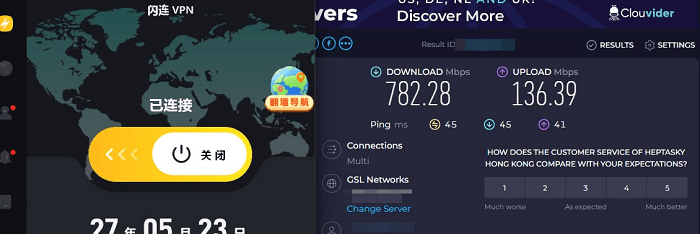
As shown above, LightningX VPN delivers relatively fast loading speeds overall, especially on Hong Kong, Japan, and Singapore servers. In most cases, the connection is established almost instantly. If your local network is already decent, some high-speed servers can even come close to fully utilizing your bandwidth, with very little buffering during 4K streaming.
LightningX VPN “Auto Select Server” Mode
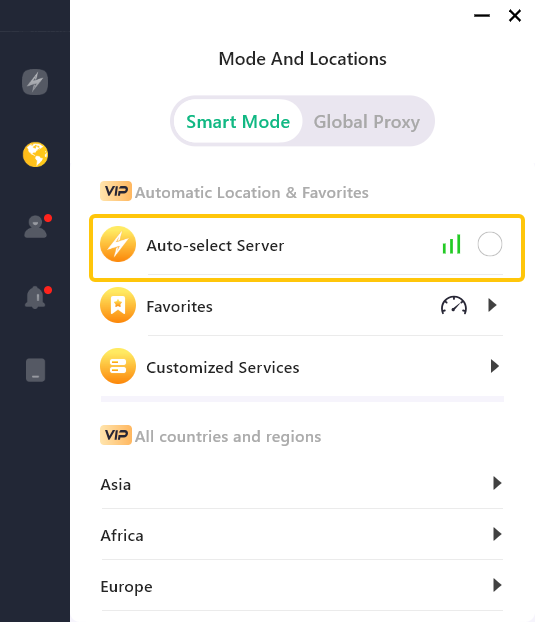
It also includes an “Auto Select Server” feature for users who prioritize speed. In this mode, the app automatically connects to the fastest available server at that moment, so you don’t need to manually test and switch between nodes repeatedly.
2. How Stable Is LightningX VPN?
We tested the stability of LightningX VPN continuously over several days. One noticeable impression was that while speeds may fluctuate slightly during peak hours, it rarely becomes completely unusable.
Even during evening traffic peaks, the connection stayed relatively stable without frequent disconnects or endless loading screens. In particular, when watching YouTube in 4K, buffering after dragging the timeline was still reasonably fast. Netflix also maintained HD quality most of the time, resulting in a smooth viewing experience overall.
LightningX VPN Connection Stability
Another practical feature of LightningX VPN is its Smart Mode and Global Proxy Mode.
- Smart Mode works like split tunneling. Only apps and websites that require a VPN connection will go through the VPN, while the rest continue using your local network directly. The advantage is that other websites remain fast, downloads are less affected, and local app notifications work more normally, making daily use much more convenient.
- In Global Proxy Mode, all network traffic goes through the selected VPN server. This is more suitable for users involved in overseas social media operations, livestreaming, or cross-border business scenarios where IP consistency is more important.
In addition, overall webpage responsiveness on LightningX VPN feels more stable, especially when opening sites like Google, Reddit, and X (Twitter), with noticeably shorter waiting times.
3. How Good Is LightningX VPN at Unblocking Websites?
When choosing a VPN, the ability to unblock streaming services and AI tools is also a major consideration. This time, we tested Netflix, YouTube, TikTok, HBO Max, ChatGPT, Gemini, and several other platforms.
Overall, most mainstream services were accessible without issues, and loading speeds after connecting were quite good. For Netflix, we tested servers from different regions, and in most cases, region-specific libraries loaded successfully. HD and 4K streaming remained stable without frequent buffering or quality drops.
AI tools like ChatGPT and Gemini actually require a fairly stable connection. After extended testing, LightningX VPN performed reliably with AI services.
4. Is LightningX VPN Good for Gaming?
Besides streaming performance, many users also care about gaming performance, since VPNs are often used for overseas games, Steam regions, or international servers.
Based on testing, LightningX VPN feels more focused on connection stability. For example, when connecting to U.S. servers, latency is naturally higher than a local connection, but the fluctuation remains relatively stable.
When downloading overseas Steam games through Hong Kong and Japan high-speed servers, download speeds stayed consistent overall.
For many international mobile games, stable routing is often more important than chasing the absolute lowest ping.
5. Does LightningX VPN Support Multiple Devices?
Multi-device support is another major concern for VPN users today.
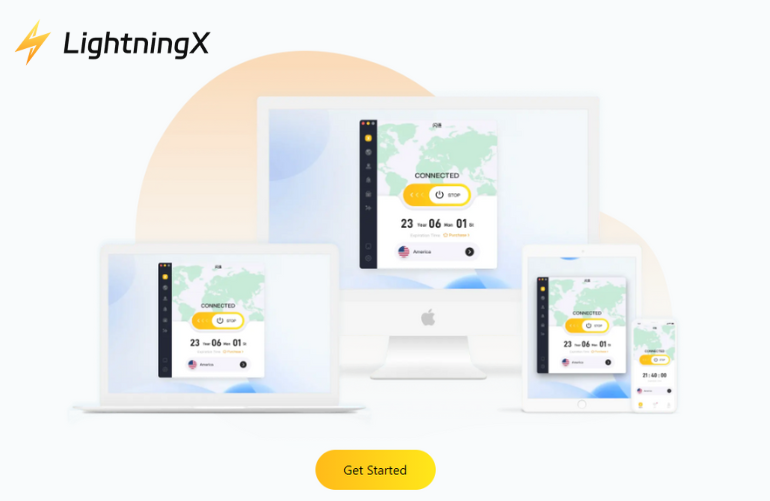
LightningX VPN supports Android, iOS, macOS, Windows, TV, Linux, and Chrome. During testing, we used LightningX VPN on Windows, iPhone, and Mac, and the installation and login process was very straightforward.
In most cases, you simply install the app, sign in, and start using it without additional configuration or manually importing nodes.
LightningX VPN supports 3 simultaneous devices online and allows up to 10 device logins in total. If you need support for more devices, additional device plans can also be customized through the official website.
Is LightningX VPN Safe and Reliable?
When choosing a VPN, safety and reliability are also important, especially considering the risks of a free VPN. So, how secure is LightningX VPN?
LightningX VPN currently supports WireGuard, Shadowsocks, and TLS-in-TLS.
Among them, WireGuard is generally known for its fast speeds and stable performance, while TLS-in-TLS focuses more on disguising traffic patterns, making VPN traffic harder to detect. In regions with stricter network restrictions, this can help maintain a more stable connection overall.
On the encryption side, LightningX VPN uses high-level encryption standards such as AES-256-GCM and ChaCha20-Poly1305. In simple terms, your internet traffic is encrypted during transmission, which helps prevent others from directly monitoring your browsing activity or accessing your data.
Another noticeable advantage was the overall quality of its server routes and IP environment. It has native IP servers that performed quite well when accessing platforms like ChatGPT, TikTok, Google, and Netflix. During testing, we rarely encountered repeated verification prompts, suspicious login alerts, or account restrictions.
Overall, LightningX VPN delivers a solid balance of both security and connection stability.
Is LightningX VPN Free?
LightningX VPN is not completely free, but it does offer limited free access for new users to try some of its features.
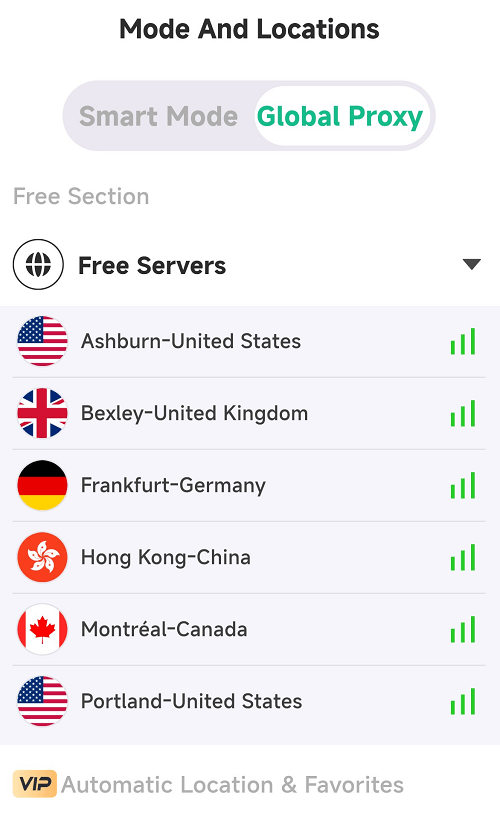
Currently, the mobile version offers several free high-speed servers in Hong Kong, the United States, the United Kingdom, and Canada.
That said, because free servers tend to have more users, speeds during peak hours may not be as stable or fast.
LightningX VPN Free Servers
If you want access to more advanced features, such as:
- More global server locations
- Dedicated high-speed routes
- Netflix and TikTok unblocking
- One-click China mode
- Multiple simultaneous device connections
- More stable connection performance
Upgrading to a premium plan is recommended.
For new users and devices, LightningX VPN often offers limited-time promotions such as “Buy 1 Year, Get 6 Months Free,” which makes the pricing relatively affordable.
It also supports multiple payment methods, including WeChat Pay, Alipay, PayPal, credit cards, and USDT, making the purchase process fairly convenient for international users.
Current Pricing Plans
| Plan | Price |
|---|---|
| Weekly Plan | $3.99 |
| Monthly Plan | $9.99 |
| Quarterly Plan | $19.99 |
| Annual Plan | $59.99 |
Overall, LightningX VPN follows more of a “free trial + premium core service” model. In practice, this approach usually helps maintain better server quality, bandwidth availability, and long-term stability.
How to Download and Install LightningX VPN?
Method 1: Download from the Official Website (Recommended)
- Go to the official LightningX VPN website: https://lightningxvpn.com/
- Once you’re on the website, click the “Download” button in the top navigation menu to access the download page for your device.
- Then choose the version that matches your operating system and install it.
LightningX VPN for Windows Installation Guide
- Step 1: Visit the official download page and click “Free Download.” Once the installer finishes downloading, open the installation file and follow the on-screen instructions to complete setup.
- Step 2: After installation, choose a subscription plan that fits your needs. Once your purchase is completed, the system will automatically generate an account and password for you.
- Step 3: Log in to your account, select the country or server location you want to use, and you’re ready to connect.
Method 2: Download LightningX VPN on iPhone or iPad
For iPhone and iPad users, open the App Store and search for “LightningX VPN” to download and install the app.
If you need more help, you can also check the official iOS installation guide on the LightningX VPN website.
Method 3: How to Download LightningX VPN on Android
- Option 1: Search for “LightningX VPN” directly in the Google Play Store and install it normally.
- Option 2: If you prefer, you can also download the APK installation file directly from the official website.
After downloading, allow installation from unknown sources if prompted, then follow the instructions to complete setup.
Frequently Asked Questions
1. Can LightningX VPN Unblock Netflix?
Yes. LightningX VPN currently supports access to Netflix libraries in multiple regions, including the United States, Japan, Singapore, and more.
During testing, the most popular servers were able to stream HD and 4K content smoothly without major buffering issues.
In addition to Netflix, LightningX VPN also works with platforms such as YouTube, TikTok, HBO Max, ChatGPT, and Gemini.
2. Is LightningX VPN Stable for Everyday Use?
Yes. LightningX VPN offers optimized high-speed servers and features like Smart Mode routing to improve overall connection stability and browsing performance.
For everyday activities such as streaming, browsing overseas websites, using AI tools, or accessing social media platforms, the overall experience is smooth, stable, and secure.






