



Telegram is one of the most popular messaging platforms, hosting millions of public and private groups across almost every niche. Whether you are looking for study groups, marketing channels, gaming chat groups, or movie channels, mastering the Telegram group search method is the key to finding the right communities quickly.
This post introduces 6 methods to help you find Telegram groups easily, with step-by-step instructions for each method.
Method 1: Use Telegram’s Built-In Search Feature
The most basic Telegram group search method is using Telegram’s native search bar. While limited, it’s still effective for popular topics.
Steps
- Open the Telegram app (mobile or desktop).
- Tap the search icon at the top.
- Enter a keyword related to your interest (e.g., “gaming chat group,” “English learning group”, “movie channel”). Try to add words like “group”, “channel”, “community”, “chat”, etc. to your search terms.
- Scroll through the results and look for sections labeled Groups or Channels.
- Click on a group to preview it before joining.

Pros
- No external tools needed
- Fast and easy
Cons
- Results are limited
- Smaller or newer groups often don’t appear
For broad topics, Telegram’s native search works well, but for a deeper Telegram group search, you may try other methods below.
Also read: Telegram Download – How to Get the App on Any Device
Method 2: Use Dedicated Telegram Group Finder Websites
One of the most effective ways to search Telegram groups is to use third-party Telegram group finder platforms. These websites index thousands of public Telegram groups by category.
Steps
- Open a Telegram group finder website. Some popular sites are listed below.
- Enter a keyword or choose a category.
- Filter results by language, popularity, or activity.
- Click the invite link to preview the group in Telegram.
- Click “Join Group” or “Join Channel” to join the Telegram group directly via Telegram.
Top Telegram Group Search Websites
- TgramSearch
- Teleteg
- TGStat
- XTEA Pro
- TelegramChannels.me
- Telegram Directory
- TopTelegramGroups.com
- LinkfyHub.com
- TelegramGroups.co
Pros: Telegram group finder sites are constantly updated and often show groups that don’t appear in Telegram’s own search. This makes them ideal for niche searches.

Also read: Fix Telegram “This Channel Cannot Be Displayed” Error: 12 Ways
Method 3: Search Telegram Groups via Google
Many public Telegram groups are indexed by search engines. You can also search and find Telegram groups in Google Chrome.
Steps
- Open Google Chrome.
- In the search bar, use search operators like: site:t.me “your keyword”.
- Browse the results for group invite links.
- Click the Telegram link to open the group in Telegram.
- Review group details and join.
Pros: Google-based Telegram group search often reveals hidden or older groups that Telegram’s algorithm doesn’t surface anymore.

Method 4: Use Telegram Search Bots for Group Discovery
Telegram bots are automated tools that can function as advanced Telegram group finder tools.
Steps
- Launch Telegram.
- Search for a Telegram group search bot via the search bar.
- Start the bot by clicking Start.
- Enter a keyword or select a category.
- Browse the list of recommended groups.
- Join directly through the bot’s links.
Popular Telegram search bots
Here’s a curated list of popular Telegram search bots you can use to help you find Telegram groups, channels, bots, and more.
- @TgLinkSearch_bot
- @SearchXBot
- @GroupHelpBot
- @FileSearchBot
- @SearcheeBot
- @Argon_Search_bot
Pros
- Instant results
- Often categorized by niche
- Easy to use on mobile
Telegram bots make Telegram group search faster, especially if you frequently look for new communities.

Method 5: Find Telegram Groups Through Social Media Platforms
Social platforms like Reddit, Twitter (X), and Facebook are excellent places for Telegram group search, especially for trending topics.
Steps
- Open Reddit or X.
- Search for phrases like: “Telegram group link”, “Telegram group for beginners”.
- Check comments and posts for invite links.
- Verify the group’s activity level.
- Join through the shared link.
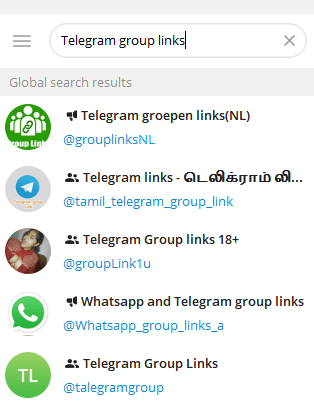
Many large Telegram channels are dedicated to sharing Telegram group links daily. These channels act as curated Telegram group finder hubs.
Steps
- Open Telegram.
- Search for keywords like “Telegram group links”.
- Join a channel with frequent updates.
- Browse posted group links by category.
- Click to preview each group.
- Join the ones that match your interests.
Pros: These channels constantly post fresh links, helping your Telegram group search stay up to date with active communities.
Also read: How to Create a Telegram Channel for Free: Step-by-Step Guide
Tips to Improve Telegram Group Search Results
To get better results for Telegram group search, keep these tips in mind:
- Use specific keywords instead of broad ones
- Check group activity before joining
- Avoid spam-heavy groups
- Leave inactive groups quickly
Smart filtering saves time and improves your overall Telegram experience.
Telegram Group Search – FAQs
1. Why can’t I find some Telegram groups?
Not all Telegram groups appear in the built-in Telegram search. Common reasons include:
- The group is private
- The group is new or inactive
- The group name doesn’t match common keywords
- Telegram limits visibility for smaller groups
To solve this, use external Telegram group finder tools, bots, or Google-based Telegram group search techniques.
2. How to find Telegram groups by topic?
- Use specific keywords instead of broad terms
- Try Telegram group search bots inside Telegram
- Search Google using “site:t.me + keyword”
- Browse Telegram group finder directories by category
3. Are Telegram group finder websites safe to use?
Most well-known Telegram group finder websites are safe, but users should still be cautious. Always:
- Check group activity before joining
- Avoid groups that spam links immediately
- Never share personal information
4. What’s the difference between Telegram group search and Telegram channel search?
Telegram group search focuses on interactive communities where members can chat, while Telegram channel search is for one-way content broadcasting. Both use similar discovery methods, but Telegram groups emphasize discussion and engagement.
5. Is Telegram group search safe?
Follow these best practices to keep Telegram group search safe:
- Use trusted Telegram group finder websites only
- Avoid groups that spam links immediately after joining
- Never share personal or financial information
- Do not connect wallets or accounts via group links
- Leave inactive or suspicious groups quickly
- Contact Telegram Support to report scam groups directly






