


Telegram links play a crucial role in how communities grow, brands promote content, and users connect instantly. Whether you’re running a public channel, managing a private group, or sharing your profile, understanding how Telegram links work can significantly improve your visibility and engagement.
This post explains everything you need to know about Telegram links, e.g., link format and types, how to create them, how to stay safe when using them, how to fix the Telegram link not opening/working issue, etc.
What Are Telegram Links?
Telegram links are unique URLs that allow users to join Telegram groups, channels, bots, or contact individual accounts instantly. These links simplify sharing and eliminate the need for manual username searches.
Most Telegram links follow this format: https://t.me/username.
The t.me Telegram link is the official short domain Telegram uses for public accounts, channels, bots, and groups.
For example:
- https://t.me/channelname
- https://t.me/groupname
- https://t.me/username
Once clicked, the link automatically opens the Telegram app (or web version) and directs users to the target destination.
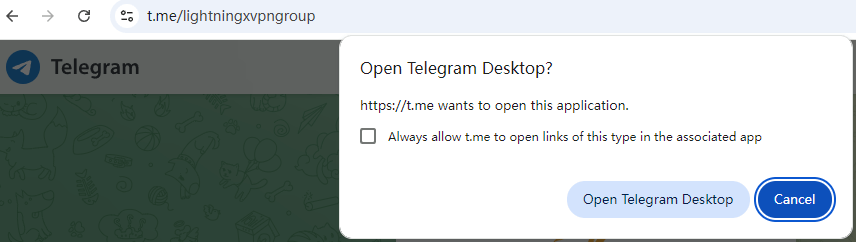
Understanding how Telegram links function is essential for anyone who wants to build an audience or distribute content efficiently.
Types of Telegram Links
Not all Telegram links are the same. Different link types serve different purposes.
1. Public Username Links (t.me Telegram Link)
When you set a public username in Telegram, your account or channel receives a permanent t.me Telegram link. This link never changes unless you modify your username.
Best for:
- Businesses
- Influencers
- Public channels
- Brand promotion
Advantages:
- Easy to remember
- Permanent structure
Related: 60 Best Telegram Channels in 2026 (List by Category)
2. Invite Links for Private Groups
Private Telegram groups and channels use invite links instead of public usernames.
These links typically look like: https://t.me/+AbCdEfGh123.
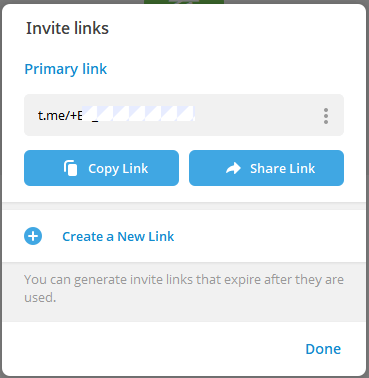
Unlike public Telegram links, invite links can be:
- Revoked
- Time-limited
- Member-limited
This makes them ideal for exclusive communities.
Related: How to Share a Telegram Group Link: Complete Guide
3. Telegram Bot Links
Bots also use Telegram links in the t.me format: https://t.me/botusername.
You can also create start parameters: https://t.me/botusername?start=referral123.
These custom Telegram links are often used for:
- Marketing campaigns
- Referral tracking
- Automation workflows
How to Create Telegram Links
Creating Telegram links depends on the type of account you manage.
For Public Accounts or Channels
- Open Telegram.
- Go to Settings.
- Select “Username”.
- Choose a unique username.
- Save changes.
Your t.me Telegram link is instantly generated.
Example: If your username is lightningxvpngroup, your Telegram link becomes: https://t.me/lightningxvpngroup.
For Private Groups
- Open your group.
- Tap the group name.
- Select “Invite via Link”.
- Copy or customize the invite link.
You can also configure:
- Expiration date
- Maximum number of users
- Approval requirements
These flexible Telegram links help control access and improve security.
Related: Telegram Group Search: 6 Ways to Find Telegram Groups
Are Telegram Links Safe?
A common question users ask is: are Telegram links safe?
The short answer: It depends.
Telegram links themselves are not inherently dangerous. However, the content behind them may pose risks.
Potential Risks
- Phishing scams
- Malware downloads
- Fake giveaways
- Adult or inappropriate content
- Impersonation channels
Just like any URL, Telegram links can lead to harmful destinations if shared by malicious users.
How to Stay Safe When Clicking Telegram Links
Here are some safety practices when clicking Telegram links.
1. Verify the Source
Only click Telegram links from trusted websites or people you know.
2. Check the Username
Before joining, examine the username carefully. Scammers often use look-alike names.
3. Avoid Suspicious Promises
“Free Bitcoin”, “Instant giveaways”, and “Investment secrets” are common red flags.
4. Adjust Privacy Settings
Go to: Telegram > Settings > Privacy and Security
Limit who can:
- Add you to groups
- See your phone number
- Forward your messages
Related: How to Add People on Telegram: Complete Guide for Beginners
These steps significantly reduce risk exposure when interacting with Telegram links.
Common Problems with Telegram Links
Even though Telegram links are powerful, users sometimes face issues.
Telegram Link Not Opening (in App) or Not Working
Possible reasons:
- Telegram app not installed
- Country restrictions
- Broken invite link
Solutions:
- Download and install the Telegram app on iPhone/Android/PC/Mac before clicking the Telegram links.
- In certain countries, Telegram services may be partially restricted. Try a VPN like LightningX VPN to change your IP to another country, then try to open the Telegram link again.
- Sometimes the issue isn’t with Telegram, it’s your browser. Try a different browser to open the link.
- An outdated Telegram version may cause Telegram link not opening errors. Update the Telegram app to the latest version.
- Try restarting your device. A simple restart can reset app associations, fix background conflicts, and fix temporary glitches.
Related: Fix “Telegram Not Working” Issue: 10 Solutions
Telegram Invite Links Expired
Private Telegram links may expire if:
- Admin revoked them
- Time limit ended
- Member limit reached
Request a new link from administrators if needed.
Related: Fix Telegram “This Channel Cannot Be Displayed” Error: 12 Ways
Best Practices for Using Telegram Links
To maximize performance and safety when using Telegram links:
- Keep usernames short and brandable
- Avoid frequent username changes
- Monitor analytics
- Remove inactive invite links
- Use link tracking tools
Conclusion
Telegram continues to grow globally as a privacy-focused communication platform. As communities expand, Telegram links remain the backbone of user acquisition and content distribution.
When used responsibly, Telegram links are not only safe but also one of the most effective tools for building online communities, driving traffic, and improving digital reach.






