


A VPN kill switch is a crucial feature that helps you instantly cut off your internet connection and prevent potential data leaks.
In this article, we’ll explain everything you need to know about VPN kill switches, including how they work, their types, and when you might need one.
What Is a VPN Kill Switch?
Unexpected connection drops occasionally occur when using a VPN. If the VPN connection drops and the VPN kill switch is not enabled, your real IP address and personal data may be immediately exposed.
VPN kill switch is a built-in protection feature of VPNs. Once the encrypted VPN tunnel becomes unstable, the kill switch activates immediately, preventing your device from sending any unencrypted traffic. This way, your browsing activity remains private even if the VPN connection is interrupted.
Types of VPN Kill Switch
A VPN kill switch is a better tool for protecting your network. Now, we can learn about the types of VPN kill switches.
1. System-level kill switch
A system-wide kill switch is a comprehensive security measure that cuts off all internet traffic if your VPN connection drops.
This is ideal for users who handle sensitive information or work in public environments, but interrupting all internet access can lead to network instability.
2. Application-level kill switch
Unlike a system-level kill switch, an application-level kill switch terminates the internet for select specific apps when the VPN connection drops. Other internet activities will not be disconnected.
If some of your apps require constant internet access, a VPN kill switch will not affect them.
Welfare: LightningX VPN provides a powerful Kill Switch function, TUN mode, and local DNS features to enhance online security. It offers 2000+ nodes, making your network connection options rich and fast.
Download now to get a free trial of high-speed nodes.
How Does VPN Kill Switch Work?
If you’re curious about how a VPN kill switch works, here’s how it works:
Step 1: Continuously Monitor VPN Connection Status
A VPN kill switch continuously monitors your VPN connection. It checks in real time to ensure everything is running smoothly. If it detects an unstable VPN connection, it takes immediate action.
Step 2: Disconnect from the Internet
Once the kill switch detects that your VPN is disconnected, it automatically disconnects you from the internet. This ensures your real IP address and any sensitive information aren’t exposed to your ISP or hackers.
Step 3: Automatically Restore Connection
Many VPN kill switches come with an auto-reconnect feature. Once your VPN connection is restored, the kill switch automatically restores your internet access.
Should I Use VPN Kill Switch?
A VPN kill switch is important for internet privacy, but when do we really need it?
1. On Public Wi-Fi: When you’re at a café, bookstore, or airport, public Wi-Fi can be unsafe. If your VPN disconnects, a kill switch makes sure your data doesn’t leak onto the open network.
2. Handling Sensitive Information: If you’re a journalist, lawyer, or anyone dealing with private data, a kill switch is a must. It blocks any unprotected data from slipping out if the VPN drops.
3. Financial Transactions: When shopping or banking online, you want your payment details to be secure. A kill switch keeps your information safe, even if the VPN suddenly stops working.
4. Preventing ISP Tracking: In some countries, internet providers can track what you do online. A kill switch ensures your browsing stays hidden, even during VPN outages.
How to Enable the VPN Kill Switch?
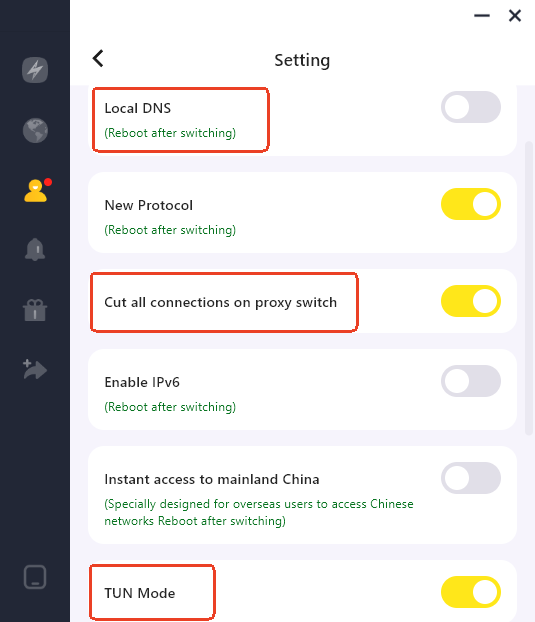
Turning on the VPN Kill Switch in LightningX VPN is quick and works the same across your phone, Windows, and iPad. Here’s how to enable it:
- Open the LightningX VPN app.
- Go to “My Account”.
- Tap “Settings”.
- Find the option labeled “Cut all connections on proxy switch”.
- Toggle it “on” to activate the VPN Kill Switch.
Once enabled, LightningX VPN will automatically block all internet traffic whenever the VPN connection drops or switches servers. This ensures your real IP and data never leak during a connection interruption.
How to Disable VPN Kill Switch?
If you ever need to turn off the VPN Kill Switch, the process is usually easy. Most VPN apps include this feature in their security or privacy settings.
Simply open your VPN app, go to the Settings or Advanced section, and look for the Kill Switch toggle. Switch it off, and your device will continue sending traffic even if the VPN disconnects. Just keep in mind that disabling the Kill Switch reduces your protection, since your real IP and data may be exposed during connection drops.
Best VPN with Kill Switch
If you’re looking for a VPN with strong disconnection protection, LightningX VPN is worth considering. Its disconnection protection safeguards your real IP address and data, allowing you to use the service with peace of mind.
Once the VPN connection drops or the server switches, LightningX VPN automatically cuts off all network traffic. This prevents accidental data leaks during proxy/node switching, ensuring your online activities remain private.
In addition to disconnection protection, LightningX VPN offers other features that enhance speed, stability, and security:
- Local DNS Protection: Helps reduce DNS leaks and improve connection performance.
- TUN Mode: Ensures smoother connections and fewer interruptions between different networks.
- High-speed Servers: With over 2000 servers in more than 70 countries, you get a consistently fast and stable connection.
- Strong Encryption: Protects your data from snooping using AES-256-GCM and ChaCha20-Poly1305 encryption algorithms.
FAQ about VPN Kill Switch
1. Which VPNs come with kill switch?
Having a kill switch feature is very important for a VPN. Most of the top VPNs have this feature, such as:
- NordVPN has a built-in kill switch, which is usually enabled by default.
- ExpressVPN is known for its speed and reliability and comes with a kill switch. It keeps you safe even if your VPN connection is interrupted.
- LightningX VPN has a kill switch feature. Not only does it stop your internet connection if the VPN goes down, but it also offers local DNS support and proxy switching disconnection features.
2. What Data Leaks Can a VPN Kill Switch Prevent?
A VPN Kill Switch can prevent several types of data leaks when your VPN connection drops. This includes:
- IP address leaks: protecting your real location and identity.
- DNS leaks: keeping your browsing activity private.
- Unencrypted traffic leaks: preventing apps or websites from sending data over an unsecured connection.
In short, a Kill Switch ensures nothing leaves your device without VPN protection.






