


If your antivirus shows no threats but your system behaves strangely, a rootkit may be the cause. Unlike typical malware, rootkits operate at the kernel or firmware level, allowing them to manipulate what the operating system reports as “normal.” This is why they can evade standard scans, and in some cases, survive a full OS reinstallation.
In this guide, you’ll learn how rootkits work, how modern variants spread and persist, and the proven methods used to detect and remove them safely.
What Is a Rootkit? (And Why It’s So Hard to Detect)
A rootkit is a type of malware designed to maintain privileged, long-term access to a system while actively hiding its presence.
In practical terms, it operates below the level most security tools can see. The system may appear stable, resource usage may look normal, and antivirus software may report no issues, even while unauthorized control is already in place.
The term comes from “root,” the highest level of access in Unix-based systems, but modern rootkits are no longer confined to files or user applications. They commonly embed themselves at the operating system kernel level (Ring 0), and in more advanced cases, within hardware firmware such as UEFI.
This positioning allows a rootkit to interfere with the system’s internal “source of truth.” By controlling low-level execution paths, it can mislead security software into trusting falsified system states. As a result, traditional user-mode detection methods often fail to recognize an active compromise.
In 2025, the primary risk posed by rootkits is not limited to data theft. It is persistence. Once established, a rootkit can survive reboots, evade standard scans, and – in firmware-level scenarios – remain present even after a full operating system reinstallation.
Key Takeaway: A rootkit doesn’t just steal your data; it lies to your operating system about its existence.
How Do Rootkits Work?
Rootkits work by embedding themselves within the core of an operating system. This is often at a level where they can control the actions and visibility of various programs and files. Once installed, rootkits can:
- Hide malware: Rootkits can mask other forms of malware, like computer viruses, spyware, or keyloggers. This makes it easier for hackers to carry out attacks without the user knowing.
- Control your system: A rootkit can give a hacker access to almost everything on your computer. They can manipulate system settings, access personal files, and even install more harmful software.
- Spy on activities: Some rootkits are designed to log keystrokes or take screenshots, allowing hackers to steal sensitive data like passwords, banking information, and personal details.
- Bypass security measures: Since rootkits hide so well, they can often evade detection by antivirus software, firewalls, and other security tools.
Types of Rootkits
Rootkits aren’t just classified by where they sit in a system – they’re better understood by how deeply they embed themselves, how hard they are to remove, and how long they can persist without detection.
Kernel-Mode Rootkits (Ring 0 Threats)
Kernel-mode rootkits operate at Ring 0, the same privilege level as the operating system kernel itself. This gives them near-total control over the system.
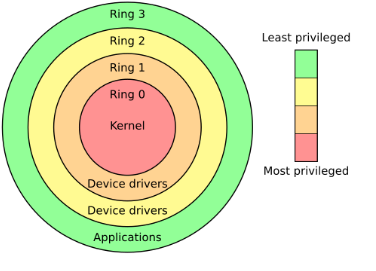
In modern attacks, these rootkits don’t simply drop obvious malicious drivers. Instead, they rely heavily on API hooking, intercepting core system calls and altering their results in real time. Because they exist at the same layer as the OS, they can manipulate what the system reports as “truth.”
In practice, this means a malicious process can be running, consuming resources, and communicating externally – yet remain completely invisible in Task Manager or standard monitoring tools. The system is not “missing” the process; it’s being lied to.
This deep integration is what makes kernel-mode rootkits so difficult to detect and remove. Traditional antivirus tools running in Ring 3 (user space) are inherently at a disadvantage when the threat lives below them.
User-Mode Rootkits (Ring 3, but Still Dangerous)
User-mode rootkits operate in Ring 3, alongside regular applications. While they don’t have direct kernel access, they make up for it with stealth and reach.
The most common technique here is DLL injection. Instead of attacking the OS directly, these rootkits inject malicious code into trusted processes such as browsers, file explorers, or system utilities. Once inside, they can monitor keystrokes, hijack sessions, and quietly extract credentials.
Although they’re technically easier to remove than kernel-mode rootkits, user-mode rootkits are often the primary driver behind browser account theft, session hijacking, and credential leaks. In real-world incidents, they are frequently the first stage of a larger compromise.
Bootkits vs Firmware Rootkits (Where Reinstalls Stop Working)
These two are often lumped together – and that confusion is dangerous.
Bootkits target the disk’s boot components, such as the MBR or VBR. They load before the operating system, giving them control at the earliest stage of startup. While advanced, they can usually be removed by fully rebuilding the disk layout and reinstalling the OS correctly.
Firmware rootkits, however, are a different class entirely.
They embed themselves into the motherboard’s firmware, typically within SPI flash memory used by BIOS or UEFI. At this level, the malware doesn’t live in Windows, Linux, or any operating system at all. It lives in hardware.
This is the reason Reddit users often report that “even a full system reinstall didn’t fix it.” The OS wasn’t the problem – the firmware was. As long as the compromised firmware persists, the infection can reinstate itself on every clean install.
These rootkits are built for persistence, not speed or scale.
Emerging Rootkit Threats (2025 and Beyond)
Virtualization-Based Rootkits
One of the more alarming cases discussed in advanced security communities involves virtualization rootkits. Instead of hiding inside the OS, they move below it.
In these attacks, the original operating system is silently converted into a virtual machine, while a minimal malicious hypervisor runs underneath. From this position, the attacker can observe or manipulate everything the OS does – without the OS being aware it’s no longer running on bare metal.
This technique is rare, but its existence signals how far advanced persistent threats (APTs) are willing to go.
Cross-Platform Rootkits
While the idea of “one file infects every OS” is largely exaggerated, firmware-based rootkits can spread across systems through infected hardware.
Compromised USB controllers, external drives, or other peripherals can act as carriers. When connected to different machines – regardless of operating system – they provide a pathway for reinfection. This is another example of persistence being prioritized over convenience.
Why This Matters
Rootkits are no longer just about hiding files. They’re about controlling trust boundaries – from Ring 3 applications, down to Ring 0 kernels, and even below the OS itself.
Understanding where a rootkit operates is the key to understanding why some infections refuse to go away, and why layered defense – from firmware security to user behavior – is no longer optional.
How Do Rootkits Spread in 2026?
While old-school phishing still exists, modern rootkits favor more sophisticated entry points:
- The BYOVD Technique: Attackers “bring their own” vulnerable, legally signed drivers to bypass Windows’ kernel mode code signing (KMCS). By exploiting a legitimate driver’s flaws, they gain an immediate foothold in Ring 0.
- Malvertising Campaigns: Cybercriminals hijack Google Ads for popular software. Users searching for tools like “OBS” or “VLC” may accidentally download a re-packaged installer that bundles a silent rootkit payload.
- Supply Chain Infiltration: Instead of attacking you, hackers attack the software you trust. By compromising a single update server, they can distribute rootkits to millions of devices simultaneously.
How to Detect and Completely Remove a Rootkit (Beginner to Advanced)
Rootkits are difficult to deal with because they are designed to lie to the operating system itself. If Task Manager shows normal CPU usage but your fans are running at full speed, or if security settings keep disabling themselves without explanation, you should take the situation seriously and follow the steps below.
Start with Targeted Scans for Common Rootkits
A standard antivirus full scan is often not enough. Many rootkits operate at the kernel level, using techniques like kernel hooks that regular scans may overlook.
Use Dedicated Rootkit Tools
Run Kaspersky TDSSKiller. It’s a lightweight but highly respected free tool designed specifically to detect hidden drivers, services, and boot-level threats commonly used by rootkits.
Enable Deep Rootkit Scanning
In Malwarebytes, go into the settings and manually enable “Scan for rootkits.” This option is disabled by default in many security tools to improve scan speed, but leaving it off reduces detection accuracy.
Use an Aggressive Secondary Scanner
Run Norton Power Eraser (NPE) as an additional check. It uses a much more aggressive detection approach and can uncover malware that disguises itself as legitimate system components.
If the Rootkit May Still Be Present: Offline Removal (Advanced)
If a rootkit has already compromised the operating system, scanning from within a running Windows environment can no longer be fully trusted. This is a common concern raised by experienced users in security communities like Reddit.
Offline Scanning
Use Windows Defender Offline. The system will reboot into a clean, minimal environment before malicious code has a chance to load, allowing threats to be removed at a lower level.
Bootable Rescue Disks
Create a bootable USB using tools such as Kaspersky Rescue Disk or ESET SysRescue Live. Booting from the USB allows you to scan the file system without loading the infected operating system at all, which significantly increases removal success.
When even reinstalling Windows doesn’t work: UEFI and firmware-level rootkits
If suspicious behavior continues after a full Windows reinstall and hard drive format, such as persistent account compromises or unexplained location changes, you may be dealing with a UEFI or firmware-level rootkit.
Rebuild the Partition Table
During reinstallation, do not simply format the C: drive. Delete all existing partitions and recreate them from scratch to ensure the MBR or GPT is fully rebuilt.
Update or Reflash BIOS/UEFI Firmware
Visit your motherboard manufacturer’s official website and download the latest firmware version.
Use the board’s built-in flashing utility (such as M-Flash or similar tools) to reflash the firmware. This process can overwrite malicious code hidden in the motherboard’s firmware chip.
Enable Secure Boot
Make sure Secure Boot is enabled in BIOS/UEFI settings. This prevents unauthorized bootloaders and bootkits from executing during system startup.
Important note: kernel-level anti-cheat software
A frequent topic of debate in online communities is the behavior of modern kernel-level anti-cheat systems used by games like Valorant or Call of Duty.
- Are they malware? Strictly speaking, no. However, they operate with extremely high system privileges and behave very similarly to rootkits.
- The real risk: If these anti-cheat drivers contain vulnerabilities, attackers can potentially exploit them as legitimate entry points straight into the kernel.
- Best practice: If you no longer play a game, use its official removal tools to fully uninstall the anti-cheat component. Leaving unused kernel-level drivers on your system unnecessarily increases your attack surface.
Extra Tip: Use a Reliable VPN for Security
Preventing rootkits is about layered defense. Keeping your system patched and using reputable antivirus software should always come first. But there’s another part that’s often overlooked: the network you connect through.
Public Wi-Fi is a common entry point for attackers, especially during the early stages of an intrusion.
A VPN like LightningX VPN fits into this layer. Encrypting your internet traffic makes it significantly harder for attackers on the same network to monitor your activity or exploit weaknesses before malware ever reaches your system.
It’s not a replacement for antivirus tools, but an additional barrier – particularly useful when browsing, working, or logging into accounts on unsecured networks.

LightningX VPN provides secure and private internet access, with fast and stable connections through servers in over 70 countries, which adds a layer of protection when browsing online.
Why Are Rootkits So Dangerous? (The Anatomy of a Silent Threat)
Rootkits aren’t just typical viruses; they are the “ghosts” in your machine. Their danger stems from three architectural advantages that most malware lacks:
1. The Privilege Gap: Operating at “Ring 0”
Most software runs in “User Mode” (Ring 3). Rootkits, however, aim for the Kernel (Ring 0) – the absolute core of the operating system.
The Danger: At this level, the rootkit has more authority than your Antivirus. It can tell the Antivirus, “There are no malicious files here,” and the Antivirus is forced to believe it because the rootkit has hijacked the system’s “source of truth.”
2. Persistence Beyond Formatting
Standard malware lives on your hard drive. Advanced UEFI/BIOS Rootkits live in your motherboard’s firmware.
The Danger: As discussed in tech communities like Reddit, you can wipe your SSD and reinstall Windows ten times, but the rootkit will remain. It executes before the operating system even starts, re-infecting the new OS every single time you boot up.
3. Subverting the “Observer” (Anti-Forensics)
Rootkits use a technique called System Hooking. When you open Task Manager to check for suspicious processes, the rootkit intercepts that request.
The Danger: It dynamically modifies the data in real-time. It simply “filters out” its own name from the list. You see 1% CPU usage, while in reality, the rootkit might be using 90% of your resources to mine cryptocurrency or launch DDoS attacks.
4. Turning Your Device into a “Zombie” (Legal Risk)
Because rootkits grant hackers Remote Access (RAT), your computer becomes a node in a global Botnet (like the famous ZeroAccess or Necurs).
The Danger: Hackers can use your IP address to attack government websites or distribute illegal content. When investigators trace the attack, the digital breadcrumbs lead directly to your home, creating potential legal nightmares for an innocent user.
How to Prevent Rootkits
Preventing rootkits requires a combination of cautious behavior and protective tools. Here are some effective ways to reduce your chances of encountering a rootkit:
Hardware-level protection: enable UEFI Secure Boot
This is one of the most effective defenses against bootkits.
What it actually does: Secure Boot ensures that only boot components with valid, trusted digital signatures are allowed to load during system startup. If a rootkit attempts to tamper with the bootloader or insert unauthorized code into the boot chain, Secure Boot blocks the system from booting, effectively stopping the infection at its source.
Operating system protection: follow the principle of least privilege
Most rootkits need administrator-level access to modify kernel components or install malicious drivers.
What it actually does: Avoid using an administrator account for everyday work. Instead, create a standard user account for daily tasks and reserve admin privileges only when absolutely necessary. Even if a malicious file is executed, restricted permissions make it far more difficult for a rootkit to inject itself into the kernel.
Driver hygiene: beware of BYOVD (Bring Your Own Vulnerable Driver)
This is a higher-level risk frequently discussed by experienced users and security professionals.
What it actually does: Attackers often abuse legitimate but outdated, signed drivers that contain known vulnerabilities to gain kernel-level access. Avoid downloading GPU overclocking tools, game cheats, or obscure peripheral drivers from unofficial sources – these are common delivery mechanisms for rootkits.
Network-level defense: monitor outbound traffic behavior
Since rootkits are designed to evade local detection, network behavior becomes a critical signal. Use firewall or EDR tools to monitor abnormal outbound connections, especially command-and-control (C2) communication.
If a system suddenly starts sending encrypted traffic to unknown foreign IP addresses at odd hours, security tools can raise alerts even when no malicious files are found locally.
FAQs – What Is a Rootkit
Q1. Does a Factory Reset remove a rootkit?
Not always. While a factory reset or a clean OS installation will remove most user-mode and kernel-mode rootkits, it is ineffective against Bootkits and Firmware Rootkits. Since these threats live in the disk’s boot sector or the motherboard’s UEFI chip, they can survive a complete wipe and re-infect the new operating system the moment it boots up.
Q2. Can I see a rootkit in the Windows Task Manager?
Usually, no. Advanced rootkits use a technique called System Hooking to intercept the data sent to the Task Manager. Even if the rootkit is using 90% of your CPU for crypto-mining or DDoS attacks, it can force the Task Manager to display a “normal” 1-5% usage. To see the truth, you often need to use an external, offline scanner.
Q3. How do I know if my BIOS/UEFI is infected? Firmware infections are extremely stealthy, but red flags include:
- Your PC’s Secure Boot settings being disabled or modified without your input.
- The BIOS/UEFI failing to update or “freezing” during an update attempt.
- Persistent account breaches even after changing passwords on a clean, newly-imaged device.
- Unexplained hardware behavior, such as internal fans or lights running even when the system is supposedly shut down.
Q4. Is “Kernel-level Anti-cheat” basically a rootkit?
Technically, they are similar in how they function. Both operate at Ring 0 (Kernel level) to monitor system activity. The difference is intent: anti-cheat software is authorized and designed to prevent game hacking. However, security experts warn that if an anti-cheat driver has a vulnerability, it could be exploited by hackers as a “legitimate” doorway to install an actual malicious rootkit.
Conclusion
Rootkits represent the ultimate “stealth game” in cybersecurity. By operating beneath the gaze of traditional antivirus software – within the Kernel, Bootloader, or even the Hardware Firmware – they don’t just steal data; they subvert the very foundation of your system’s trust.
The most critical takeaway for 2025 is that proactive hardware-level defense, such as UEFI Secure Boot, is infinitely more effective than reactive software scanning. Once a rootkit gains Ring 0 persistence, removal is no longer a simple task but a deep-level recovery of the system’s integrity.
To stay protected, you must adopt a layered defense: prioritize hardware-level verification, minimize administrative privileges for daily tasks, and secure your network perimeter with tools like LightningX VPN to spot the suspicious outbound traffic that local scans might miss.






