


Knowing how to contact Telegram support is essential when you need to recover your Telegram account, troubleshoot login issues, report spam, etc.
Telegram doesn’t offer a traditional customer service hotline or live chat, but there are 5 official ways to contact Telegram Support depending on the type of issue you’re facing. We also detail what Telegram support can and cannot fix, and the best troubleshooting steps for common Telegram problems. Here’s the complete guide.
Method 1. Contact Telegram Support via the Support Bot
The Telegram Support Bot is the main gateway to Telegram’s help system. The bot acts as a filter, ensuring minor problems get automated help, while serious issues reach real humans on the Telegram support team.
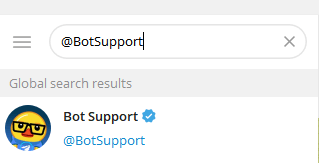
How to use Telegram Support Bot:
- Open Telegram.
- Search for @BotSupport.
- Open the bot.
- Select the issue you’re experiencing.
- Follow the instructions.
Through this bot, you can handle:
- Telegram login & verification code issues, account questions.
- Technical problems.
- Bug reporting.
- Ask questions.
- Get automated troubleshooting steps.
- General help.
- Connect with volunteer support staff.
If your case qualifies, the bot will connect you to a real human from the Telegram support team or a verified volunteer.
Method 2. Contact Telegram Support in the App (Ask a Question)
You can also message volunteer support staff directly inside the Telegram app.
Steps:
- Open Telegram.
- Click the three-line icon in the top-left corner and select Settings.
- Choose Ask a Question.
- Select Ask a Volunteer.
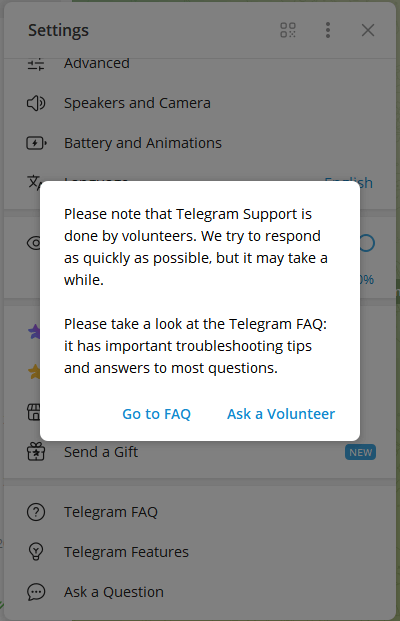
This will open a chat with Telegram’s community-verified support volunteers. These are trusted community members who can answer common Telegram questions, such as:
- Why can’t I receive Telegram verification codes?
- How to change phone number?
- How to update Telegram?
- How to remove spam bots?
- Help you with app settings, feature explanations, basic troubleshooting, and privacy questions.
Note: Volunteers cannot reset passwords, restore deleted messages, or unlock Telegram accounts.
Method 3. Contact Telegram Customer Service via Support Website
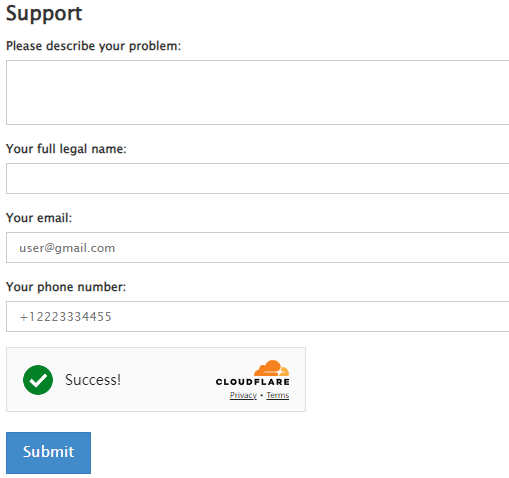
You can also submit your problem to Telegram via the official Telegram support website.
- Open your browser.
- Visit https://telegram.org/support.
- On the Telegram Support page, describe your problem in detail, add your name, email, and phone number.
- Click the Submit button to send your question.
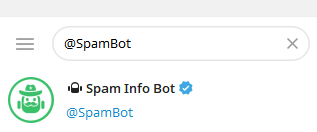
Method 4. Use @SpamBot for Account Restrictions or Spam Issues
If your account was limited for “Spam” or if you want to report abusive behavior, use @SpamBot.
The bot can help you with:
- Appealing spam bans
- Understanding restrictions
- Reporting harassment, abuse, or fake accounts
Just search for @SpamBot in Telegram and follow the prompts.
Method 5. Contact Telegram Support by Email (Special Cases Only)
Email support is not for regular users. Telegram rarely handles email-based support, but Telegram support accepts messages for:
- Fraud
- Legal inquiries
- Press & media
- Business or partnership proposals
- Copyright & trademark issues
- Security vulnerability reporting
Examples (publicly listed on Telegram’s official site):
- security@telegram.org (security flaws)
- dmca@telegram.org (copyright)
- press@telegram.org (media)
Note: These emails do not handle login issues or account recovery.
What Telegram Support Can or Cannot Fix
Telegram Support Can Help You With:
Telegram support can resolve a wide range of issues, especially those that relate to service behavior, abuse, and verification. Typical cases handled by Telegram support include:
- Account login problems: Such as not receiving SMS verification codes.
- Reporting spam or fake accounts: Including impersonation and harmful bots.
- Bug reports for iOS, Android, Desktop, or Web: Crashes, glitches, and sync issues.
- Privacy, safety, and security concerns: Settings, blocked users, and permission questions.
- App features and usage guidance: Stickers, channels, bots, media upload limits, etc.
The Telegram customer service usually responds faster for:
- High-risk security issues
- Vulnerability reports
- Widespread outages
- Critical bugs
What Telegram Support Cannot Do:
Because of Telegram’s privacy-first design, there are strict limits to what Telegram support can handle.
They cannot restore deleted chats
Messages deleted via “delete for me” or “delete for everyone” cannot be recovered.
They cannot manually log you in
You must have access to your phone number for account verification.
They cannot track your account activity
Telegram cannot tell you who viewed your profile or who forwarded your messages.
They cannot bypass bans from channels
Channel or group bans are managed by admins, not Telegram.
How to Fix Common Telegram Problems Before Contacting Telegram Support
Most issues can be fixed without contacting Telegram support. Here are the top troubleshooting steps for everyday Telegram problems.
1. Not Receiving Telegram Login Codes/Can’t Log Into Telegram
This is one of the most common reasons people contact Telegram customer service.
Try the following:
- Switch from SMS to “Call Me”
- Restart your device
- Disable VPN temporarily
- Ensure your number is active
- Wait a few minutes – rate limits may apply
99% of verification code delays resolve without needing Telegram support.
Also read: How to Delete Telegram Account Permanently: Step-by-Step Guide
2. Telegram Not Connecting
If Telegram shows “Connecting…” endlessly:
- Check if Telegram is down with Downdetector
- Switch between Wi-Fi and mobile data
- Update the Telegram app
- Clear app cache
- Reconnect the VPN or use another VPN
Issues like these rarely need actual Telegram technical support.
Tip:
In some countries, Telegram is not working and cannot be used due to regional restrictions. You can install a VPN on your device to easily unblock Telegram. LightningX VPN is a fast and user-friendly VPN for Android, iOS, PC, Mac, Linux, TV, Chrome, Firefox, and Edge. It offers 2000+ servers in 70+ countries, with several free servers. Use this VPN to access any app/website/service worldwide. It encrypts all network traffic on your device to protect your privacy.
3. Telegram App Crashes or Freezes
Try:
- Updating Telegram
- Clearing storage
- Uninstall Telegram and download the Telegram app again
- Checking device RAM
- Restarting your phone
If the crash persists, submitting a bug report to Telegram support via the Support Bot is recommended.
4. Channels Not Loading on Telegram
Often caused by local restrictions. Solutions include:
- Switching networks
- Using a VPN
- Updating the app
- Rechecking region availability
The Telegram support team cannot override local ISP restrictions, so try alternative connection methods.
5. Can’t Send or Download Media
Fixes include:
- Clearing Telegram cache
- Ensuring enough storage
- Switching to Wi-Fi
- Disabling Data Saver modes
If this happens across multiple devices, then contacting Telegram support may be necessary.
How Long Does Telegram Support Take to Respond?
The response time of Telegram support varies widely:
| Type of Support | Average Response Time |
| Support Bot automated responses | Instant |
| Volunteer support (Ask a Question) | Minutes to hours |
| SpamBot | Instant |
| Critical security reports | 24–72 hours |
| General email support | Several days or longer |
Because millions of users rely on Telegram support, response speed depends heavily on the nature of your issue.
Tips to Get Faster Telegram Support
If you want a quicker response from Telegram support, follow these best practices:
1. Be concise and clear
Include details like your device type, OS version, and steps to fix the issue.
2. Provide screenshots if possible
Helps volunteers or developers understand the bug.
3. Avoid sending repeated messages
Spamming slows down the queue.
4. Use official channels only
Fake websites claiming to offer “Telegram support login recovery” are scams.
These steps give you the best chance of receiving swift and accurate help.
Conclusion
This post mainly introduces the 5 official methods to contact Telegram support. If you need quick help, the following order is most effective:
- Telegram Support Bot
- In-app volunteer support
- @SpamBot for spam-related problems
- Telegram official support website
- Email (only for special cases)
Understanding how Telegram support works and what to expect saves your time, reduces frustration, and helps you resolve Telegram issues faster.






