


Poke is still available on Facebook, and you may want to try this classic feature again. Over time, Facebook has made the Pokes feature less visible and moved it to a dedicated page. Keep reading, and we’ll walk you through how to poke on Facebook, along with some useful tips about using the Pokes feature.
What Is “Poke” on Facebook?
Facebook “Poke” is a lightweight, non-verbal way to get someone’s attention on Facebook. When you click the Poke button next to a person’s profile, they receive a notification indicating that they have been poked. The meaning of a poke is not fixed and often depends on the relationship and context between the two users.
Pokes have been part of Facebook since its early days, dating back to around 2004. Over time, Facebook reduced the visibility of the feature and removed it from prominent profile locations, which led many users to believe it had been removed. However, the Pokes feature has never been fully discontinued and remains accessible through specific areas of the Facebook platform.
In recent years, including 2024, some users have noticed the Pokes feature again due to interface changes and renewed interest in legacy Facebook features.
Next, we’ll show you how to poke someone on Facebook and explain a few important things you should know about using the Pokes feature.
How to Poke on Facebook – Step-by-Step Tutorial
Poke Friends on Facebook via the Website
You can poke your friends directly through the Facebook website.
Step 1. Go to Facebook.com/pokes using a web browser.
Step 2. On the Pokes page, you will see a list of suggested friends to poke as well as your poke history.
Step 3. Click the Poke button next to the person you want to poke. Once the poke is sent, the recipient can choose to tap Poke Back to respond.
Tip: To enhance your Facebook account’s security, use a VPN, which encrypts your internet traffic and hides your online data. LightningX VPN is a solid option. It uses top-tier algorithms like AES-256-bit to protect your data. With a vast server fleet of 2,000+ servers in 70+ countries, it provides fast and stable connection speed.
Poke on Facebook Mobile
To poke friends on Facebook using Android, iPhone, or iPad, you need to access the Pokes feature through the Facebook mobile app. Here’s how to poke on Facebook mobile.
Step 1. Open the Facebook mobile app and log in to your account.
Step 2. Tap the Search icon in the upper-right corner of the home screen.
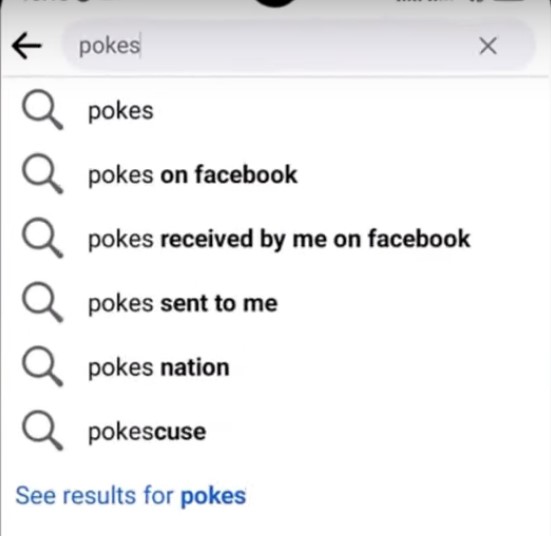
Step 3. Type “Pokes” into the search field. When the results appear, tap “See results for pokes.”
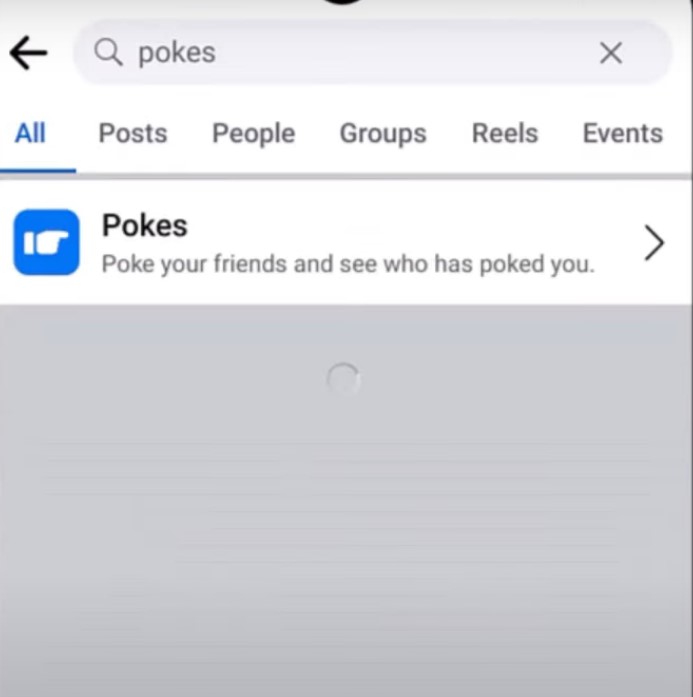
Step 4. Select the Pokes feature (the page that allows you to poke friends and view poke activity). You will then see a list of friends you can poke, along with your poke history.
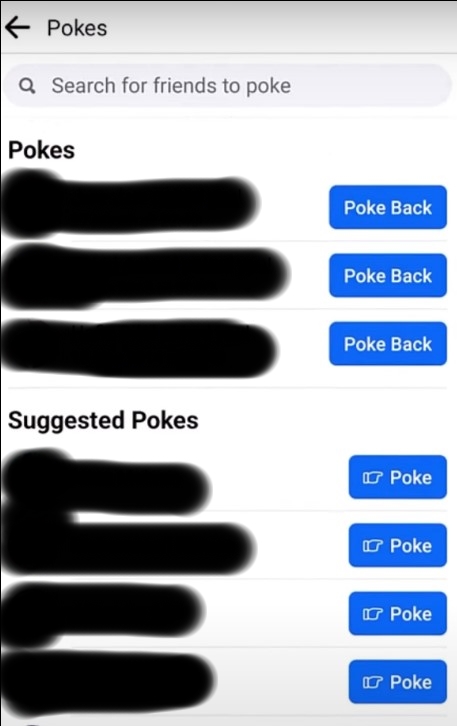
Step 5. Tap “Poke” or “Poke Back” next to the person you want to interact with. You can also use the search bar at the top of the Pokes page to find a specific friend.
Note: The Pokes feature may not be available to all users or in all regions.
Can You Unpoke on Facebook?
Currently, Facebook does not offer an option to cancel or undo a poke once it has been sent. If you accidentally poke someone, the poke cannot be withdrawn, and the recipient may still see it.
While you can view poke activity in your Activity Log, removing a record there only affects your own activity history and does not cancel the poke or prevent the recipient from receiving it.
If you receive a poke and do not want to respond, you can choose to dismiss it. However, dismissing a poke only applies to incoming pokes and does not undo pokes you have sent.
If you want to prevent further poke interactions with someone, blocking the person is the only way to stop future pokes.
Tips for Poking Someone on Facebook
Facebook limits how frequently you can poke the same person within a short period of time. While poking is meant to be a fun interaction, repeated pokes in a short timeframe may be restricted, which makes extended “poke fights” less common than before.
If you don’t want someone to poke you, you can block them on Facebook. Blocking prevents all forms of interaction, including pokes, even if the person is on your friends list.
If you are unable to poke someone, it may be because you have been blocked, the person is not on your friends list, or the Pokes feature is temporarily unavailable for your account.
If a poke is not delivered or receives no response, you can try again later. Facebook does not publish a fixed cooldown time for pokes, so availability may vary depending on account activity.
How to Poke on Facebook – FAQs
Q: Does Poke Expire on Facebook?
Facebook does not set a fixed expiration time for pokes. A poke will remain visible to the recipient until they respond by poking back, dismissing it, or taking another action such as blocking the sender. However, pokes may become less visible over time due to notification limits or interface changes, even though they do not technically expire.
Q: Why Can’t You Poke on Facebook Anymore?
There are several reasons why you may no longer be able to poke on Facebook:
- The Pokes feature is hidden and can only be accessed by searching for “Pokes” within Facebook.
- Facebook does not enable pokes for all users, regions, or accounts.
- The person you want to poke is not your friend, has blocked you, or has restricted interactions.
- Your account may be temporarily limited due to activity restrictions or frequency limits.
- Facebook frequently tests and updates features, and pokes may be removed or unavailable in certain app versions.






