


Instagram is one of the most popular social media platforms in the world, with billions of active users sharing photos, videos, and stories every day. To use Instagram, creating a free Instagram account is the first step.
This post provides a step-by-step guide for Instagram login and sign-up. You will learn how to create an Instagram account, how to log in securely on various devices, how to fix common login problems, and the best practices to keep your account safe.
Instagram Sign Up: Step-by-Step Guide (Mobile & Desktop)
Creating an Instagram account is quick, but doing it correctly helps avoid problems later. Below is a detailed walkthrough of the Instagram sign-up process.
Step 1. Download the Instagram App or Visit Instagram’s Official Website
- On mobile: Download Instagram from the App Store (iOS) or Google Play Store (Android).
- On desktop: Open Instagram’s official website using any modern browser.
Tip:
If you can’t find Instagram from the app store or can’t open Instagram’s website in the browser, you may use a VPN. Install a VPN like LightningX VPN on your device. This VPN offers numerous servers in 70+ countries, lets you unblock Instagram or any other app/site/platform from anywhere, and protects your online privacy. It is available for PC, Mac, Android, iOS, Linux, TV, Chrome, Firefox, Edge, etc.
Step 2. Choose How You Want to Sign Up
Instagram allows several sign-up methods:
- Email address
- Phone number
- Facebook account
Using an email is often recommended for better account recovery control.
Step 3. Create a Username and Password
- Choose a unique username that reflects your identity or brand.
- Create a strong password with letters, numbers, and symbols.
This step is critical, as weak passwords are a common reason accounts get hacked.
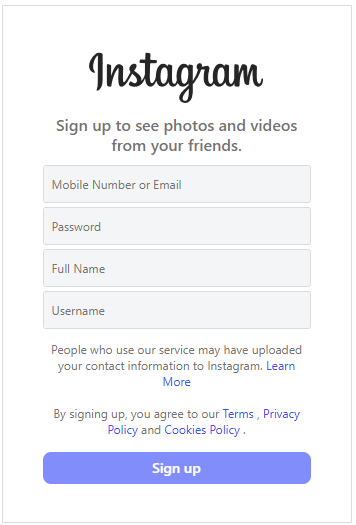
Step 4. Add Basic Profile Information
You’ll be asked to provide:
- Full name (can be real or brand name)
- Date of birth (required for age verification)
After this step, your Instagram sign-up is essentially complete.
Instagram Sign-Up Tips for Long-Term Success
Completing the Instagram sign-up is just the beginning. To ensure long-term account stability, follow these tips:
- Verify your email and phone number immediately
- Add a profile photo and bio to look authentic
- Do not create multiple accounts too quickly
These steps reduce the risk of account suspension or verification issues.
Instagram Login: How to Access Your Account Safely
Once your account is created, you can log in to Instagram whenever you want to access it. Instagram login works similarly across devices but with slight differences.
Instagram Login on Mobile
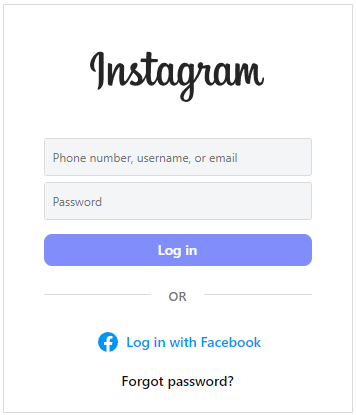
- Open the Instagram app.
- Enter your username, email, or phone number.
- Type your password.
- Tap “Log In”.
If your credentials are correct, you’ll be taken directly to your feed.
Instagram Login on Desktop
- Visit the official Instagram website.
- Enter your login details.
- Click “Log In”.
Desktop login is especially useful for managing messages, uploading content, or running business accounts.
Login with Facebook
To improve convenience, Instagram offers additional login options. If your Instagram account is linked to Facebook:
- Click “Log in with Facebook”.
- Enter your Facebook credentials.
This method can be helpful if you forget your Instagram password.
Also Read: How to Unlink Facebook and Instagram on Mobile and Desktop
Instagram Login Security Best Practices
Keeping your account secure should be a priority. After Instagram login, consider the following tips:
- On trusted devices, Instagram may save your login details. While convenient, avoid using this feature on public or shared computers.
- Enable Two-Factor Authentication (2FA): This adds an extra layer of security by requiring a verification code during login.
- Enable Login Alerts: Instagram can notify you when a new device logs into your account.
- Regular Password Updates: Changing your password every few months lowers the risk of unauthorized access.
Also Read: How to Deactivate Instagram Account Temporarily (Step-by-Step)
Common Instagram Login Problems and How to Fix Them
Many users experience issues during Instagram login and can’t log into Instagram. Below are the most common problems and solutions.
1. Incorrect Username or Password
Double-check spelling, capitalization, and keyboard language.
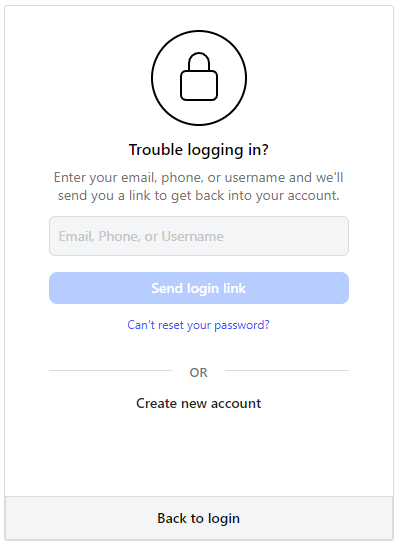
2. Forgot Instagram Password
- Click “Forgot password?”.
- Enter your email or phone number.
- Click “Send login link”.
- Follow the reset instructions sent to you to reset your Instagram account password.
3. Suspicious Login Attempt
Instagram may temporarily block suspicious login attempts to protect your account. Wait a few hours and try again, or verify your identity.
4. Account Compromised or Hacked
If your account was hacked, you might not be able to log in because the hacker changed the password. In this case, you may contact Instagram Support for help.
5. Facebook Login Problems
If you’re trying to log into Instagram with Facebook and it’s not working, this could be due to issues with your Facebook account or app settings.
Make sure you’re logged into Facebook on your phone or computer. Check that your Instagram account is properly linked to Facebook by going into Instagram settings under Account > Linked Accounts. If the issue persists, try logging in directly with your Instagram username and password instead.
6. Outdated Instagram App
An outdated version of the Instagram app may cause login issues.
Go to your phone’s app store (Google Play or Apple App Store), search for Instagram, and see if an update is available. Updating the app can fix bugs and improve functionality.
Understanding these issues helps ensure smoother Instagram login experiences.
Can You Use Instagram Without Login?
You can view limited public profiles without an Instagram login on desktop browsers. However:
- You cannot like, comment, or follow.
- Content visibility is restricted.
- Instagram may prompt you to log in after a few views.
For full access, an Instagram login is required.
Conclusion
Whether you’re a first-time user or managing multiple accounts, knowing the process of Instagram sign-up and login is essential. By following the detailed steps and best practices outlined above, you can avoid common mistakes, protect your account, and use Instagram smoothly.






