



Whether you are learning Japanese, living in Japan, or simply interested in Telegram Japanese communities, knowing how to set up Telegram Japanese language and finding high-quality Japanese Telegram channels can significantly improve your experience.
This post explains how to change Telegram’s language to Japanese and lists some popular Japanese Telegram channels for your reference.
How to Set Telegram Japanese Language
Method 1. Change Language Directly in Telegram Settings
This is the simplest method if Japanese already appears in your Telegram app.
- Launch the Telegram app on your computer or mobile device.
- Click the three-line icon in the top-left corner.
- Select “Settings”.
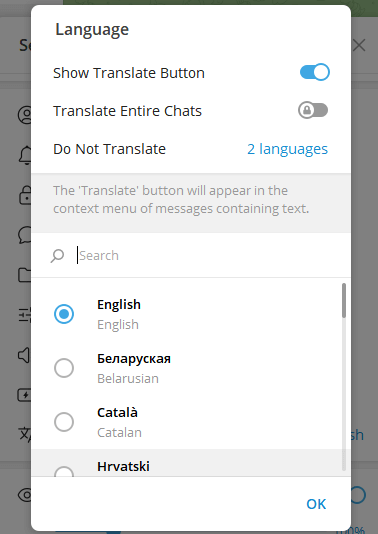
- Scroll down to click “Language”.
- Browse the language list and select Japanese (日本語).
- Restart the app if necessary.
Related: Telegram Download – How to Get the App on Any Device
Method 2. Use an Official Telegram Japanese Language Pack
If you don’t see the Japanese language in the “Language” settings pane in the Telegram app, you can use an official language pack to set Telegram to Japanese.
- Open a browser on your device.
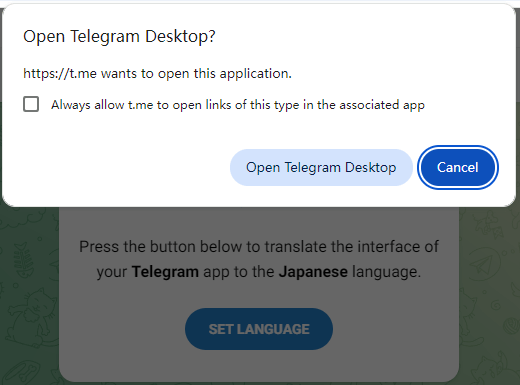
- Copy and open this link in your browser: https://t.me/setlanguage/ja-beta.
- Click “Open Telegram” or “Set Language”.
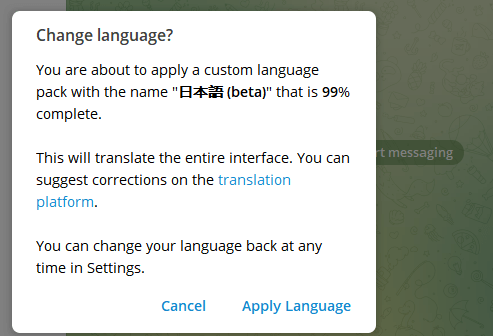
- Click “Apply Language” to translate the interface of your Telegram app to the Japanese language.
Method 3. Change Device System Language to Japanese
You may also try to change your device’s system language to Japanese to see if the Telegram app appears in Japanese.
On Android/iOS:
- Open Settings.
- Tap General or System.
- Select “Language & Region” or “Languages & Input”.
- Choose Add a language.
- Add Japanese (日本語).
- Set Japanese as the primary language.
- Restart Telegram.
On Windows:
- Open Settings.
- Go to Time & Language.
- Select Language & Region.
- Click Add a language.
- Search for Japanese.
- Select 日本語.
- Install the language pack.
- Set Japanese as the Windows display language.
- Sign out and sign back in.
On Mac:
- Click Apple > System Settings.
- Select General.
- Click Language & Region.
- Click Add Language.
- Choose Japanese (日本語).
- Set as primary language.
- Log out and log back in.
Related: Telegram Login and Sign-up: Create a Telegram Account
How to Translate Telegram Chat Messages to Japanese
Telegram has a built-in language translation feature to let you translate Telegram chats to various languages, including Japanese.
- Open the Telegram app.
- Click the three-line icon in the top-left corner.
- Select “Settings”.
- Scroll down to click “Language”.
- Turn on the “Show Translate Button” option.
- Go back to your chats window, tap or right-click any chat, and select “Translate”.
- Select “Japanese” from the list to translate the chat message to Japanese.
Tip: On the Language settings screen, you can also find a “Translate Entire Chats” feature. You can turn on this option to get real-time translation of chats and channels into other languages. However, this is a premium feature.
Common Issues with Telegram Japanese Language
Japanese Not Showing in Telegram Language List
Causes:
- Outdated Telegram version.
- Cached language data.
- Telegram app doesn’t support native Japanese yet.
Fixes:
- Update Telegram to the latest version.
- Reopen the Telegram Japanese language pack link (https://t.me/setlanguage/ja-beta) and set it again.
- Clear cache (Android).
Partial Japanese Translation
Some sections may remain in English.
This is normal. Telegram uses community-maintained translations, and Telegram Japanese localization is still improving.
List of Telegram Supported Languages
Telegram supported app languages (Official UI Languages):
These languages are fully supported by Telegram and available directly in Settings > Language on most devices.
- English
- Spanish (Español)
- French (Français)
- German (Deutsch)
- Italian (Italiano)
- Malay (Bahasa Melayu)
- Serbian (Cрпски)
- Portuguese (Brasil)
- Russian (Русский)
- Ukrainian (Українська)
- Polish (Polski)
- Dutch (Nederlands)
- Croatian (Hrvatski)
- Catalan (Català)
- Belarusian (беларуская)
- Turkish (Türkçe)
- Indonesian (Bahasa Indonesia)
- Korean (한국어)
Telegram supported translation languages (Community-Based):
Telegram also supports dozens of additional languages through its community-driven translation platform. These languages may not appear by default but can be enabled via language packs.
Examples of Telegram-supported translation languages:
- Arabic (العربية)
- Persian (فارسی)
- Vietnamese (Tiếng Việt)
- Thai (ภาษาไทย)
- Hindi (हिन्दी)
- Chinese (Simplified & Traditional)
- Japanese (日本語)
- Korean (한국어)
- Malay (Bahasa Melayu)
- Filipino / Tagalog
- Bengali (বাংলা)
- Tamil (தமிழ்)
- Urdu (اردو)
- Marathi
- Gujarati
- Kannada
- Sinhala
- Nepali
- Swahili
- Hebrew (עברית)
- Greek (Ελληνικά)
- Bulgarian (Български)
- Romanian (Română)
- Hungarian (Magyar)
- Czech (Čeština)
- Slovak (Slovenčina)
- Croatian (Hrvatski)
- Serbian (Cрпски)
Telegram bata languages (Experimental):
Beta or experimental languages are incomplete or actively being improved. These languages may show partial translations or fallback English strings.
Some Telegram beta languages include:
- Japanese (日本語)
- Basque (Euskara)
- Galician (Galego)
- Icelandic (Íslenska)
- Irish (Gaeilge)
- Maltese
- Welsh (Cymraeg)
- Armenian (Հայերեն)
- Georgian (ქართული)
- Lao (ລາວ)
- Khmer (ភាសាខ្មែរ)
Beta languages may:
- Not appear in default settings
- Require a language pack link
- Change frequently
Popular Telegram Japanese Channels
Here are some popular Telegram Japanese channels you can join directly via links:
Japanese Language & Learning:
- Learn Japanese (@Learn_Japanese): https://telegram.me/Learn_Japanese
- Japanese language translations and resources (@ja_JP8): https://t.me/ja_JP8
- Japanese sharing & learning channel (@Japaneselanguagesharingbyhanoko1): https://t.me/Japaneselanguagesharingbyhanoko1
- Moe Japanese Sharing (@moejapanesesharingjp): https://t.me/moejapanesesharingjp
- Japanese conversation group (@nihongo_practice): https://t.me/nihongo_practice
Japan News & Culture:
- Japan News (@japan): https://t.me/japan
- Cultural insights & Japanese lifestyle (@Japanes): https://t.me/Japanes
- Japan movie download channel (@japanmoviedownloadchannel): https://t.me/japanmoviedownloadchannel
Tip: Inside Telegram, you can use Telegram Search to type keywords like: Japanese, 日本語, Japan news, Japanese learning, etc., to discover more Telegram Japanese channels and groups.
Best Free VPN for Telegram
You may utilize a VPN for Telegram:
- If Telegram is restricted and inaccessible in your region.
- If the Telegram Japanese language pack fails to load.
- If you want to access Japan-focused Telegram content and channels.
- If you want to protect your privacy on Telegram.
LightningX VPN is a VPN for PC, Mac, Android, iOS, Linux, TV, Chrome, Firefox, and Edge. It offers servers in 70+ countries and offers several free servers for Android and iOS apps. You can use this VPN to unlock global content, apps, websites, and services, and protect your online privacy and safety.






