


You may have created a Twitch account to stream, grow an audience, or even earn some income. But if you no longer want to stream or simply want to step away from the platform, deleting your Twitch account might be the right choice.
Some users also choose to delete their accounts to protect their personal data or to avoid unwanted messages, harassment, or negative interactions.
In this guide, you’ll learn everything you need to know about how to delete your Twitch account safely and properly.
How to Delete Twitch Account
Twitch account deletion can be done via the web and the mobile app.
Delete Twitch Account via Web Browsers
No matter whether you use a PC, Mac, iPhone, or Android, you can delete your Twitch account via the web. Here’s how.
- Go to the Twitch.tv website to log in to your account.
- Tap or click on your profile icon in the top right of the Twitch web.
- Select “Settings”.
- In the “Profile” tab, scroll down to the bottom of the page.
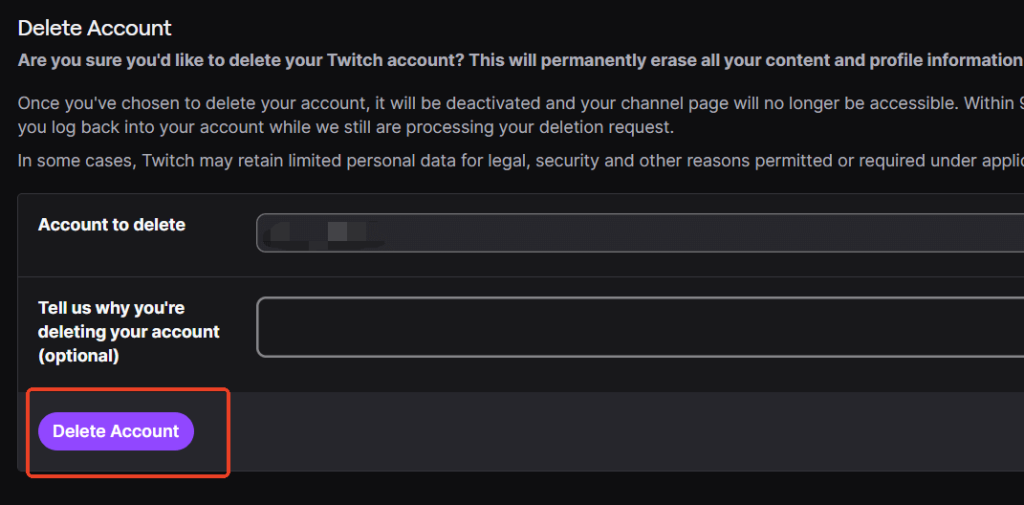
- In the “Deactivate Your Twitch Account” section, click on the “Delete Account” link. You’ll be navigated to the “Twitch delete account” page.
- Make sure this is the account you want to permanently delete.
- Tap or click on the “Delete Account” button to delete your Twitch account.
Related: Twitch Ad Block: Watching Twitch Without Ad
Delete Twitch Account on iPhone and Android
Here’s how to delete your Twitch account on an iPhone or Android.
- Open the Twitch app on your phone.
- Tap on your profile icon in the bottom left.
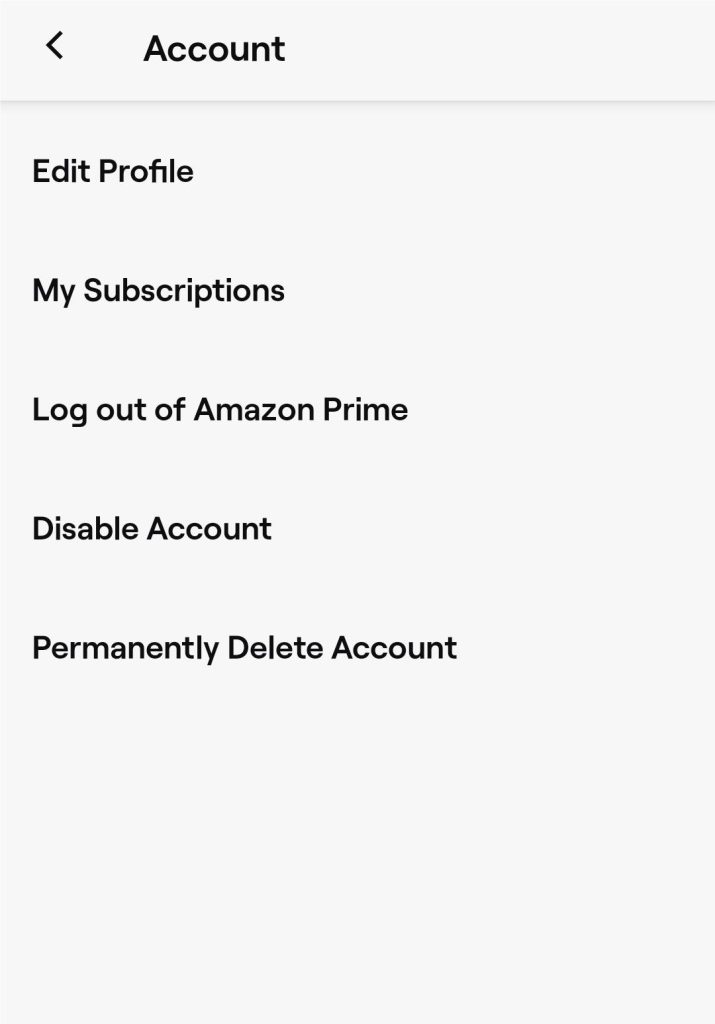
- Choose “Account Settings” > “Account”.
- Select “Permanently Delete Account”.
- Make sure this is the correct account you want to delete.
- Tap on “Delete Account”.
- Enter your Twitch password to confirm the action and tap “Next”. Now, your Twitch account should be deleted.
Tip: LightningX VPN can protect your Twitch account from data loss, hacking, and other malicious activities. It offers more than 2,000 servers in 70+ countries, including the US, India, Argentina, Brazil, etc. Your streaming speed will not be slowed by LightningX VPN because it doesn’t limit your bandwidth. It now provides a one-day free trial for you to test the water.
How to Disable Twitch Account
If you want to stop using Twitch for a short time, you can temporarily disable the account.
On PC (Web Browsers)
Here are the steps for disabling the Twitch account on your PC via the web.
- Go to the Twitch.tv website and log in to your account.
- Tap on your profile icon in the top right corner.
- Choose “Settings”.
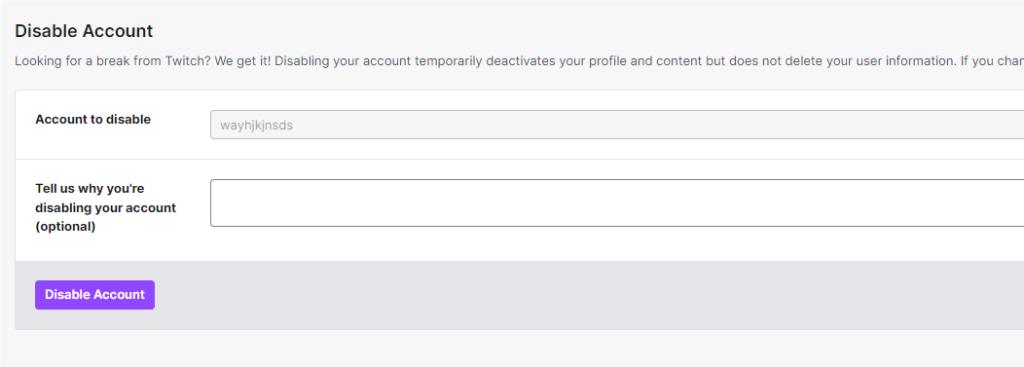
- Scroll down to the bottom of the page and tap “Disable Account”. You’ll be navigated to the “Twitch disable account” page.
- Check the Twitch account you want to disable.
- Tap the “Disable Account” button. Your Twitch account should be disabled.
On iPhone and Android
Disabling the Twitch account on an iPhone and Android is also simple. Here’s how.
- Go to the Twitch app on your phone.
- Tap on the profile icon in the bottom left corner.
- Tap on “Account Settings” > “Account”.
- Choose “Disable Account”.
- Tap on “Disable Account” again to confirm the action.
- Enter your Twitch password and tap “Next” to disable your Twitch account.
How to Reactivate Your Twitch Account
You can reactivate your Twitch account by signing in again, but the process depends on whether your account was disabled or scheduled for permanent deletion.
- If your account was disabled, you can simply log back in using the same username and password. Once you sign in, you should see a “Reactivate” prompt. Click it, and your account will be restored immediately.
- If your account was scheduled for permanent deletion, Twitch gives you a grace period (usually around 90 days) before the deletion is finalized. If you sign in during this period, you’ll be able to cancel the deletion and reactivate your account. However, if the grace period has passed and the account has been fully deleted, it cannot be recovered.
Related: How to Activate Twitch: Full Guide to Connecting to TV, PS5/4, Xbox
Why Was My Twitch Account Suddenly Deleted?
If your Twitch account appears to have been deleted without warning, several possible reasons could explain what happened.
1. Your Account Was Recycled by Twitch: If you haven’t logged into your Twitch account for a long period, typically one to two years, Twitch may reclaim inactive usernames. This means your username could be released and made available to other users, which may make it seem like your account was deleted.
2. Your Account Was Involved in Policy Violations or Security Issues: Twitch may disable or remove accounts that violate its Community Guidelines or Terms of Service. This includes posting harmful or inappropriate content related to politics, religion, race, harassment, or hate speech.
Additionally, if you accidentally click on malicious links or visit unsafe websites, your account could be compromised. A hacked Twitch account may be suspended or disabled for security reasons. Using a secure VPN like LightningX VPN can help protect your connection and reduce the risk of malicious attacks.
3. The “Deletion” Notice Was a Scam: If you received an email claiming that your Twitch account has been deleted, be cautious. Many of these messages are phishing attempts designed to steal your login information. Clicking the link in a fake email could allow hackers to access your Twitch account within minutes.
What Happens If I Delete the Email Address Related to My Twitch Account?
If you delete the email address associated with your Twitch account, you may run into several issues when trying to use or recover your account. Here are the most common problems:
- Login Problems: If your email address is used as your username, you may experience difficulties signing in. Although deleting the email doesn’t instantly disable your Twitch account, it can still make logging in more complicated.
- Password Recovery Issues: If you ever forget your password or need to recover your account, Twitch will send the reset link or verification code to your registered email. Without access to that email, recovering your account becomes extremely difficult.
- Missing Important Notifications: Twitch may send you security alerts, login warnings, payment notices, or updates about your account. If the email no longer exists, you won’t receive these important messages.
- Security Risks: A valid email address is required for two-factor authentication (2FA) and other account-verification processes. Without an active email connected to your account, you lose a key layer of security, which could make your account more vulnerable.
Conclusion
Deleting your Twitch account can be a helpful way to step away from negativity, unwanted messages, or a community you no longer wish to engage with. You can delete your account from the Twitch website or mobile app, whether you’re using a PC or a phone.
However, keep in mind that deleting your Twitch account will permanently erase all your data, including your profile, subscriptions, and channel information. Make sure to think it through before proceeding.






