Online prices are not always as simple as they look. The same flight, hotel, subscription, or software can show different prices depending on your location, browsing data, and even the device you are using. This is why you need to save money with a VPN.
By changing your virtual location, a VPN can help you compare regional prices and discover cheaper deals that may not appear in your default region. In this guide, you’ll learn how it works and 6 ways to find better prices online using a VPN.
Can a VPN Really Help You Save Money?
Yes, a VPN can help you save money online. Many websites and services adjust their prices based on your geographic location, browsing behavior, or the demand levels in your region. This pricing strategy is known as “dynamic pricing” or “regional pricing.”
By using a VPN to change your IP address, you may get lower prices that are not available in your region.
A VPN can also help reduce price tracking. Some travel and shopping websites increase prices after repeated searches by using cookies and IP tracking. Switching VPN servers may help you compare prices more fairly.
Now, let’s take a look at 6 ways to save money using a VPN.
6 Ways to Save Money with a VPN
1. Get Cheaper Flight Tickets with a VPN
Airlines and travel booking sites use dynamic pricing systems that adjust fares based on factors such as your country, local demand, browsing history, and even how often you search for the same route.
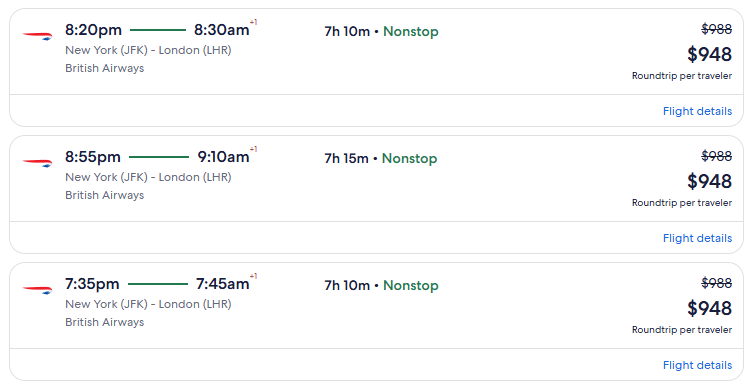
So, you can use a VPN to find cheaper flight tickets. For instance, if you search for a flight from New York to London while located in the United States, the displayed fare may appear higher than if you were searching from countries such as India, Thailand, or Mexico.
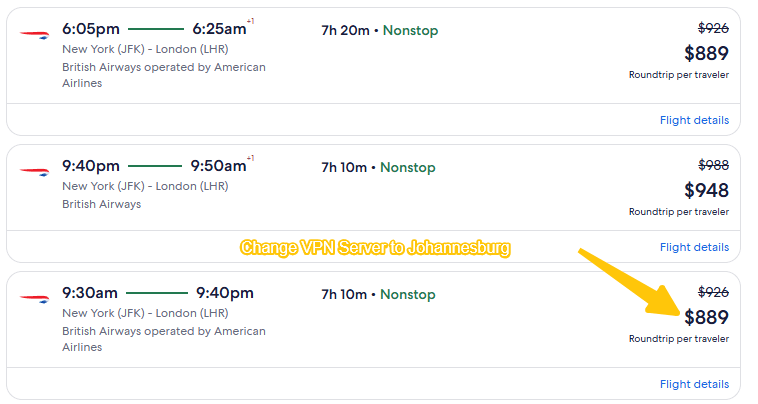
In such cases, simply changing your VPN location before booking can help you save anywhere from $50 to over $200.
Here are the steps to use a VPN to find lower flight prices:
- Open the webpage in your browser’s “Incognito Mode“.
- Clear your cookies and browsing data.
- Connect to a VPN server located in a different country.
- Search for the same flight route again.
- Compare the prices displayed for different countries or regions.
However, some airline websites may check during the checkout process to ensure that your payment method, account region, or currency match your location. To improve your chances of finding cheaper airline tickets with a VPN, it’s best to compare prices across multiple regions.
2. Find Lower Hotel Prices by Changing Your VPN Location
Hotel booking websites also use regional pricing and demand-based pricing to adjust room rates. The same hotel can show different prices depending on your country, browsing history, and travel demand in your area.
For example, a hotel room listed on Booking.com or Expedia may appear cheaper when searched from countries with lower average purchasing power, such as India or Brazil, compared to searches from the US or UK.
Using a VPN with incognito mode can help reduce this type of hotel price tracking.
- Clear your browser cookies
- Use incognito mode
- Connect to different VPN server locations
- Compare rates across several countries
Keep in mind that taxes, currency conversion fees, and local payment requirements can sometimes affect the final price.
3. Save Money with VPN on Streaming Services
Streaming services like Netflix, Spotify, YouTube, and Disney+ use regional pricing to match local markets, which means users in some countries pay significantly less for the same subscription.
For example, YouTube Premium and Spotify Premium are often much cheaper in countries like Turkey, India, and Argentina than in the US or Canada. You can utilize the same methods mentioned above to secure these lower subscription prices.
However, it has become more difficult to leverage a VPN to obtain discounted streaming subscriptions. Some platforms now verify a user’s billing address, local mobile phone number, or the country of issuance for their payment card before allowing them to subscribe.
4. Find Cheaper Apps Subscriptions
App prices can also vary depending on your App Store or Google Play region. Many developers adjust pricing based on local purchasing power, making certain apps and in-app subscriptions cheaper in specific countries. This includes:
- Productivity apps
- AI tools
- VPN subscriptions
- Mobile games
- Cloud storage services
Using a VPN for cheaper app subscriptions usually works best when combined with changing your store region settings. Here are a few tips to compare app prices with a VPN:
- Connect to another country with your VPN.
- Change your App Store or Google Play region.
- Compare subscription pricing before purchasing.
- Check currency conversion and local taxes.
5. Get Better Deals on Steam Games
Regional pricing is very common in the gaming industry. Platforms like Steam, Epic Games, and Microsoft often set different prices based on local economies and purchasing power.
For example, when Elden Ring launched, the standard edition on Steam was priced at around $59.99 in the US store, while players in regions like Turkey or Argentina could sometimes find significantly lower regional prices. To compare Steam game prices with a VPN:
- Connect to different VPN server locations
- Check local game prices in each region
- Compare currency exchange rates
- Review regional sales and promotions
However, Steam has become much stricter about VPN region switching. Changing your Steam store region usually requires a local payment method, and frequent region changes may trigger account restrictions.
6. Save on Online Shopping Sites Like Amazon
On online shopping sites such as Amazon, AliExpress, and eBay, product prices can be based on your geographic location, browsing history, local taxes, and shipping destination.
Furthermore, some international sellers offer exclusive discounts or promotional campaigns tailored to specific regions—deals that may not be visible in all markets.
So, you can use a VPN to buy things more cheaply. This feature proves particularly useful during major promotional events such as:
- Amazon Prime Day
- Black Friday
- Cyber Monday
- Seasonal Clearance Sales
In some cases, while the listed price of the product itself may not differ significantly, adjusting for shipping costs, taxes, or bundled discounts can still result in substantial savings.
How to Compare Prices with a VPN?
Using a VPN to compare prices is actually quite simple. The goal is to trick websites into believing you are browsing from a different country, thereby allowing you to check for price discrepancies across different regions.
Step 1: Choose a Reliable VPN Service
First, install a good VPN service that maintains servers in multiple countries. The larger the server network, the more regional options you will have available for price comparisons.
LightningX VPN offers over 2,000 nodes across more than 70 countries, ensuring you have a wide range of options for comparing prices. Furthermore, it utilizes advanced encryption protocols to safeguard your online privacy and security.
It supports Android, iOS, macOS, Windows, Smart TVs, Linux, and Chrome, allowing you to use the service seamlessly on any device.
Step 2: Clear Cookies and Browser Cache
Before you begin checking prices, be sure to clear your browser’s cookies and cache. Many websites track user browsing behavior; if they detect that you are repeatedly searching for the same item, they may dynamically increase the displayed price.
Additionally, you can open a “Private Browsing” window in your browser to further minimize the risk of being tracked.
Step 3: Connect to a VPN Server in Another Country
Launch your VPN and connect to a server located in a different country or region. The following countries are frequently chosen for price comparisons due to their typically lower pricing: India, Turkey, Argentina, Brazil, Thailand, Mexico, and others.
Once successfully connected, your IP address will be masked and replaced with an IP address corresponding to that specific country or region.
Step 4: Revisit the Website and Compare Prices
Now, reopen the website and search again for the specific product or service you wish to purchase.
Step 5: Test Using a Different Device or Browser
Some websites employ “browser fingerprinting” technology or adjust their pricing strategies based on the type of device a user is utilizing.
If the price remains unchanged, try switching to a different device or browser while maintaining your active VPN connection.
Risks of Using a VPN for Cheaper Prices
While using a VPN can indeed help us save money, this practice comes with certain risks.
- No Guarantee of Price Differences: Many websites no longer display varying prices based on a user’s geographic location; consequently, using a VPN may not result in any change to the actual cost.
- Payment Restrictions: Some platforms require users to provide a local credit card, billing address, or payment method that corresponds to the selected region.
- Account Verification or Restrictions: Frequently switching IP locations may trigger security verification checks or lead to temporary restrictions on certain services.
- Terms of Service Limitations: Some platforms impose restrictions on attempts to exploit regional price differences to obtain discounts, which could potentially impact your orders or subscription services.
FAQ about Save Money with a VPN
1. Why VPN Discounts Sometimes Don’t Work?
VPN-based price differences are not guaranteed because many platforms now use multiple signals beyond IP address, such as cookies, account region, payment method, and browser fingerprinting.
2. Is It Legal to Use a VPN for Saving Money?
In most countries, using a VPN itself is legal. However, using a VPN to obtain discounts may violate the Terms of Service of certain platforms.
While this typically does not result in legal disputes, it may lead to order cancellations, payment failures, or account restrictions.