


If you’re planning to travel, work, or live in China, you might quickly discover that many international streaming services like Netflix are restricted. Netflix is not officially available in mainland China due to licensing and regulatory restrictions.
The good news is that there are several reliable methods you can use to access Netflix within China. In this post, you’ll learn how to watch Netflix in China using different techniques, including VPNs, smart DNS tools, and alternative setup strategies. Each method includes detailed steps so you can choose the one that works best for your situation.
Method 1. Use a VPN to Watch Netflix in China (Most Effective)
Using a VPN (Virtual Private Network) is the most common and reliable way to access Netflix from China. A VPN for Netflix works by encrypting your internet traffic and routing it through servers in other countries where Netflix is available.
This method is widely considered the best solution to watch Netflix in China, especially for long-term stays.
Step 1. Choose a Reliable VPN Provider
Not all VPNs work in China. You should select one known for bypassing network restrictions and offering fast streaming speeds.
Look for these features:
- Servers in multiple countries (US, UK, Japan, Singapore, etc.).
- Fast streaming speeds.
- Strong encryption protocols.
- Reliable connection inside China.
- Offer apps for Windows, Mac, Android, and iOS.
Important Tip:
Download and install the VPN before entering China, since some VPN websites may be blocked inside the country.
LightningX VPN is a fast and stable VPN for Windows, Mac, Android, iOS, TV, Linux, Chrome, Firefox, and Edge. It offers servers in 70+ countries, including the US, UK, etc. You can use this VPN in China to unblock Netflix or any other website/app/platform worldwide.
Download and install LightningX VPN on your computer, tablet, smartphone, or smart TV. You can install it on multiple devices. For Android and iOS, it offers several free servers, and you can use this VPN app for free.
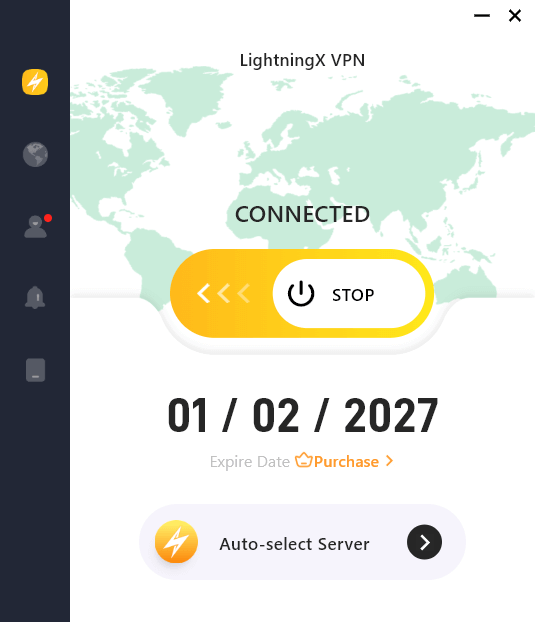
Step 2. Connect to a Netflix-Supported Server
After opening LightningX VPN:
- Log into your account.
- Select a country where Netflix works (for example: the United States).
- Click Start to connect to the server immediately.
Once connected, your internet traffic appears to come from that country.
Step 3. Open Netflix to Stream Movies and TV Shows
- Then you can open the Netflix app or website.
- Log into your Netflix account.
- Start streaming your favorite content.
Tip: If you encounter buffering, try switching to another server location.
Why VPN Is the Best Way to Watch Netflix in China
- Provide stable access
- Improve privacy and security
- Allow access to global content libraries
- Work on multiple devices
However, connection quality depends on the VPN provider and server performance.
Also read: Best Movies on Netflix of All Time
Method 2. Use Smart DNS to Access Netflix in China
Another solution for how to watch Netflix in China is using a Smart DNS service. Unlike VPNs, Smart DNS does not encrypt your traffic. Instead, it reroutes specific DNS requests to bypass geographic restrictions.
This method offers fast streaming speeds but may be less reliable in restricted networks.
Step 1. Subscribe to a Smart DNS Service
Choose a Smart DNS provider that supports Netflix streaming.
Look for:
- Compatibility with streaming platforms
- Easy setup instructions
- Support for routers and TVs
Step 2. Configure DNS Settings
After subscribing:
- Log into your device settings.
- Locate Network Settings.
- Change DNS addresses manually.
- Enter the DNS numbers provided.
- Save changes.
Step 3. Restart Your Device
Restarting ensures the new DNS settings take effect.
Step 4. Launch Netflix
Now:
- Open Netflix
- Log into your account
- Start streaming content
If the connection fails, double-check your DNS settings.
When to Use Smart DNS: This method works best if you’re streaming Netflix on smart TVs or gaming consoles.
Also read: Netflix Download Guide (Android, iPhone/iPad, PC, Mac)
Method 3. Set Up a VPN Router for Multiple Devices
If you want to stream Netflix on several devices at once, setting up a VPN on your router can be extremely useful.
This method is popular among families and long-term residents researching how to watch Netflix in China.
Step 1. Check Router Compatibility
Not all routers support VPN installations.
Look for:
- VPN-ready routers
- Firmware compatibility
- Manufacturer instructions
Step 2. Install VPN on Router
After confirming compatibility:
- Log into your router admin panel
- Upload VPN configuration files
- Enter login credentials
- Save settings
Step 3. Connect Devices to the Router
Once the router connects to a VPN server:
- All connected devices use the VPN automatically
- No need to install VPN apps individually
Step 4. Open Netflix
Now:
- Connect your device to the Wi-Fi network
- Launch Netflix
- Start streaming normally
Benefits of Using a VPN Router
- It protects all devices
- Works with smart TVs
- Requires minimal daily setup
- Supports continuous streaming
Method 4. Download Netflix Content Before Entering China
If you plan ahead, downloading shows before arrival can be a simple temporary solution.
While this method does not technically teach how to watch Netflix in China online, it provides offline viewing without relying on network access.
Step 1. Open the Netflix App on your Mobile Device
Step 2. Choose Downloadable Content
Not all titles support downloads.
Look for:
- Download icon next to episodes
- Offline viewing compatibility
Step 3. Download Content
Tap Download and wait for completion.
Make sure you have:
- Enough storage space
- Stable internet connection
Step 4. Watch Offline in China
Once in China:
- Open the Netflix app
- Go to Downloads.
- Watch Netflix content without internet.
Limitations of Offline Downloads
This method works best for:
- Short trips
- Flights
- Temporary stays
However, downloads expire after a period of time, so it’s not ideal for long-term use.
Tips to Improve Netflix Streaming in China
These practical tips can improve your experience if you are learning how to watch Netflix in China.
Choose Nearby Server Locations
Servers in:
- Japan
- Singapore
- Hong Kong
- South Korea
often provide faster speeds than distant servers.
Use Wired Connections When Possible
Ethernet connections are usually more stable than Wi-Fi.
Update Apps Regularly
Keeping VPN and Netflix apps updated helps maintain compatibility.
Test Multiple Servers
If streaming fails:
- Switch server locations
- Try different protocols
- Restart the VPN
These adjustments often resolve buffering issues.
Common Netflix Streaming Problems and How to Fix Them
Netflix Not Loading
Possible Causes:
- VPN server blocked
- Slow internet connection
Solutions:
- Switch VPN servers
- Restart the VPN app
- Try another location
Slow Streaming Speeds
Possible Causes:
- High server traffic
- Long-distance server connection
Solutions:
- Choose nearby servers
- Close background apps
- Lower video quality settings
Possible Causes:
- Outdated app
- Network restrictions
Solutions:
- Update VPN software
- Change protocols
- Restart device
Conclusion
If you are wondering how to watch Netflix in China, this post introduces some feasible ways. With the right tools and preparation, you can enjoy your favorite Netflix movies and shows without interruptions.






